Features · Lesson 3
SOLIDWORKS Revolve
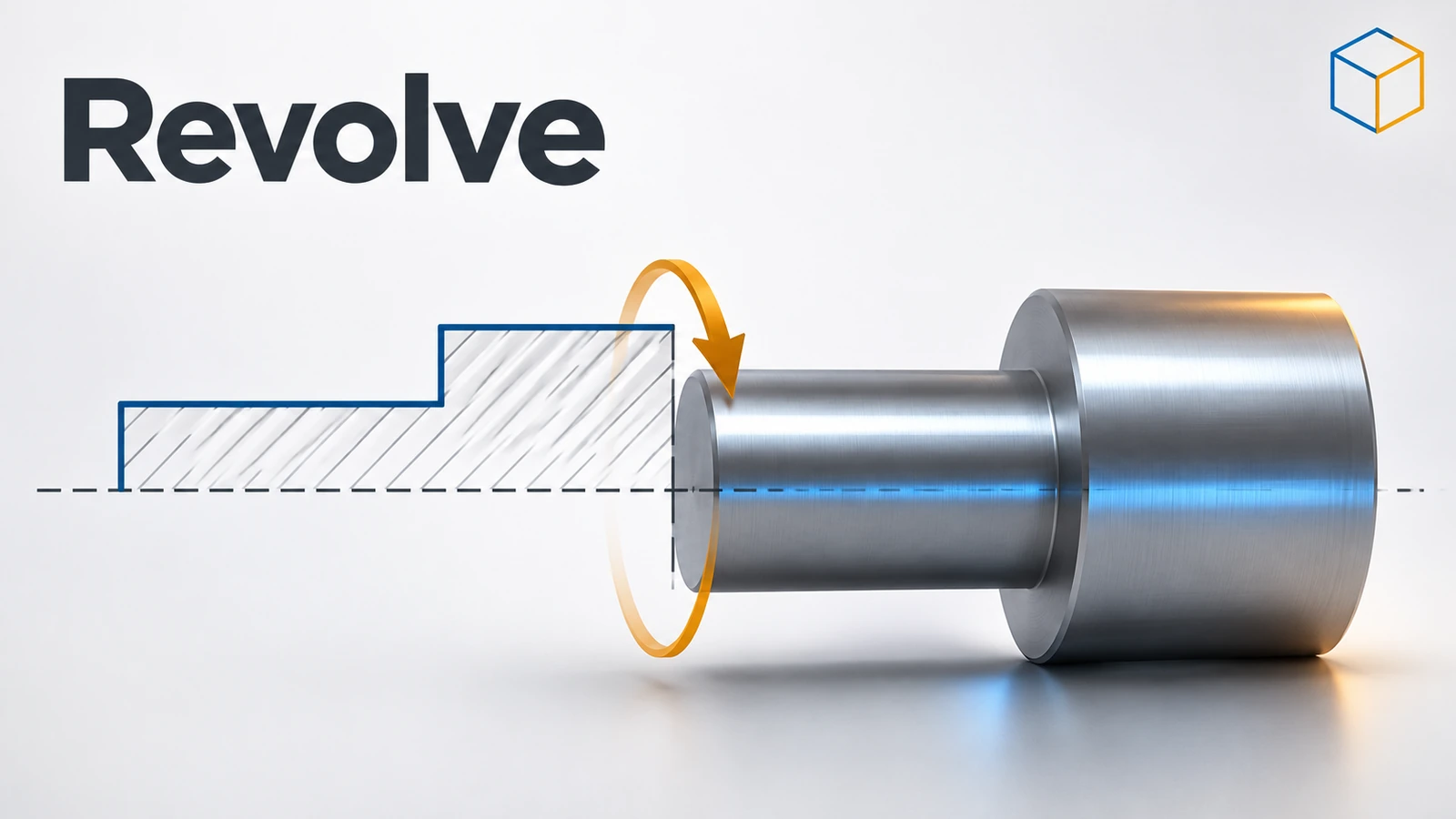
Revolve spins a sketch around an axis to make round parts: shafts, pulleys, knobs, bottles. You sketch half of the cross-section on one side of a centerline and SOLIDWORKS sweeps it around — 360° for a full part, or less for a segment. Revolved Cut does the same to remove material, for grooves and turned recesses.
 Kevin Walsh
Where to find it
Features tab → Revolved Boss/Base; Revolved Cut
Revolve options
| Option | What it does |
|---|---|
| Axis of Revolution | Centerline, axis, sketch line or linear edge |
| Direction 1 | Angle (360° by default) or up to a surface |
| Mid Plane | Splits the angle equally on both sides of the sketch |
| Direction 2 | A second angle the other way |
| Thin Feature | Revolves an open profile with a wall thickness |
| Selected Contours | Revolves only some regions of the sketch |
Diameter dimensions about the axis make drawings easier: dimension from the centerline to a line and place the dimension on the far side of the axis. More on centerlines in construction geometry.
Practise it: the stepped shaft and grooved pin exercises.
Practise it: the body of the threaded bottle and the rings of the 6201 bearing.
Step by step
-
1
Draw the axis
On the Front Plane draw a horizontal Centerline through the origin. It will be the shaft axis.
-
2
Sketch half the profile
Above the centerline, sketch a stepped outline: radius 10 for 50 mm, then radius 15 for 20 mm, closing back down to the centerline at both ends. Dimension the radii as diameters about the centerline (select the centerline and a line, place the dimension on the far side) — Ø20 and Ø30.
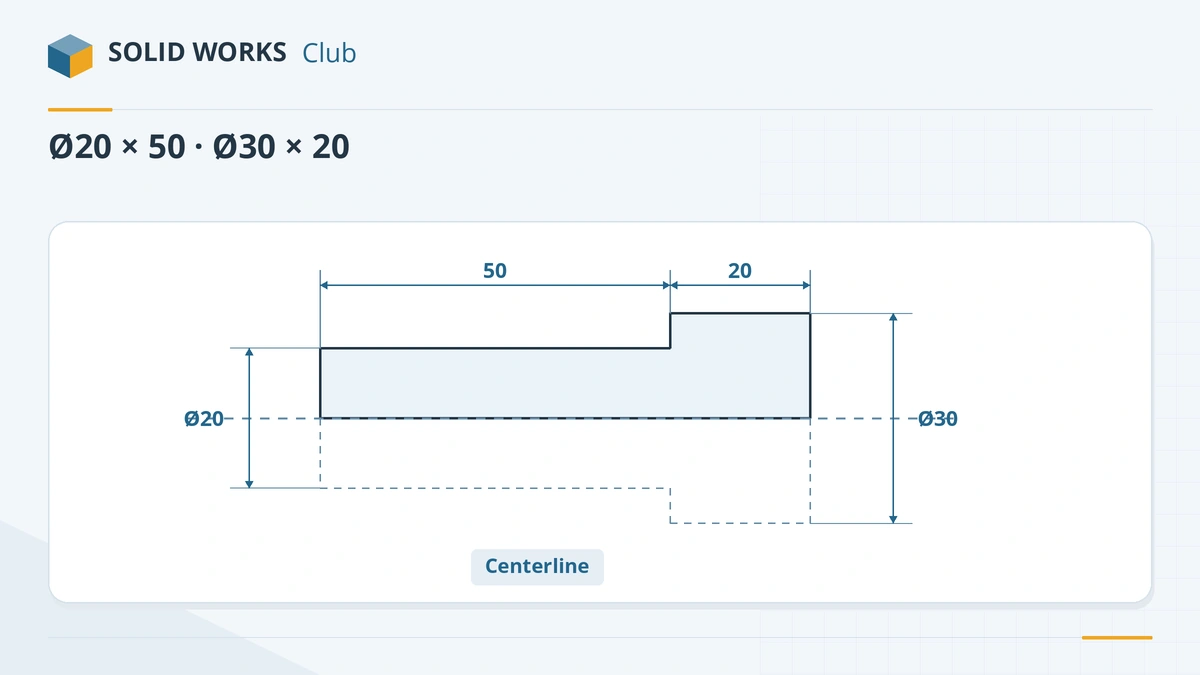
Sketch half the shaft and dimension diameters about the centerline. -
3
Revolve
Features → Revolved Boss/Base. With one centerline in the sketch it is picked as the axis automatically. Keep 360° and click the tick.
Common mistakes
- Sketching the full cross-section on both sides of the axis — draw only half.
- Letting the profile cross the axis; the revolve fails with an open or self-intersecting sketch message.
- A tiny gap where the profile meets the centerline. Close it with a line along the axis.
- Two centerlines in the sketch — then you must pick the axis yourself.
Lesson 3 of 18 in the features course.
Practice
Revolve the stepped shaft above: Ø20 × 50 mm and Ø30 × 20 mm. Check: volume 29,845.13 mm³.
Sources
- Solid Solutions — How to create a revolve (Jul 2023)
- SOLIDWORKS Tech Blog — Basics of reference geometry (2018)
- GoEngineer — What's new in SOLIDWORKS 2024: sketches and features
- SOLIDWORKS Help 2024 — Converting sketch entities to construction geometry
Checked November 2026. SOLID WORKS Club is independent; menu names can differ slightly between releases.
Frequently asked questions
What can I use as a revolve axis?
+
A centerline, a reference axis, a sketch line or a straight model edge. If the sketch has one centerline, SOLIDWORKS uses it automatically.
Why does my revolve fail?
+
Usually because the profile crosses the axis, is open, or intersects itself. Draw half the profile on one side of the axis and close it.
Can I revolve less than 360 degrees?
+
Yes. Set an angle, revolve in two directions, use Mid Plane, or revolve up to a surface.
How do I make a groove in a shaft?
+
Sketch the groove's cross-section beside the shaft axis and use Revolved Cut. Since SOLIDWORKS 2024 Revolved Cut also has Flip side to cut.
Related
- SOLIDWORKS Extruded Boss/BaseHow to use Extruded Boss/Base in SOLIDWORKS: every end condition from Blind to Mid Plane, Direction 2, draft, thin features, Selected Contours and Merge result.
- SOLIDWORKS reference axis and temporary axesHow to create a reference axis in SOLIDWORKS, show temporary axes, and use axes for revolves and angled planes, plus points and coordinate systems.
- Construction geometry and centerlinesHow construction geometry works in SOLIDWORKS: centerlines, For construction, converting entities, and using them as mirror lines, revolve axes and references.
- SOLIDWORKS SweepHow to use Swept Boss/Base and Swept Cut in SOLIDWORKS: profile and path rules, Pierce, circular profiles, orientation, twist and guide curves.