Advanced parts · Lesson 2
SOLIDWORKS Circular Pattern
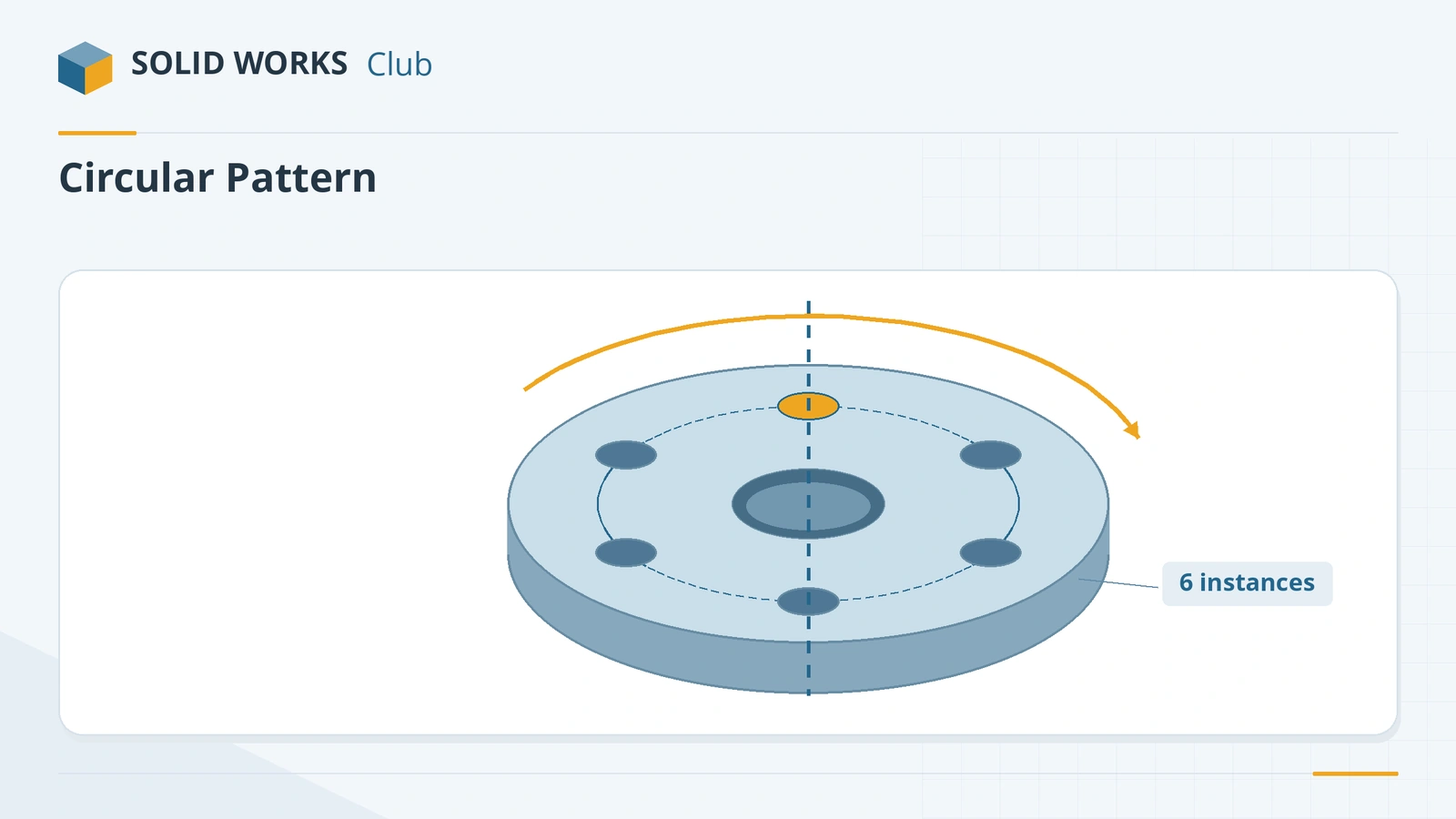
Circular Pattern copies features, faces or bodies around an axis — bolt circles on flanges, spokes, teeth, vents in a round cover. Pick the seed, the axis (an axis, a circular edge or a cylindrical face) and the number of copies; Equal spacing spreads them over 360°. Since SOLIDWORKS 2017 a second direction can pattern the other way, symmetrically or with its own settings.
 Kevin Walsh
Where to find it
Features tab → Linear Pattern flyout → Circular Pattern
Circular Pattern options
| Option | What it does |
|---|---|
| Pattern axis | Axis, circular edge or cylindrical face; Reverse direction |
| Equal spacing | Sets the total angle to 360° |
| Angle / instance spacing | Angle between instances (when not equal) |
| Number of instances | Copies including the seed |
| Direction 2 (2017+) | Pattern the other way; Symmetric mirrors Direction 1 |
| Instances to Skip | Remove individual copies |
| Instances to Vary | Change a seed dimension per copy |
| Vary sketch | Lets the pattern change as it repeats |
| Geometry pattern | Copies faces and edges only — faster |
| Propagate visual properties | Copies colours, textures and cosmetic thread data |
| Full / Partial preview | Full computes every instance; partial shows seed geometry only |
From the official Circular Pattern PropertyManager reference. For patterns along curves, from tables or filling an area, see other patterns.
Practise it: the hub flange and disk with hole pattern exercises.
Practise it: pattern the teeth of the spur gear and the arms of the drone frame.
Step by step
-
1
Model the flange
On the Top Plane sketch a Ø100 circle and a concentric Ø30 circle, and extrude 10 mm — a flange with a centre hole.
-
2
Cut the seed hole
Cut one Ø10 hole through all, centred 35 mm from the centre on a line from the origin (a Ø70 pitch circle).
-
3
Pattern it around the flange
Features → Circular Pattern. Pattern axis: the cylindrical face of the centre hole (or its temporary axis). Tick Equal spacing (360°), instances 6, features to pattern: the hole.
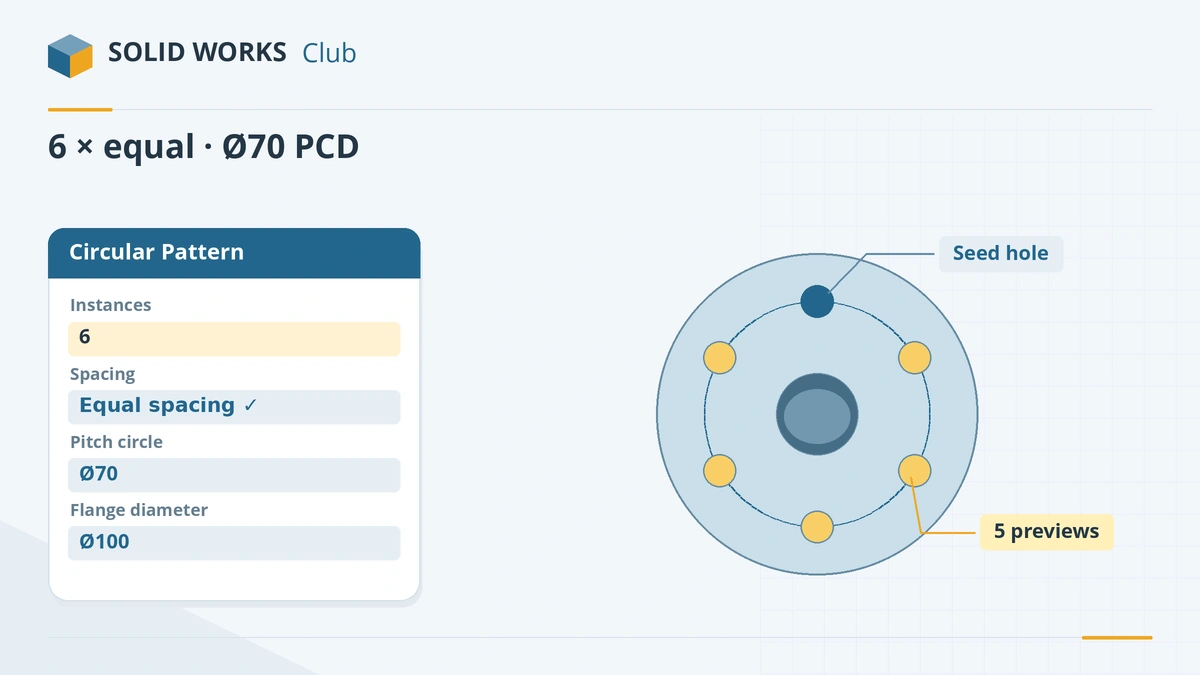
Six instances with Equal spacing around the centre hole. -
4
Confirm
Click the tick. Change the instance count to 8 later — all holes rearrange evenly.
Common mistakes
- Forgetting Equal spacing, so the angle box means the angle between copies, not the total.
- Counting instances without the seed — the number of instances includes the original.
- Choosing an axis that will disappear later; a cylindrical face of a feature you may delete breaks the pattern.
Lesson 2 of 16 in the advanced parts course.
Practice
Build the Ø100 × 10 mm flange with a Ø30 centre hole and six Ø10 holes on a Ø70 pitch circle. Check: volume 66,758.84 mm³.
Sources
- SOLIDWORKS Help 2024 — Circular Pattern PropertyManager
- Javelin — Bidirectional circular pattern (2017)
- Javelin — How to use patterns in SOLIDWORKS (Jun 2026)
- Solid Solutions — Temporary axis
- GoEngineer — Design for performance with patterns
Checked November 2026. SOLID WORKS Club is independent; menu names can differ slightly between releases.
Frequently asked questions
What can I use as the axis of a circular pattern?
+
A reference axis, a temporary axis, a circular edge or a cylindrical face. Show temporary axes from the heads-up toolbar to pick them easily.
How do I space instances evenly around 360°?
+
Tick Equal spacing — it sets the angle to 360° and spreads the instances evenly.
Can a circular pattern go in both directions?
+
Yes, since SOLIDWORKS 2017. Direction 2 can be symmetric to Direction 1 or have its own angle and count.
How do I pattern a hole on a bolt circle?
+
Make one hole at the pitch radius, then circular-pattern it around the centre axis with Equal spacing and the number of bolts.
Related
- SOLIDWORKS Linear PatternHow to use Linear Pattern in SOLIDWORKS: one or two directions, spacing, Up to reference, skipping and varying instances, and Geometry pattern.
- SOLIDWORKS reference axis and temporary axesHow to create a reference axis in SOLIDWORKS, show temporary axes, and use axes for revolves and angled planes, plus points and coordinate systems.
- Linear and circular sketch patternsHow to use linear and circular sketch patterns in SOLIDWORKS: spacing, instances, angle, editing a pattern, and when a feature pattern is the faster choice.
- Curve, sketch, table, fill and variable patternsSOLIDWORKS curve driven, sketch driven, table driven, fill and variable patterns explained: what each does, when to use it, and a fill pattern example.