Sketching · Lesson 16
Linear and circular sketch patterns
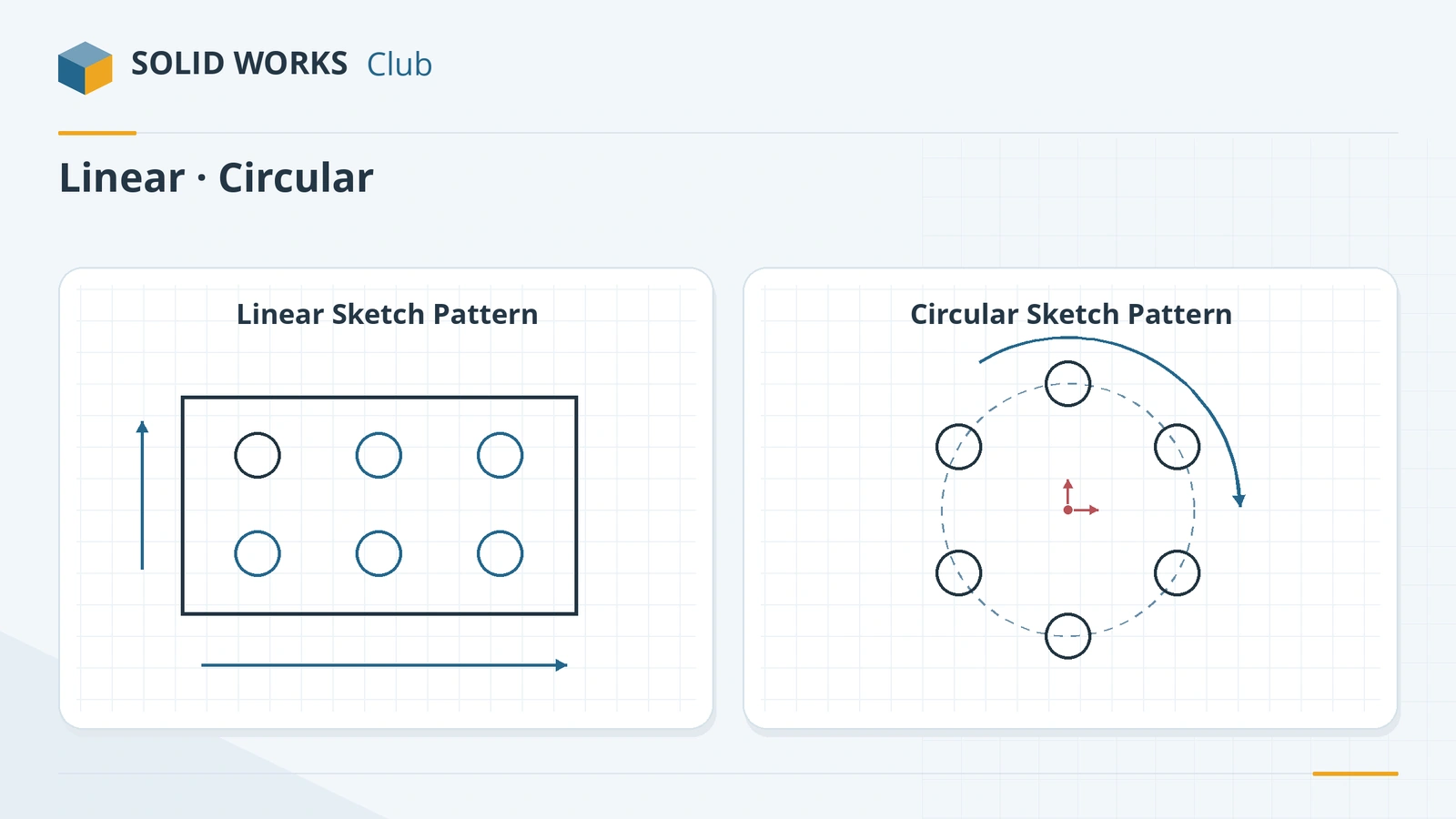
Sketch patterns copy sketch entities in rows (linear) or around a centre (circular) inside one sketch. They are handy for small numbers of repeated shapes, such as a row of slots or holes on a bolt circle. For large numbers, feature patterns are much faster to rebuild — in one reseller test, a sketch pattern of 841 holes took about 18 times longer than the equivalent geometry pattern.
 Kevin Walsh
Where to find it
Sketch tab → Linear Sketch Pattern flyout (Linear, Circular)
Circular sketch pattern options
| Option | What it does |
|---|---|
| Center X / Y | Pattern centre — drag the point or snap it to a circle centre |
| Spacing | Total angle covered, e.g. 360° |
| Equal spacing | Spreads instances evenly over the angle |
| Number of instances | Including the original |
| Dimension radius / angular spacing | Adds those as dimensions |
| Radius / Arc angle | Distance and angle of the seed from the centre |
| Reverse direction | Clockwise or counter-clockwise |
Linear patterns set instances, spacing and direction for one or two directions in the same way.
Sketch pattern or feature pattern?
| Case | Better choice |
|---|---|
| A few repeated shapes in one outline | Sketch pattern |
| Holes or bosses repeated many times | Feature pattern |
| Pattern that differs by configuration | Feature pattern |
| Very large hole grids | Feature pattern with the Geometry option, or cosmetic patterns |
Feature patterns are covered in the upcoming features course. A slow part with many patterns? See SOLIDWORKS running slow.
Feature patterns are covered in Linear Pattern and Circular Pattern.
Step by step
-
1
Sketch the plate and the first hole
On the Front Plane draw a Corner Rectangle 100 × 60 from the origin. Add a Circle Ø10 whose centre is 20 mm from the left edge and 15 mm from the bottom edge.
-
2
Linear pattern
Click Linear Sketch Pattern, select the circle. Direction 1: 3 instances, spacing 30 mm along X. Direction 2: 2 instances, spacing 30 mm along Y. Click the tick.
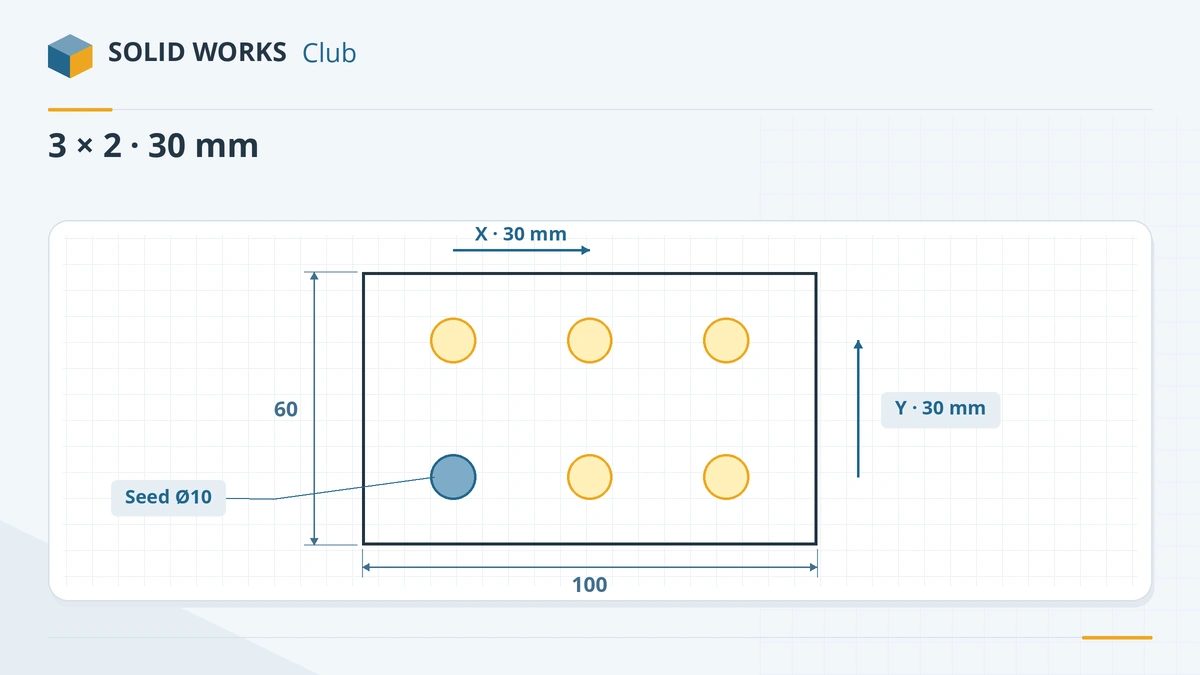
One seed circle, 3 × 2 instances at 30 mm spacing. -
3
Extrude
Exit the sketch and extrude it 10 mm — the six circles become six through holes.
-
4
Edit the pattern later
Edit the sketch, right-click one of the pattern instances → Edit Linear Pattern to change the count or spacing.
Common mistakes
- Patterning dozens of holes in a sketch. Model one hole as a feature and use a feature pattern — it rebuilds far faster.
- Forgetting to dimension the seed entity's position; the pattern moves with it.
- Choosing a spacing that pushes instances outside the outline — the extrude then fails or gives unexpected shapes.
Lesson 16 of 17 in the sketching course.
Practice
Build the plate above: 100 × 60 mm, six Ø10 holes in a 3 × 2 linear sketch pattern at 30 mm pitch, starting 20 mm from the left and 15 mm from the bottom, extruded 10 mm. Check: volume 55,287.61 mm³.
Sources
- SOLIDWORKS Help 2024 — Creating circular sketch patterns
- TriMech — Understanding the pattern sketch command
- CATI — Edit sketch patterns in SOLIDWORKS
- GoEngineer — Design for performance with patterns
- CATI — Pattern performance: features, faces and sketches
Checked November 2026. SOLID WORKS Club is independent; menu names can differ slightly between releases.
Frequently asked questions
What is the difference between a sketch pattern and a feature pattern?
+
A sketch pattern copies entities inside one sketch. A feature pattern copies whole features (holes, bosses) in the part. Feature patterns have more options and usually rebuild faster.
How do I make a bolt circle in a sketch?
+
Draw one circle, then use Circular Sketch Pattern around the centre point with the number of instances and 360° total angle, with Equal spacing ticked.
How do I edit a sketch pattern?
+
Edit the sketch, right-click a patterned entity or the seed, and choose Edit Linear Pattern or Edit Circular Pattern.
Why is my part slow with many holes?
+
Sketch patterns make SOLIDWORKS solve many relations. Feature patterns, especially with the Geometry pattern option, or cosmetic patterns, are much faster.
Related
- Mirror sketch entities in SOLIDWORKSHow to mirror sketch geometry in SOLIDWORKS with Mirror Entities and Dynamic Mirror, choose a centerline, line, edge or plane, and keep the halves symmetric.
- SOLIDWORKS circle toolsHow to sketch circles in SOLIDWORKS with the Circle and Perimeter Circle tools, dimension the diameter, add Equal relations and measure to the edge.
- Construction geometry and centerlinesHow construction geometry works in SOLIDWORKS: centerlines, For construction, converting entities, and using them as mirror lines, revolve axes and references.
- SOLIDWORKS running slow — how to speed it upSpeed up a slow SOLIDWORKS with Performance Evaluation, large assembly settings, lightweight mode, image quality, local files and the right graphics setup.