Advanced parts · Lesson 1
SOLIDWORKS Linear Pattern
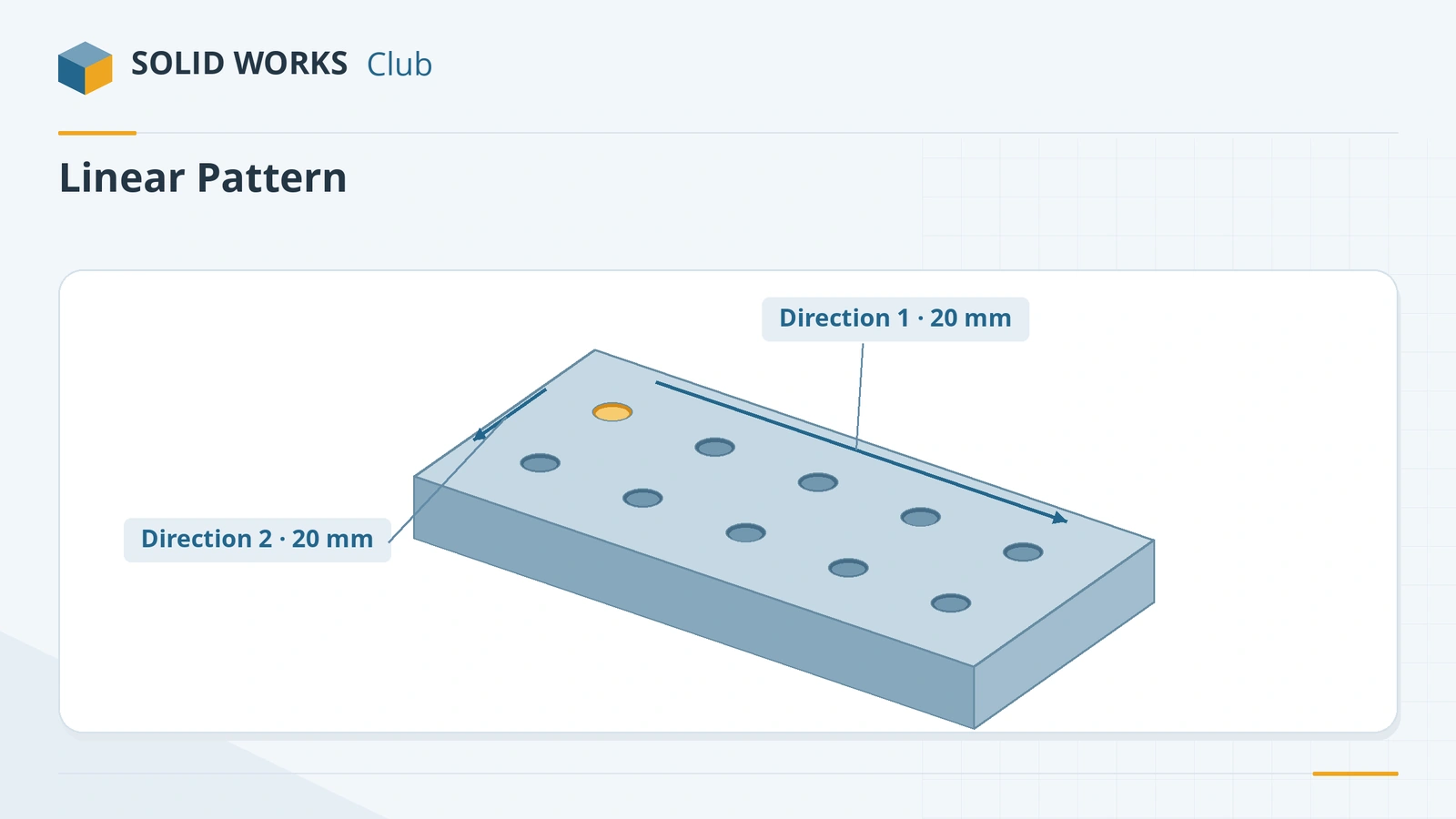
Linear Pattern copies features, faces or bodies in rows — one direction or a grid in two. Model one hole, boss or slot (the seed), then pattern it instead of drawing every copy. The copies update when you change the seed. You can skip instances, let the spacing follow a reference edge, vary dimensions from copy to copy, and switch to a Geometry pattern when rebuild speed matters.
 Kevin Walsh
Where to find it
Features tab → Linear Pattern (Insert → Pattern/Mirror → Linear Pattern)
Linear Pattern options
| Option | What it does |
|---|---|
| Direction 1 / 2 | Edge, line, axis, dimension — and since 2016 planar or conical faces, circular edges and planes |
| Spacing and instances | Distance between copies and how many |
| Up to reference (2015+) | Runs to an edge, vertex or face; spacing or count adapts, with an offset for the last instance |
| Pattern seed only | In Direction 2, copies only the seed, not the whole first row |
| Instances to Skip | Click purple dots to remove copies |
| Instances to Vary | Changes a seed dimension by an increment for each copy — e.g. growing slots or numbers |
| Rotate instances (2018+) | Rotates each copy about a face, axis or edge |
| Geometry pattern | Copies geometry only — much faster rebuilds |
Patterns and performance
In a GoEngineer test, a 29 × 29 hole pattern rebuilt in 1.34 s as a Geometry pattern against 25.34 s as a standard pattern, and sketch patterns were the slowest of all. For hundreds of identical holes, pattern a cosmetic-thread hole with Geometry pattern on, or pattern bodies and combine them once. Round patterns are next: Circular Pattern.
Step by step
-
1
Model the plate and the seed hole
Extrude a 120 × 60 mm Corner Rectangle from the origin 10 mm. Cut one Ø8 hole through all, centred 20 mm from the left edge and 20 mm from the bottom edge (or use the Hole Wizard).
-
2
Start the pattern
Select the hole feature first, then Features → Linear Pattern. Direction 1: pick the bottom edge, spacing 20 mm, 5 instances. Check the arrow points across the plate.
-
3
Add Direction 2
Direction 2: pick a vertical edge, spacing 20 mm, 2 instances. The preview shows a 5 × 2 grid.
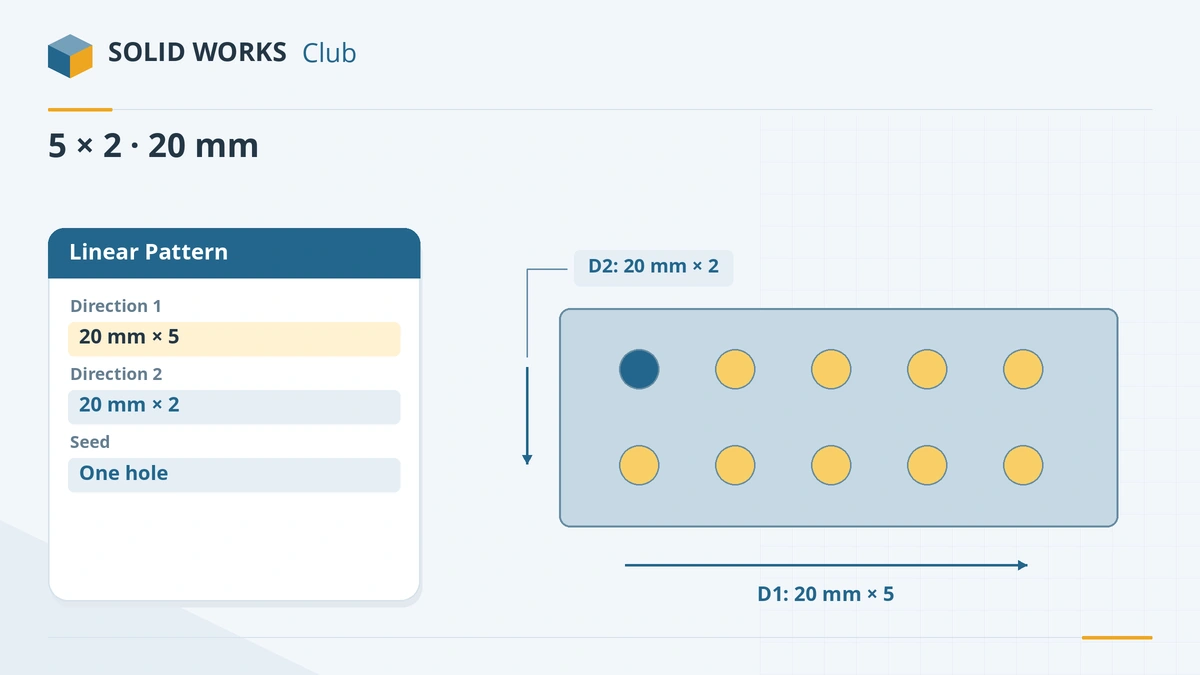
Five instances along X and two along Y at 20 mm spacing. -
4
Skip one instance (optional)
Open Instances to Skip and click the purple dot of any copy to remove it. Click again to bring it back. Leave all ten for the check.
Common mistakes
- Patterning a sketch instead of a feature for many copies — feature patterns rebuild much faster than sketch patterns.
- Spacing that pushes copies off the part; the instances fail or stick out.
- Using Geometry pattern on a seed whose end condition must adapt (for example Up To Surface on an uneven face) — it copies the geometry and ignores the seed's references.
Lesson 1 of 16 in the advanced parts course.
Practice
Pattern a Ø8 through hole in a 120 × 60 × 10 mm plate: 5 instances at 20 mm along X, 2 instances at 20 mm along Y, starting 20 mm from the left and bottom edges. Check: volume 66,973.45 mm³ (ten holes).
Sources
- Javelin — How to use patterns in SOLIDWORKS (Jun 2026)
- Javelin — Two-directional linear pattern (Feb 2023)
- CATI — Pattern direction references (2016)
- SOLIDWORKS blog — Up to reference pattern (2015)
- CATI — Up to reference pattern
- GoEngineer — Incremental numbers with Instances to Vary (Feb 2025)
- CATI — Instances to Vary
- Javelin — SOLIDWORKS 2018 pattern enhancements
- GoEngineer — Design for performance with patterns
- Solid Solutions — Geometry pattern (2015)
- SOLIDWORKS blog — Increasing performance in patterns
Checked November 2026. SOLID WORKS Club is independent; menu names can differ slightly between releases.
Frequently asked questions
How do I make a linear pattern in two directions?
+
Fill in Direction 1 and Direction 2 in the Linear Pattern PropertyManager, each with an edge or direction, a spacing and a number of instances.
What is Up to reference in a linear pattern?
+
An option added in SOLIDWORKS 2015: the pattern runs up to an edge, vertex or face, and either the spacing or the count adjusts when that reference moves.
How do I remove one instance from a pattern?
+
Use Instances to Skip and click the purple dot shown at the centre of that instance.
What is Geometry pattern?
+
An option that copies the seed's faces and edges without re-solving its end condition. It is much faster to rebuild but loses the seed's references.
Related
- SOLIDWORKS Circular PatternHow to use Circular Pattern in SOLIDWORKS: pattern axis, equal spacing, angle and instances, symmetric Direction 2, skipping instances and preview options.
- Curve, sketch, table, fill and variable patternsSOLIDWORKS curve driven, sketch driven, table driven, fill and variable patterns explained: what each does, when to use it, and a fill pattern example.
- Linear and circular sketch patternsHow to use linear and circular sketch patterns in SOLIDWORKS: spacing, instances, angle, editing a pattern, and when a feature pattern is the faster choice.
- SOLIDWORKS running slow — how to speed it upSpeed up a slow SOLIDWORKS with Performance Evaluation, large assembly settings, lightweight mode, image quality, local files and the right graphics setup.