Getting Started
How to install SOLIDWORKS step by step
SOLIDWORKS is installed with the SOLIDWORKS Installation Manager. You download a small setup file, sign in, enter your serial number, choose the products and folders, and the Installation Manager downloads the rest — roughly 8 to 16 GB depending on the products — and installs it. Plan for an hour on a good connection. Students, makers and 3DEXPERIENCE users install differently; see the last section.
 Kevin Walsh
Where to find it
solidworks.com → Support → Downloads (subscription customers) → SolidWorksSetup.exe
What you need
| Item | Details |
|---|---|
| Windows | Windows 11 Pro/Enterprise, 64-bit (2026 and later) |
| Memory | 16 GB minimum, 32 GB recommended |
| Disk | SSD recommended; allow tens of GB for the program and download |
| Graphics | Certified card and driver — see graphics cards |
| Account | Serial number; 3DEXPERIENCE ID or SOLIDWORKS ID with download access |
| Rights | Local administrator |
Students, makers and 3DEXPERIENCE SOLIDWORKS
- Student edition — you receive a serial number and install instructions by email; the Installation Manager steps are the same, and you can activate straight away. See free SOLIDWORKS for students.
- 3DEXPERIENCE SOLIDWORKS and Makers — no serial number. Sign in to the 3DEXPERIENCE platform, start the SOLIDWORKS app from your dashboard, install the 3DEXPERIENCE Launcher when asked, and the license comes with your ID. See SOLIDWORKS for Makers. It cannot be installed next to desktop SOLIDWORKS of the same major version.
If something goes wrong
The Installation Manager keeps logs and can zip them for your reseller. Common messages — pending reboot, could not connect, error 1603 — are covered in installation errors. Upgrading from an older release? Read updating SOLIDWORKS first. Before your first project, set up files and folders.
Step by step
-
1
Check your PC first
SOLIDWORKS 2026 needs 64-bit Windows 11 Pro or Enterprise (Home editions are not supported, and Windows 10 support ended with 2025 SP5), an x86_64 processor, at least 16 GB of RAM (32 GB recommended), an SSD and a certified graphics card. Check with the PC checker or the system requirements.
-
2
Have your details ready
You need your serial number (24 digits for commercial licenses), a 3DEXPERIENCE ID or SOLIDWORKS ID linked to your company's subscription, administrator rights on the PC and an internet connection. Install pending Windows updates and restart before you begin.
-
3
Download SolidWorksSetup.exe
Go to the SOLIDWORKS downloads page, sign in, pick the version and the latest service pack, accept the agreement and download SolidWorksSetup.exe. It is small — it only contains the Installation Manager. Your reseller may also offer the download. Right-click the file → Properties → tick Unblock if shown.
-
4
Run it as administrator
Right-click SolidWorksSetup.exe → Run as administrator. It unpacks itself and starts the SOLIDWORKS Installation Manager.
-
5
Choose "Install on this computer"
On the welcome page choose to install on this computer (older guides call it Individual). The other options — administrative image, server components, download and share all files — are for IT departments and license servers.
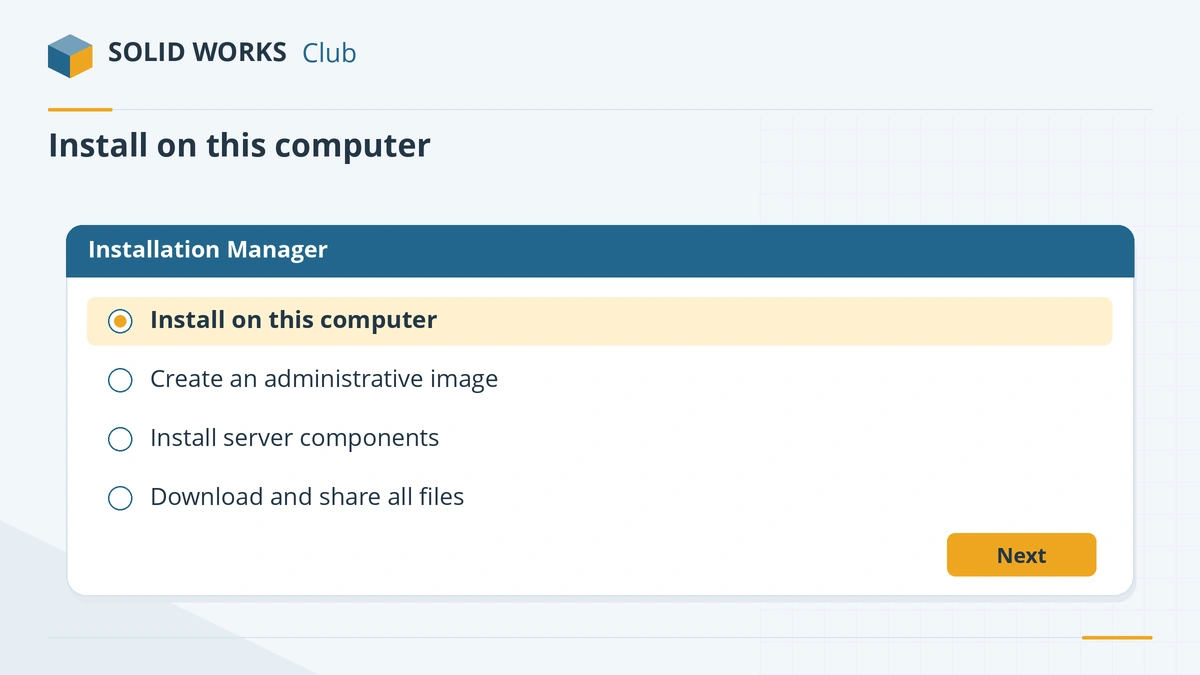
For a single PC, choose to install on this computer. -
6
Enter your serial numbers
Type the serial number for SOLIDWORKS and for any extra products such as Simulation. One serial can cover several products. If an older version is found, choose whether to upgrade it or install the new version alongside it — different major versions can live side by side.
-
7
Check the Summary page
Click Change next to each section, then Back to Summary: Products (untick what you do not need), Download Options (the download folder defaults to Documents\SOLIDWORKS Downloads), Installation Location (default
C:\Program Files\SOLIDWORKS Corp) and Toolbox/Hole Wizard Options (defaultC:\SOLIDWORKS Data— add the year, for exampleC:\SOLIDWORKS Data 2026, if you keep several versions).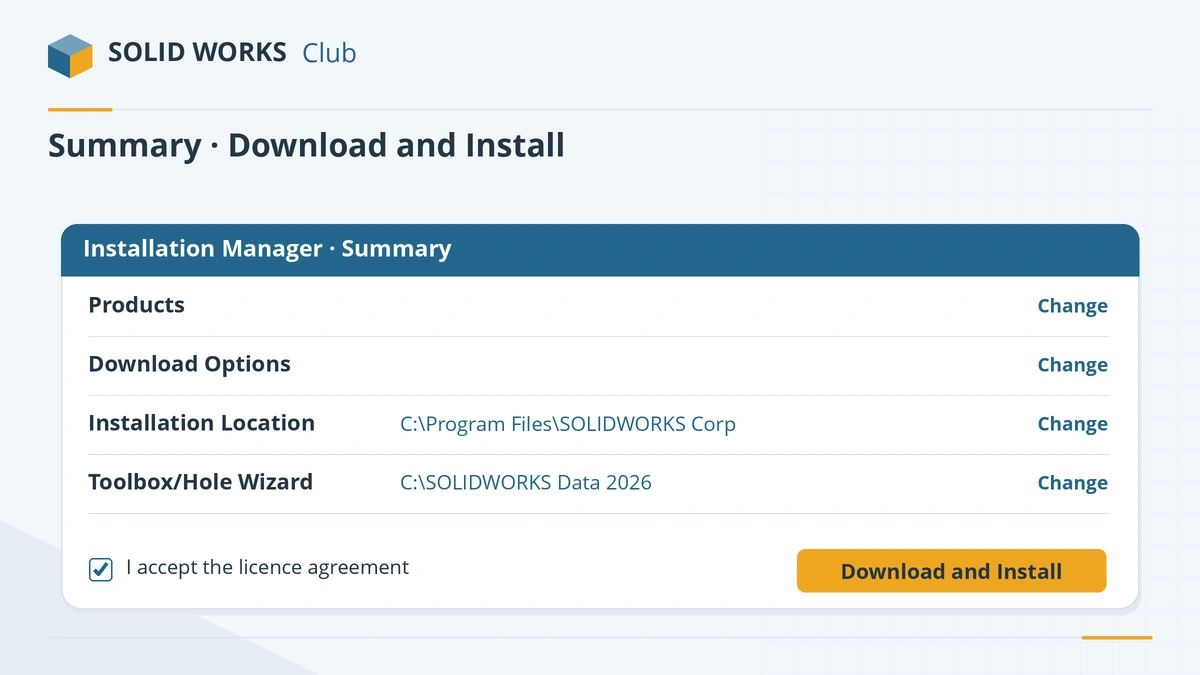
Check each section of the Summary page before you install. -
8
Accept and install
Tick I accept the terms of the SOLIDWORKS license agreement and click Download and Install. If the files are already downloaded, the button reads Install only. Keep the PC awake; if it asks to restart, sign back in as the same administrator so it can finish.
-
9
Start SOLIDWORKS and activate
Start SOLIDWORKS. The activation wizard opens on first launch; choose automatic activation over the internet. Details and alternatives: activate SOLIDWORKS.
Common mistakes
- Installing on Windows Home or Windows 10 with SOLIDWORKS 2026 — neither is supported.
- Not running the installer as administrator.
- Leaving the Toolbox folder without a year when you keep two versions — the newer one can upgrade the Toolbox the older one uses.
- Deleting the download folder. Repairs and some updates need the original files.
Sources
- SOLIDWORKS — Downloads (subscription customers)
- Hawk Ridge — How to download SOLIDWORKS
- Hawk Ridge — How to install SOLIDWORKS
- Javelin — How to install SOLIDWORKS
- GoEngineer — How to install SOLIDWORKS
- Visiativ — SOLIDWORKS desktop installation (Jun 2026)
- SOLIDWORKS 2026 Installation Guide (PDF, German edition)
- SOLIDWORKS system requirements
- Solid Solutions — 10 things to do before upgrading to SOLIDWORKS 2026 (Dec 2025)
- SOLIDWORKS Student Edition installation guide (PDF)
- SOLIDWORKS — Student products
- Javelin — Installing 3DEXPERIENCE SOLIDWORKS for Makers (May 2026)
- TriMech — How to install 3DEXPERIENCE SOLIDWORKS
Checked November 2026. SOLID WORKS Club is independent; menu names can differ slightly between releases.
Frequently asked questions
How big is the SOLIDWORKS download?
+
Resellers quote about 8 to 16 GB depending on the products you select; a full administrative image with every product is over 17 GB. Leave plenty of free space on the SSD.
Can I install two versions of SOLIDWORKS on one PC?
+
Yes. Different major versions (for example 2025 and 2026) can be installed side by side. Only one service pack of each major version can be installed at a time.
Where do I download SOLIDWORKS?
+
Commercial users download SolidWorksSetup.exe from the downloads page on solidworks.com after signing in with an ID linked to an active subscription, or from their reseller. Students use the link in their student license email.
Do I need internet to install SOLIDWORKS?
+
For a normal installation, yes — the Installation Manager downloads the program and checks your serial. IT departments can prepare an administrative image or a downloaded set of files for offline installs.
Related
- How to activate SOLIDWORKSActivate SOLIDWORKS after installing, automatically over the internet or by email, plus the yearly reactivation and how to move a license to a new PC.
- SOLIDWORKS installation errors and how to fix themFix SOLIDWORKS Installation Manager errors: pending reboot, cannot connect, additional files needed, 1722 and 1603, and where to find the install logs.
- SOLIDWORKS system requirements (2025–2027)Official SOLIDWORKS system requirements for 2025–2027 — Windows 11, 16 GB RAM minimum, 32 GB recommended, x86_64 CPU, certified graphics card and an SSD.
- How to get the free SOLIDWORKS student edition (2026)Since July 1, 2026, students get SOLIDWORKS Design Standard free, no .edu email needed. Who qualifies, how to download it, its limits and the $60 Premium.