Sketching · Lesson 3
SOLIDWORKS circle tools
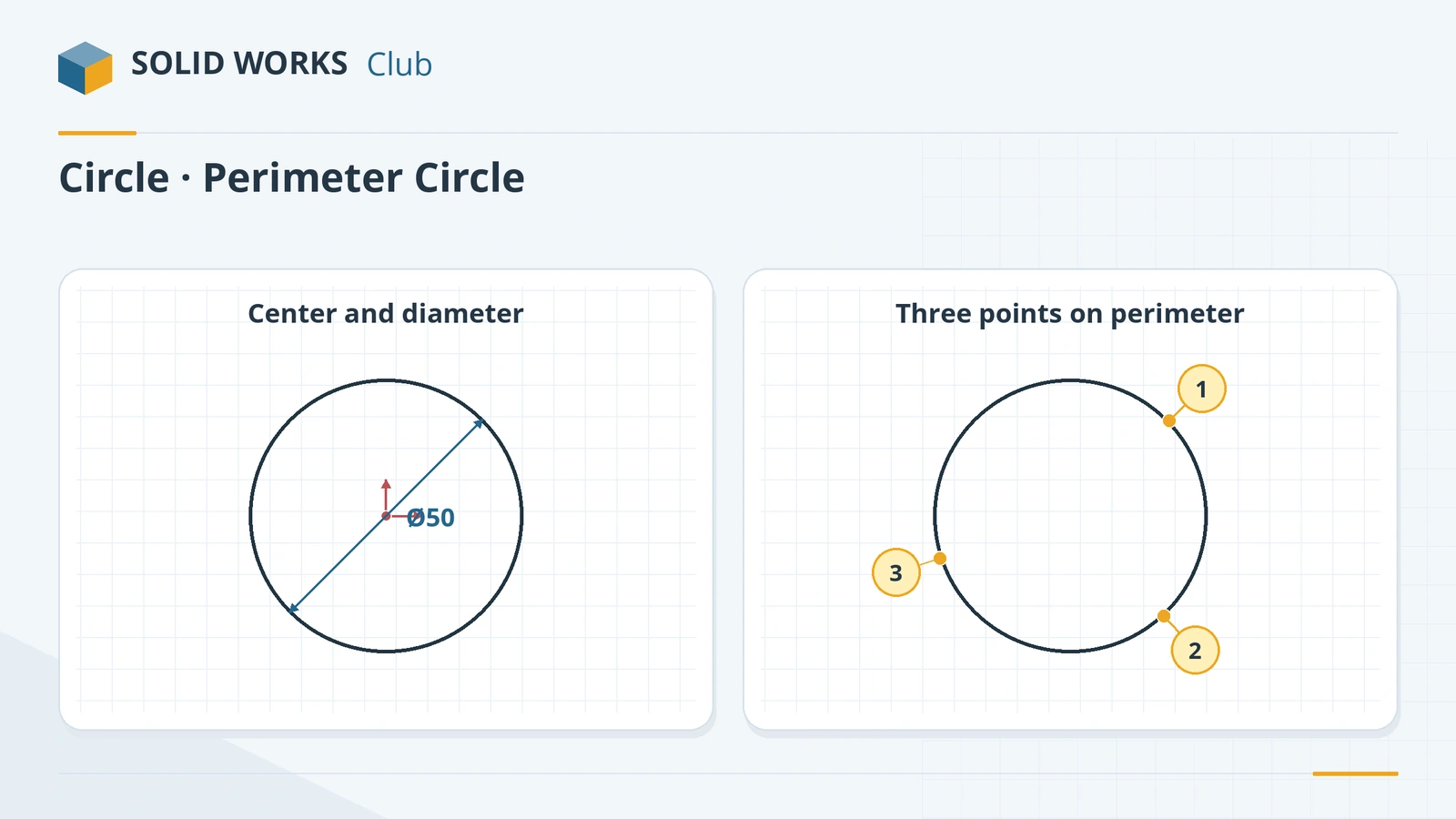
The Circle tool draws a circle from its centre: click the centre, then click again (or drag) to set the size. Perimeter Circle draws a circle through three points on its edge, which is handy when a circle must touch existing geometry. A circle is fully defined by its diameter and the position of its centre — two dimensions or relations for the centre, one for the size.
 Kevin Walsh
Where to find it
Sketch tab → Circle flyout (Circle, Perimeter Circle)
Circle vs Perimeter Circle
| Circle | Perimeter Circle | |
|---|---|---|
| Defined by | Centre and a point on the edge | Three points on the edge |
| Typical use | Holes, bosses, shafts | Circles that must touch existing geometry |
| To fully define | Centre position + diameter | Position of the points or relations + diameter |
For drilled and tapped holes in a finished part, the Hole Wizard is usually a better choice than a sketched circle and a cut, because it stores the hole type for drawings. Several circles in a row or ring are faster with sketch patterns or, better, a feature pattern.
Step by step
-
1
Pick the Circle tool
Open a sketch on the Front Plane and click Circle.
-
2
Place the centre on the origin
Click the origin for the centre (a coincident relation is added), move out and click again. Click-drag does the same in one motion.
-
3
Dimension the diameter
Smart Dimension → click the circle edge and place the dimension. SOLIDWORKS shows a diameter (Ø) for circles. Type 50.
-
4
Add a concentric circle
Draw a second circle with its centre on the same point and dimension it 30. Because both centres are on the origin they are concentric.
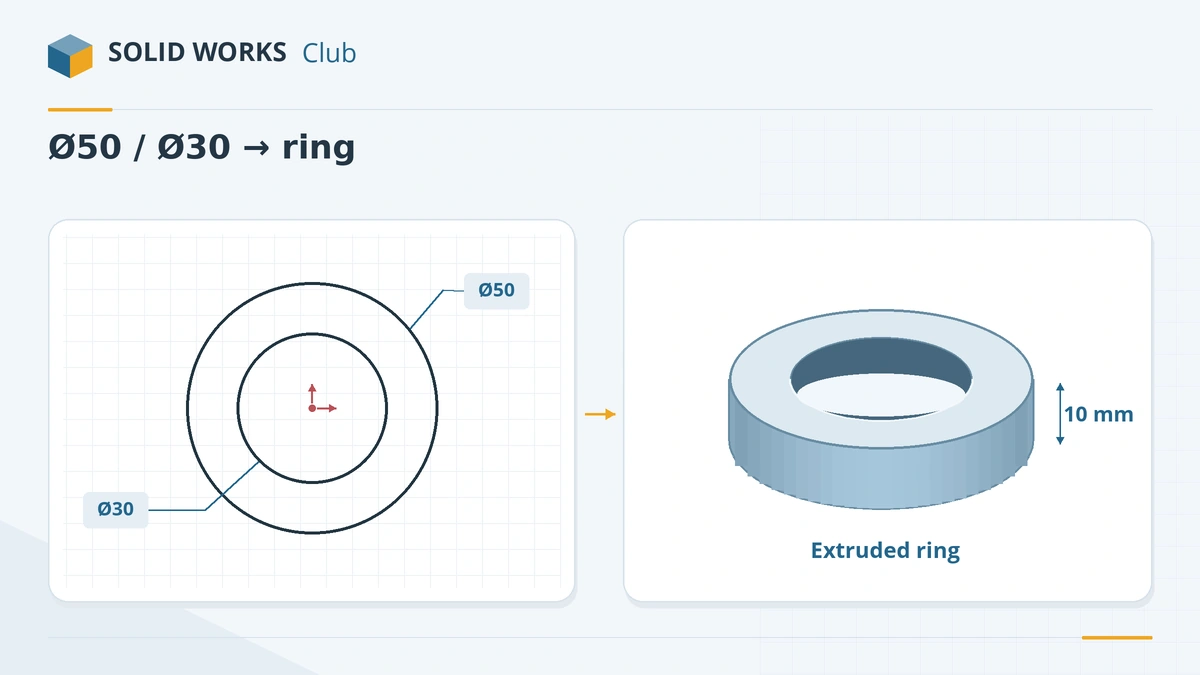
Two concentric circles extrude into a ring. -
5
Equal circles
For several holes of the same size, dimension one circle, then Ctrl-select the others with it and add an Equal relation. Changing one dimension changes them all.
Common mistakes
- Dimensioning each of several identical circles. Use one dimension and Equal relations so a later change is one edit.
- Leaving the centre floating. A circle with only a diameter is still blue — its centre can move.
- Measuring between two circles centre-to-centre when the drawing needs the gap. Hold Shift while clicking the circles to dimension to their edges.
Lesson 3 of 17 in the sketching course.
Practice
Draw two concentric circles on the origin, Ø50 and Ø30, and extrude 10 mm — SOLIDWORKS makes a ring because the inner circle becomes a hole. Check: volume 12,566.37 mm³. A single Ø50 circle extruded 10 mm gives 19,634.95 mm³.
Sources
- Javelin — Choosing the best sketch method (Dec 2025)
- Planchard — SOLIDWORKS 2020 Reference Guide, sketch chapter (sample PDF)
- Javelin — Five sketching techniques every user should know
- GoEngineer — SOLIDWORKS sketch relations guide (Feb 2025)
- Hawk Ridge — Sketching basics in SOLIDWORKS (updated Sep 2026)
Checked November 2026. SOLID WORKS Club is independent; menu names can differ slightly between releases.
Frequently asked questions
How do I dimension a circle as a radius instead of diameter?
+
Select the dimension and change the display to radius in the dimension PropertyManager (Leaders tab), or right-click it and choose Display Options. The size is the same; only the display changes.
What is a perimeter circle?
+
A circle defined by three points on its edge instead of a centre. Use it when the circle must pass through or touch existing points or lines.
How do I make two circles the same size?
+
Select both (Ctrl+click) and add an Equal relation from the context toolbar or the PropertyManager.
How do I dimension to the edge of a circle?
+
Hold Shift while clicking the circle with Smart Dimension. The dimension goes to the nearest or farthest point of the circle instead of its centre.
Related
- SOLIDWORKS arc toolsHow to sketch arcs in SOLIDWORKS: Centerpoint Arc, Tangent Arc and 3 Point Arc, when to use each, how to reverse tangency and why not to trim circles.
- SOLIDWORKS sketch relationsAll SOLIDWORKS sketch relations explained: horizontal, coincident, tangent, equal, symmetric, fix and more, plus how to add, view and delete them.
- Linear and circular sketch patternsHow to use linear and circular sketch patterns in SOLIDWORKS: spacing, instances, angle, editing a pattern, and when a feature pattern is the faster choice.
- SOLIDWORKS rectangle toolsHow to sketch rectangles in SOLIDWORKS: Corner, Center, 3 Point Corner, 3 Point Center and Parallelogram, with construction lines and centring.