Features · Lesson 11
SOLIDWORKS Hole Wizard
The Hole Wizard creates standard holes — plain drilled, tapped, counterbored, countersunk, slots — from a database of standards such as ISO, ANSI Metric, ANSI Inch and DIN. You pick the type, standard and size, then place the holes with points on a face. Because SOLIDWORKS knows what each hole is, drawings get correct hole callouts automatically, which a sketched circle and a cut cannot do.
 Kevin Walsh
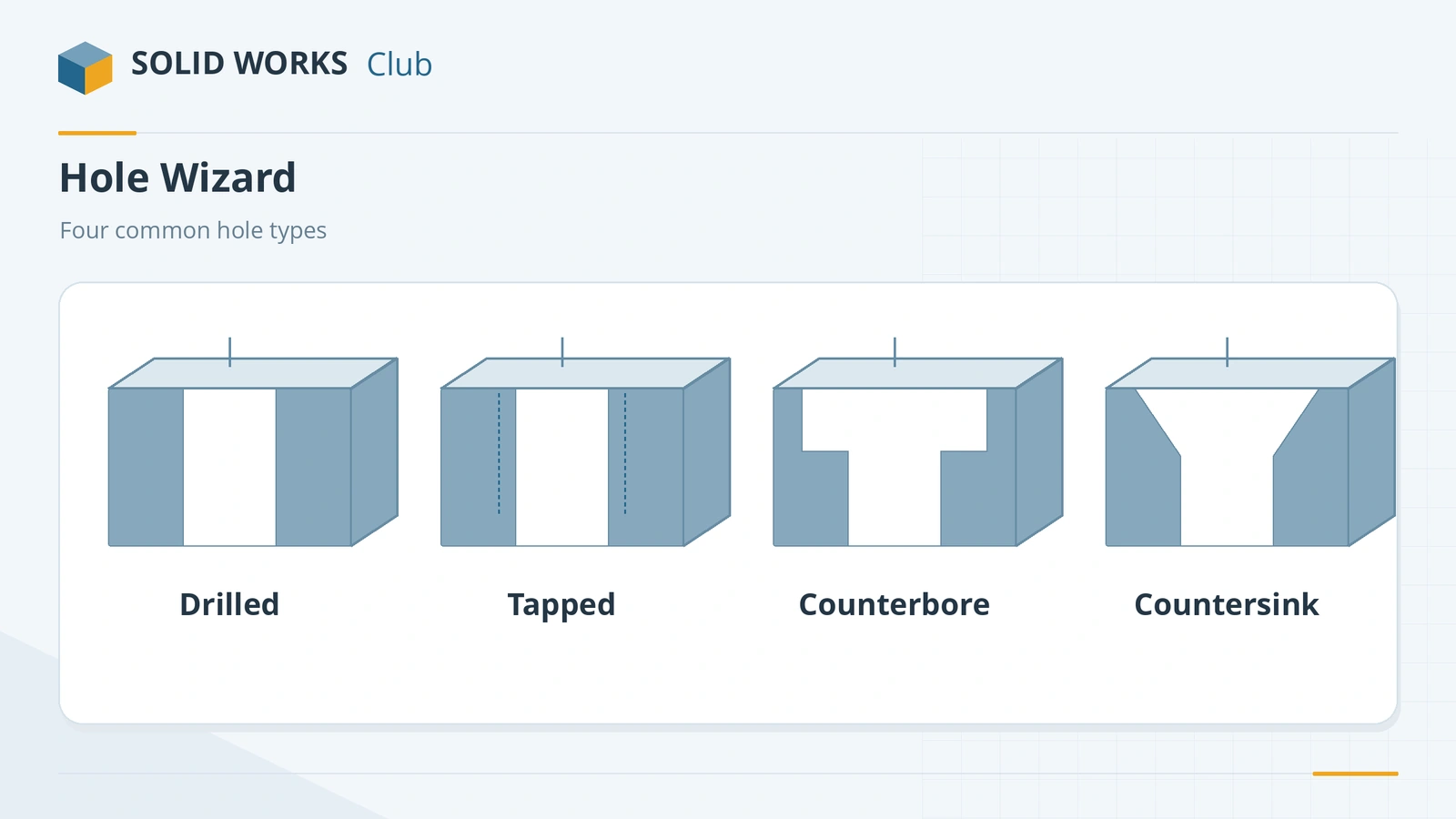
Where to find it
Features tab → Hole Wizard (Insert → Features → Hole → Wizard)
Hole types
| Type | Use |
|---|---|
| Counterbore | Socket head screws below the surface |
| Countersink | Flat head screws flush with the surface |
| Hole | Plain drilled holes, clearance holes |
| Straight Tap | Threaded holes (metric, UNC/UNF…) |
| Tapered Tap | Pipe threads |
| Legacy | Holes from very old versions |
| Counterbore / Countersink / Straight Slot | Slots with the same profiles, length centre-to-centre or tangent-to-tangent |
Key settings
| Setting | What it does |
|---|---|
| Standard | ISO, ANSI Metric, ANSI Inch, DIN and others |
| Type / Size | Screw type and size, e.g. Socket Head Cap Screw M6 |
| Fit | Close, Normal or Loose clearance |
| End Condition | Blind, Through All, Up To Next… |
| Options | Cosmetic thread, countersinks at the near or far side |
| Favorites | Save and reuse hole settings |
Each unique hole type and size is a separate feature; holes of the same type share one. Threads are explained in Cosmetic Thread and Thread. If the wizard reports database errors, see Toolbox errors. Hole Wizard holes are recognised automatically in SOLIDWORKS CAM.
Practise it: the counterbored block exercise.
Step by step
-
1
Make the plate
Extrude an 80 × 50 mm Center Rectangle on the Top Plane 10 mm up.
-
2
Type tab
Features → Hole Wizard. On the Type tab choose Hole, standard ISO, type Drill sizes, size Ø10.0, end condition Through All.
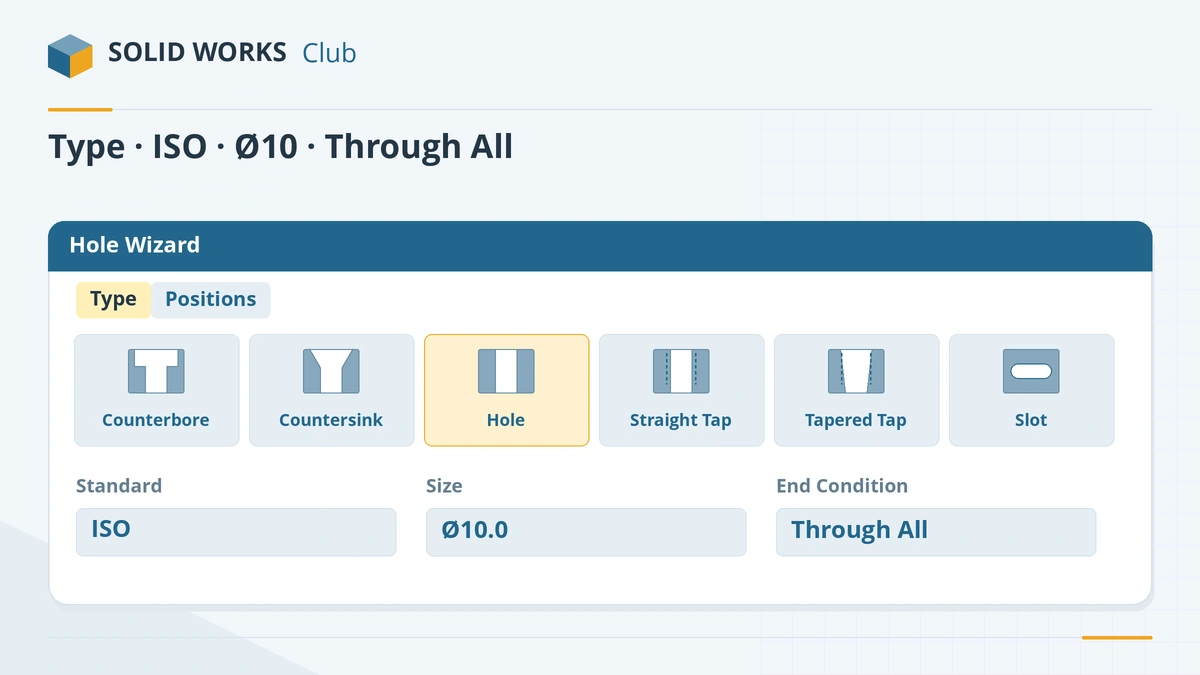
The Type tab sets what the hole is; the Positions tab sets where it goes. -
3
Positions tab
Switch to Positions and click the top face. Each click places a hole point; click once near the centre.
-
4
Locate the hole
Still in Positions, use Smart Dimension or a coincident relation to put the point on the origin. Click the tick. The hole feature appears in the tree with its size in the name.
Common mistakes
- Modelling tapped holes with Extruded Cut. The drawing then has no thread callout — use the Hole Wizard tapped types.
- Leaving hole points undimensioned in the Positions sketch, so holes move when the part changes.
- Using Show custom sizing for standard holes. Custom sizes can break the link to the standard fit.
- A wrong Hole Wizard/Toolbox folder. Errors such as "not the expected version" come from the shared database — see Toolbox errors.
Lesson 11 of 18 in the features course.
Practice
Add one ISO Ø10 drill-size hole, Through All, at the centre of an 80 × 50 × 10 mm plate. Check: volume 39,214.60 mm³. Then edit the feature and change it to an M10 tapped hole — the hole name in the tree updates.
Sources
- Hawk Ridge — Deep dive into the Hole Wizard
- SOLIDWORKS Help 2024 — Creating slots with the Hole Wizard
- GoEngineer — The power and value of the Hole Wizard
- Javelin — Unlock the power of the Hole Wizard (Feb 2023)
- Javelin — Customizing hole callouts in drawings (Aug 2022)
- GoEngineer — Fix Hole Wizard and Toolbox database errors (Sep 2024)
- SOLIDWORKS blog — Advanced Hole in SOLIDWORKS 2017
- Hawk Ridge — Hole Wizard vs Advanced Hole vs Hole Series
- GoEngineer — Performance: physical vs cosmetic threads
- GoEngineer — Missing cosmetic threads: how to fix them
Checked November 2026. SOLID WORKS Club is independent; menu names can differ slightly between releases.
Frequently asked questions
Why use the Hole Wizard instead of an extruded cut?
+
The Hole Wizard stores the hole type, standard and size, so drawings get automatic hole callouts, tapped holes get threads, and all holes of one type live in one editable feature.
How do I add a tapped hole?
+
Choose Straight Tap (or Tapered Tap for pipe threads), pick the standard and size, and set the thread depth. Tick the cosmetic thread option to show the thread in drawings.
What is Advanced Hole?
+
A tool added in SOLIDWORKS 2017 that builds holes from a stack of elements on the near and far side — for example a countersink on one side and a counterbore on the other.
Where does the Hole Wizard get its sizes?
+
From the Toolbox database file swbrowser.sldedb, set under Tools → Options → System Options → Hole Wizard/Toolbox.
Related
- SOLIDWORKS Cosmetic ThreadHow to add a cosmetic thread in SOLIDWORKS to shafts and holes, show shaded threads, get drawing callouts, and why it beats modelled threads for speed.
- SOLIDWORKS Thread featureHow to model real threads with the SOLIDWORKS Thread feature: die and tap profiles, cut or extrude, trim with faces, and keeping rebuilds fast.
- SOLIDWORKS Extruded CutHow to use Extruded Cut in SOLIDWORKS: sketch on a face, choose Blind or Through All, flip side to cut, open-profile cuts, and when to use Hole Wizard.
- SOLIDWORKS Toolbox and Hole Wizard errors — fixesFix SOLIDWORKS Toolbox errors: swbrowser.sldedb wrong version or missing, Hole Wizard database errors, fasteners changing size, read-only parts and PDM.