Errors & Fixes
SOLIDWORKS keeps crashing — causes and fixes
A crash is when SOLIDWORKS closes by itself, usually with the SOLIDWORKS Error Report dialog. Most crashes come back to the same handful of causes: the graphics driver, damaged settings, a broken installation or missing Windows components, antivirus, and unsupported setups such as Windows Home or a Mac. Start by saving your work from the auto-recover folder, then narrow the cause down with SOLIDWORKS Rx.
 Kevin Walsh

Applies to: SOLIDWORKS 2022–2027 on Windows 10 and 11.
Most likely causes
- Graphics card or driver (uncertified, outdated or replaced by Windows) (most common)
- Damaged settings or registry keys (common)
- Broken installation or damaged .NET Framework / Visual C++ components (common)
- Antivirus or security software blocking SOLIDWORKS (occasional)
- Pending Windows updates, folder permissions or bad file paths (occasional)
- Unsupported setup: Windows Home, Mac emulation, very old service pack (occasional)
- One damaged file or a file saved over a sync folder (only one file crashes)
Is it SOLIDWORKS, the file or Windows?
| Pattern | Points to |
|---|---|
| Crashes with every file, at random | Graphics driver, settings, install, antivirus |
| Crashes on the splash screen | Settings, add-ins, licensing — see license errors |
| Crashes with one file only | That file or its references — try it on another PC, rebuild with Ctrl + Q, or ask a colleague to open it |
| Crashes when saving | Network or sync folder, .NET damage, folder permissions |
| Crashes in drawings or RealView only | Graphics driver |
| Started after an upgrade to a new version | Imported settings, add-ins, missing service pack |
Where the crash information is
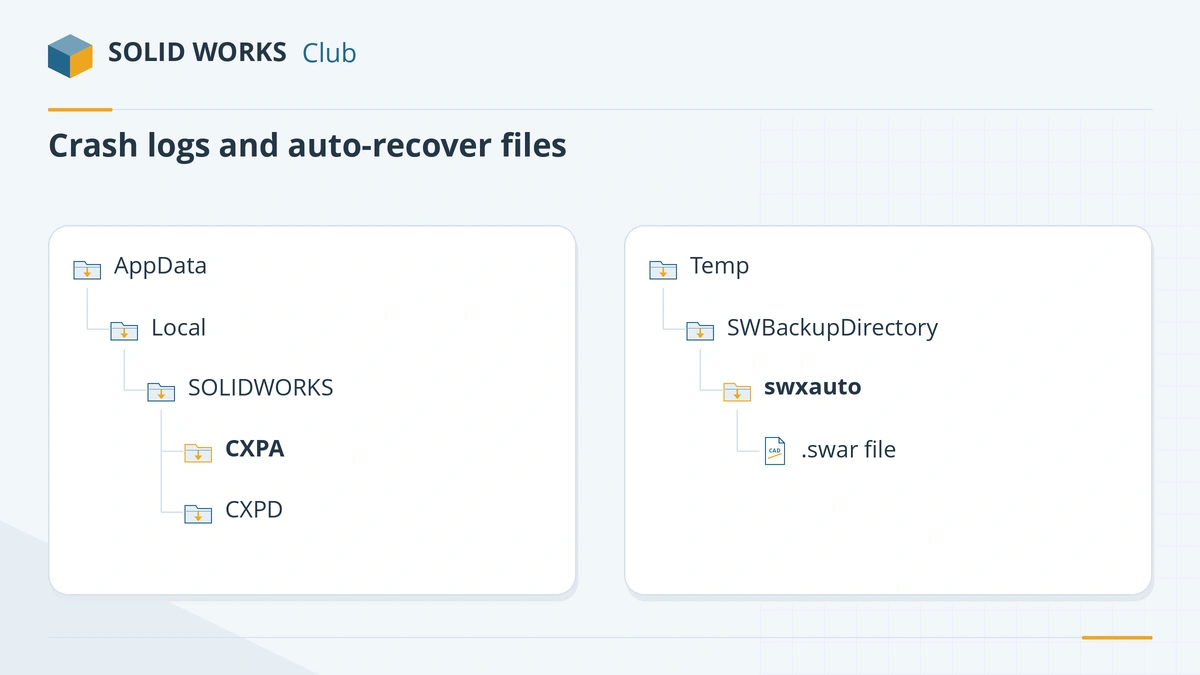
- Crash logs:
%LocalAppData%\SOLIDWORKS\CXPAholds earlier crash reports; a crash you reproduce goes to CXPD, which also contains a.dmpfile. - Windows Event Viewer: Windows Logs → Application, look for the SOLIDWORKS error and its faulting module. A module in the SOLIDWORKS folder points to SOLIDWORKS; a graphics driver file points to the driver.
- Journal file:
swxJRNL.swjin%AppData%\SOLIDWORKS\SOLIDWORKS 20xxis a text log of the session. A "journal file" warning at start-up usually means SOLIDWORKS is still running in the background — end SLDWORKS.exe in Task Manager. - Auto-recover:
.swarfiles in the SWBackupDirectory.
You do not need to read dump files yourself. Problem Capture collects them and your reseller analyses them.
Crashes on unsupported setups
SOLIDWORKS is supported only on the Windows versions in the official system requirements. Windows Home is not supported, and SOLIDWORKS 2026 and later do not support Windows 10. On a Mac, SOLIDWORKS runs only in a virtual machine and is not certified — see SOLIDWORKS on Mac. Crashes there are not something your reseller can usually fix.
If crashes started after you moved to Windows 11, read Windows 11 problems. If SOLIDWORKS freezes without closing, use the not responding guide instead. Files from a newer release that will not open at all are covered in future version files.
Crashed while saving? See corrupted files and save errors.
Fixes, in order
1. Recover your work first
On the next start SOLIDWORKS usually opens the Document Recovery pane. If it does not, look in the auto-recover folder — by default
C:\Users\<you>\AppData\Local\Temp\SWBackupDirectory\swxauto— for.swarfiles. Set a shorter auto-recover interval and a local backup folder under Tools → Options → System Options → Backup/Recover.2. Read the crash dialog and install the latest service pack
Since SOLIDWORKS 2018 the error report can check for known fixes. If it shows a green section with a service pack or hotfix, install that release. Generally, staying on the latest service pack of your version removes many crashes that are already fixed.
3. Test with Rx safe modes
Open SOLIDWORKS Rx. Launch once with Software OpenGL and once with default settings (Troubleshoot tab in 2026+, Home tab in 2025 and older). If Software OpenGL stops the crashes, fix the graphics driver. If default settings stop them, reset your settings with the Copy Settings Wizard → Reset Settings.
4. Clean-install the certified graphics driver
Use the Recommended Driver from the hardware certification page, clean install, restart. Remove DisplayLink drivers if a docking station installed them and you do not need them. On laptops, set SLDWORKS.exe to High performance graphics.
5. Check Windows Update and restart
Install pending Windows updates and restart twice. Crashes right after an update can mean a half-installed update or a new driver from Windows Update.
6. Repair SOLIDWORKS and .NET
Control Panel → Programs and Features → SOLIDWORKS 20xx → Change → Repair your installation. You need admin rights and the installation files. If crashes happen when saving, the .NET Framework may be damaged; resellers repair it by switching .NET 3.5 and 4.x off in Windows features, running Microsoft's .NET repair tool, restarting and switching them back on.
7. Exclude SOLIDWORKS from antivirus scanning
Ask IT to exclude the SOLIDWORKS processes (SLDWORKS.exe and its helper processes) and your data folders from real-time scanning, then test.
8. Capture the crash and contact your reseller
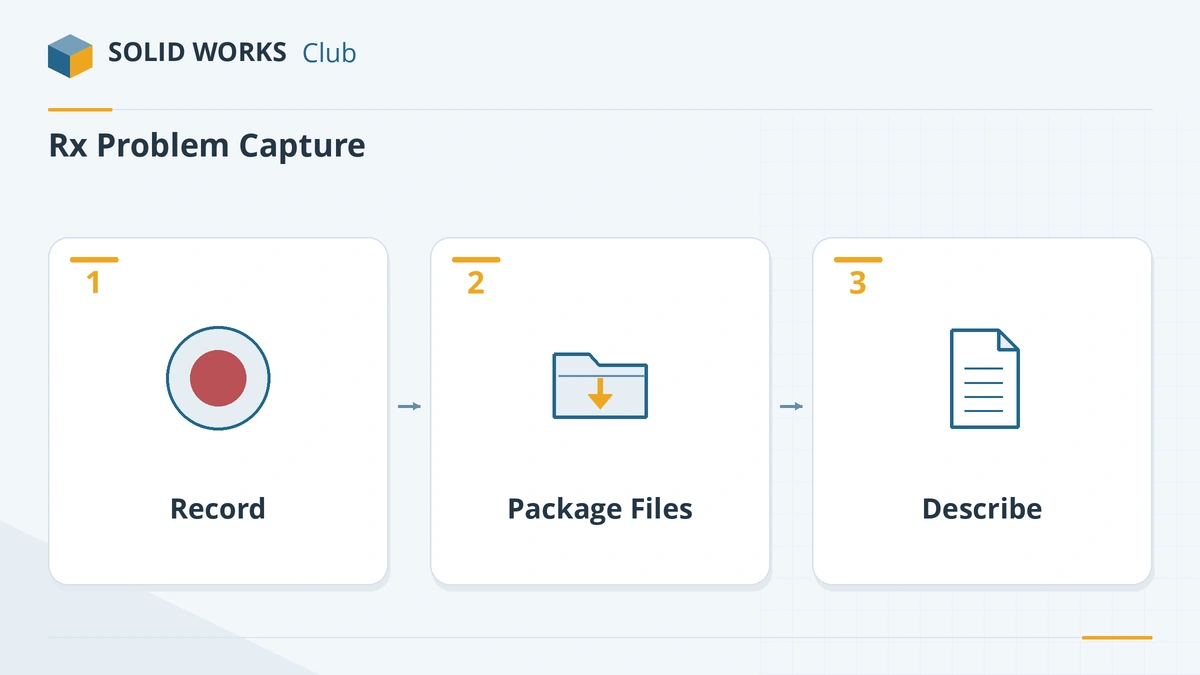
Rx Problem Capture → Record, reproduce the crash (recording stops by itself), then Package Files. The zip contains a video, system information, logs and the files you had open — including confidential ones, so check before sending. Add a Pack and Go zip of the assembly or drawing. Your reseller can read the dump files and log a bug with SOLIDWORKS.
Sources
- Solid Solutions — Why is SOLIDWORKS crashing?
- GoEngineer — How to troubleshoot a SOLIDWORKS crash
- Javelin — SOLIDWORKS crash troubleshooting guide, part 2
- Hawk Ridge — SOLIDWORKS crashes or hangs on the splash screen
- Javelin — How to use SOLIDWORKS Rx (Sep 2026)
- GoEngineer — Everything you need to know about SOLIDWORKS Rx
- GoEngineer — SOLIDWORKS Rx safe modes
- PLM Group — SOLIDWORKS Rx Problem Capture
- Solid Solutions — How to recover SOLIDWORKS files after a crash
- SOLIDWORKS Tech Blog — Support monthly news (crash solutions, Oct 2017)
- Solid Solutions — How to reset SOLIDWORKS to default settings
- Hawk Ridge — How to repair SOLIDWORKS
- Hawk Ridge — Repairing .NET Framework for SOLIDWORKS
- Hawk Ridge — Antivirus recommendations for SOLIDWORKS
- SOLIDWORKS system requirements
Checked November 2026. SOLID WORKS Club is independent; menu names can differ slightly between releases.
Frequently asked questions
Why does SOLIDWORKS crash when I open it?
+
A crash at start-up or on the splash screen usually points to the graphics driver, damaged settings, an add-in or licensing. Start SOLIDWORKS Rx in Software OpenGL mode and with default settings to see which one it is.
Where are SOLIDWORKS crash logs?
+
Crash information is kept under %LocalAppData%\SOLIDWORKS, in the CXPA folder (older crashes) and CXPD (a crash you just reproduced). Windows also logs each crash in Event Viewer under Windows Logs → Application. Problem Capture in SOLIDWORKS Rx packages these for you.
How do I recover a file after SOLIDWORKS crashed?
+
Restart SOLIDWORKS and use the Document Recovery pane. Otherwise open the auto-recover folder (by default in your Windows temp folder under SWBackupDirectory\swxauto) and look for .swar files.
Does SOLIDWORKS crash more on Windows Home?
+
Windows Home editions are not supported by SOLIDWORKS, according to the official system requirements, and resellers list them among the causes of crashes. Use Windows 11 Pro or Enterprise.
Related
- SOLIDWORKS not responding or freezing — how to fix itSOLIDWORKS freezing or showing "Not Responding"? Find the cause with SOLIDWORKS Rx safe modes, then fix drivers, settings, add-ins and network files.
- Unsupported graphics card, RealView greyed out and display problemsSOLIDWORKS says your graphics card is unsupported, RealView is greyed out, or the screen goes black? Check certification, install the right driver, fix laptops.
- SOLIDWORKS installation errors and how to fix themFix SOLIDWORKS Installation Manager errors: pending reboot, cannot connect, additional files needed, 1722 and 1603, and where to find the install logs.
- SOLIDWORKS problems on Windows 11 and how to fix themSOLIDWORKS problems on Windows 11: unsupported versions and editions, blurry scaling, drivers replaced by Windows Update, blocked saves and licenses.