Requirements & Hardware
How much RAM does SOLIDWORKS need?
The official minimum is 16 GB of RAM and 32 GB is recommended for SOLIDWORKS 2025, 2026 and 2027. 32 GB suits most users. Choose 64 GB for large assemblies, imported scans or Simulation, and 128 GB only for very large datasets. A quick rule from Puget Systems: about 5 GB for SOLIDWORKS plus 20 times the size of your largest assembly.
 Kevin Walsh
Official requirement
| Product | Minimum | Recommended |
|---|---|---|
| SOLIDWORKS 2025, 2026, 2027 | 16 GB | 32 GB |
| SOLIDWORKS PDM Contributor / Viewer, Electrical Schematic | 8 GB | 16 GB |
Source: SOLIDWORKS system requirements, checked 2026-11-06.
How much you actually need
| You mainly work on | RAM | Note |
|---|---|---|
| Learning, small parts and drawings | 16 GB (minimum) | Official minimum; close other programs |
| Everyday design, assemblies of a few hundred parts | 32 GB | Official recommendation |
| Large assemblies, imported scans, Simulation | 64 GB | Javelin and GoEngineer advanced tier |
| Very large assemblies, complex Flow Simulation, point clouds | 128 GB | Javelin ultimate tier |
Tiers based on Javelin and GoEngineer recommendations.
Size it from your largest assembly
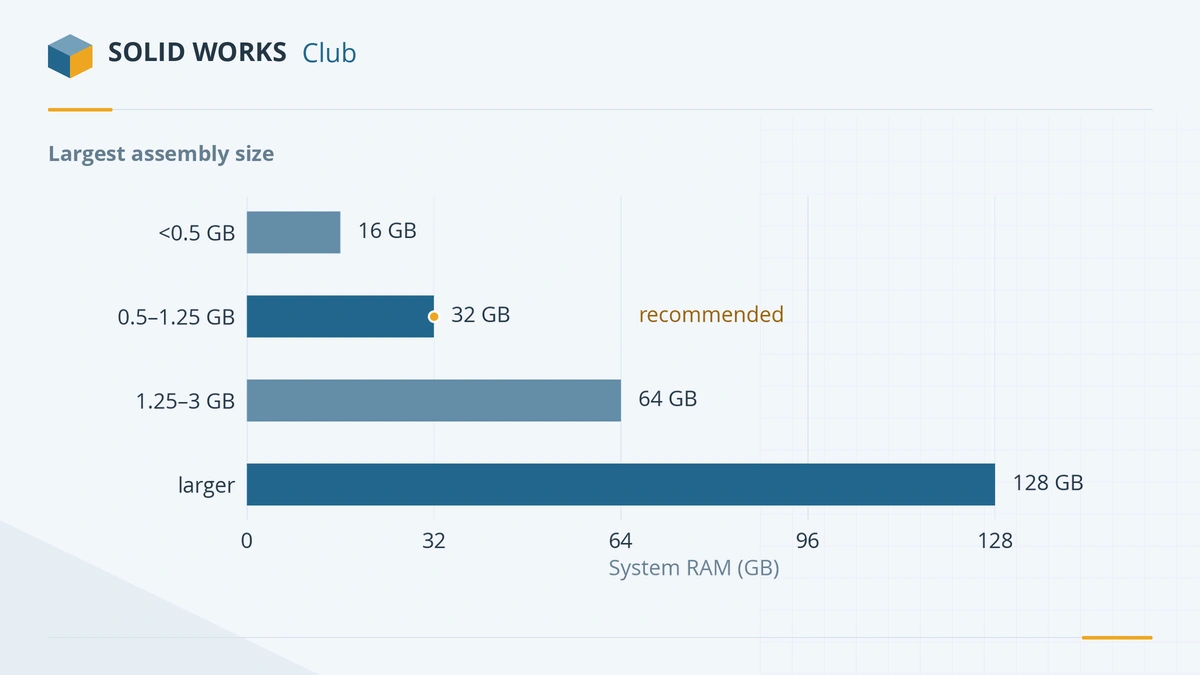
Puget Systems suggests a simple formula: about 5 GB for SOLIDWORKS itself plus 20 times the file size of your largest assembly (source). Measure the assembly, including all its referenced parts, on disk:
| Largest assembly on disk | Puget's recommendation |
|---|---|
| Under 500 MB | 16 GB |
| 0.5 to 1.25 GB | 32 GB |
| 1.25 to 3 GB | 64 GB |
Add headroom for what else you run — a browser, PDM, Office and Teams can take several gigabytes.
Laptops: check before you buy
- Soldered memory cannot be upgraded. Many thin laptops have RAM soldered to the board, so buy the amount you will need for the laptop's whole life — 32 GB at least.
- Look for SODIMM or CAMM slots if you want to upgrade later. Large mobile workstations such as the HP ZBook Fury G1i and Lenovo ThinkPad P16 Gen 3 support up to 192 GB.
- Dual-channel matters. Two matching modules are faster than one.
Laptop recommendations with memory limits are in best laptops for SOLIDWORKS.
Desktops: ECC or not?
ECC memory corrects single-bit errors. Javelin recommends it in desktops for long-running tasks such as Simulation. It needs a workstation platform (Intel Xeon W or AMD Threadripper PRO) and costs more. For modelling and drawings, standard DDR5 on a Ryzen 9 or Core Ultra desktop is fine. See the PC build guide for complete configurations, or test your current machine with the PC checker.
Seeing a low memory warning? Read what the SOLIDWORKS low memory warnings mean — the cause is not always RAM. For general speed problems see SOLIDWORKS running slow.
Frequently asked questions
Is 16 GB of RAM enough for SOLIDWORKS?
+
It meets the official minimum and is enough for learning and small parts. With a browser and other programs open, or with assemblies of a few hundred parts, you will run short. 32 GB is the official recommendation.
Is 32 GB of RAM enough for SOLIDWORKS?
+
Yes, for most users. By Puget Systems' rule of thumb, 32 GB covers assemblies up to about 1.25 GB on disk. Above that, or for Simulation with large meshes, choose 64 GB.
Does SOLIDWORKS need ECC memory?
+
No, but Javelin recommends ECC in desktops for long-running tasks such as Simulation, where a memory error can waste hours. It requires a workstation platform such as Xeon or Threadripper PRO.
Will more RAM make SOLIDWORKS faster?
+
Only if you are running out. Once your models fit in memory, extra RAM does nothing for rebuild speed — that depends on the processor. Signs you need more: heavy disk activity, low-memory warnings and slowdowns when switching windows.
Related
- SOLIDWORKS system requirements (2025–2027)Official SOLIDWORKS system requirements for 2025–2027 — Windows 11, 16 GB RAM minimum, 32 GB recommended, x86_64 CPU, certified graphics card and an SSD.
- Best CPU for SOLIDWORKS in 2026Why SOLIDWORKS needs a fast CPU rather than many cores, the best Intel and AMD processors for modelling and simulation in 2026, and why ARM is not supported.
- Best PC build for SOLIDWORKS in 2026Three SOLIDWORKS desktop builds for 2026 — entry, everyday design and large assemblies — with CPU, certified GPU, RAM and NVMe storage, plus DIY vs prebuilt.
- Can my PC run SOLIDWORKS?Check your computer against the official SOLIDWORKS 2025–2027 requirements in seconds — Windows edition, CPU, RAM, GPU and drive — with a fix for each item.