Requirements & Hardware
Best CPU for SOLIDWORKS in 2026
SOLIDWORKS modelling, rebuilds and most drawing work use only a few cores, so the processor's clock speed matters more than its core count. In 2026 the best desktop choices are the AMD Ryzen 9 9950X3D and the Intel Core Ultra 7 270K Plus. Extra cores pay off only for Simulation and CPU rendering. The processor must be Intel 64 or AMD64 — ARM chips are not supported.
 Kevin Walsh
Why clock speed beats core count
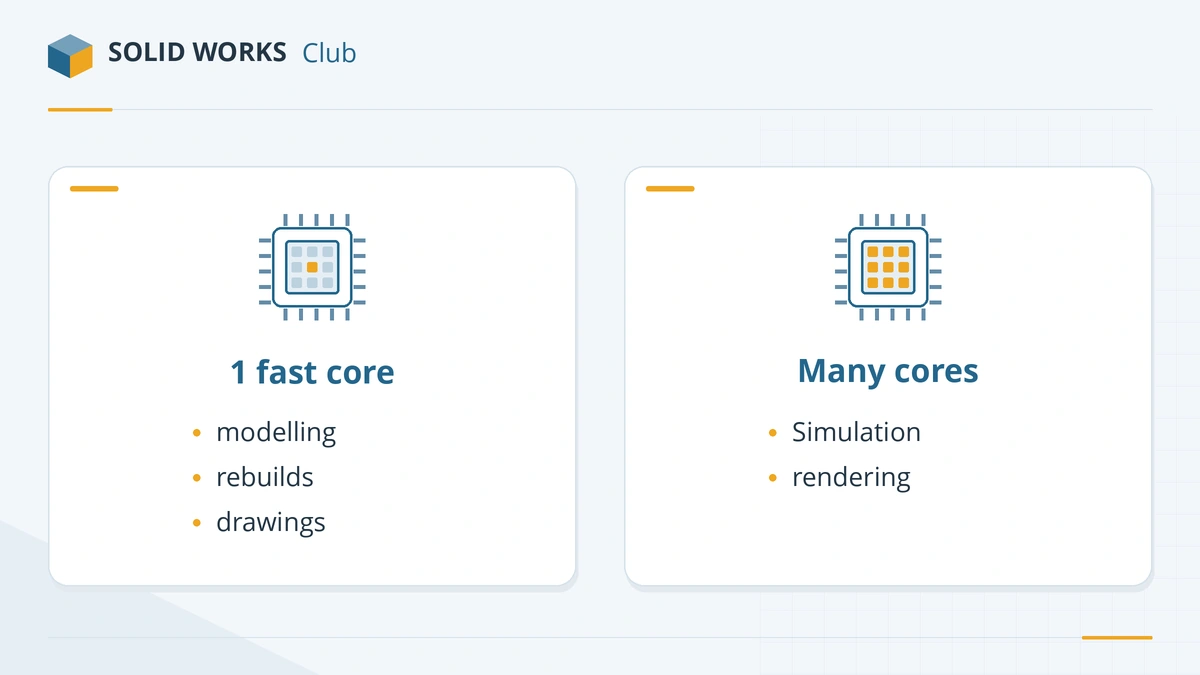
Each feature in a SOLIDWORKS part depends on the one before it, so rebuilding the feature tree is mostly sequential work. Puget Systems says modelling cannot use more than a handful of cores (source), and Javelin advises prioritising turbo frequency over core count (source).
| Task | Cores used | What helps |
|---|---|---|
| Modelling, rebuilds, opening files | One to a few | Highest turbo clock |
| Drawings | Mostly one | Clock speed |
| SOLIDWORKS Simulation (FEA), Flow Simulation | Many | More cores, more memory |
| CPU rendering | Many | More cores |
| Visualize (GPU rendering) | GPU | A strong NVIDIA card |
The official requirement is only an x86_64 processor (x86_64 processor (Intel 64 or AMD64)); no speed or core count is specified. GoEngineer's configurations all start at 3.3 GHz (source).
Best desktop CPUs for SOLIDWORKS
| CPU | Why | Source |
|---|---|---|
| AMD Ryzen 9 9950X3D | Puget's main pick for SOLIDWORKS workstations | Puget |
| Intel Core Ultra 7 270K Plus | About 1% behind the 9950X3D overall in March 2026 tests; best value for most users | Puget |
| AMD Ryzen 9 9900X3D / Ryzen 7 9850X3D | Cheaper alternatives with similar single-core speed | Puget |
| Intel Core Ultra 9 285K | Strong all-rounder; honourable mention in Puget's 2025 tests | Puget |
| Intel Xeon W7-3565X | Heavy simulation with lots of ECC memory | Puget |
| AMD Threadripper PRO / 9000 | Rendering and large Flow Simulation jobs | Puget, Javelin |
Puget advises against overclocking a SOLIDWORKS workstation: stability matters more than a few percent of speed.
Laptop CPUs
Laptop processors run at lower clocks to save power. For SOLIDWORKS:
- HX-series chips (for example Core Ultra 9 285HX) in larger mobile workstations come closest to desktop speed.
- H-series chips (Core Ultra 7/9 H, Ryzen AI 9 HX) are the usual choice in 14–16-inch workstations and handle everyday design well.
- U-series low-power chips are fine for learning, but slow for large assemblies.
Javelin's 2026 laptop tiers use Core Ultra 7 for the entry tier and Core Ultra 9 for the advanced tiers (source). Specific models are compared in best laptops for SOLIDWORKS.
ARM processors: not supported
SOLIDWORKS requires an Intel 64 or AMD64 processor. Snapdragon laptops and Apple silicon Macs use ARM chips and can run SOLIDWORKS only through x64 emulation, which Dassault does not support. Microsoft's Prism emulator has improved, but reseller TriMech notes that SOLIDWORKS CAM and Electrical rely on components that do not run on Windows on ARM. If you need SOLIDWORKS on a Mac anyway, see Apple silicon and Parallels; on Linux, see SOLIDWORKS on Linux.
Next: pair the processor with enough RAM and a certified GPU, or follow our complete PC build.
Is your current PC slow? Before upgrading, try the settings in SOLIDWORKS running slow.
Frequently asked questions
Does SOLIDWORKS use multiple cores?
+
Only partly. Puget Systems notes that modelling cannot use more than a handful of cores. Simulation solvers (FEA and Flow Simulation) and CPU rendering scale with more cores.
What clock speed does SOLIDWORKS need?
+
Dassault publishes no minimum. GoEngineer lists 3.3 GHz as the minimum in all its recommended configurations. In practice, a high turbo frequency on one core is what makes rebuilds fast.
Is Intel or AMD better for SOLIDWORKS?
+
They are close. In Puget's March 2026 tests the Core Ultra 7 270K Plus was about 1% behind the Ryzen 9 9950X3D overall and the best value for most users, while AMD led in mass-properties and Boolean operations.
Can I use SOLIDWORKS on a Snapdragon laptop?
+
Not within the requirements. SOLIDWORKS needs an x86_64 processor (Intel 64 or AMD64). Windows on ARM can emulate x64 programs, but Dassault does not support it, and some add-ins will not run.
Is a Threadripper or Xeon worth it for SOLIDWORKS?
+
Only for heavy simulation or rendering. Javelin found Threadripper 9000 chips 15–25% faster in Flow Simulation, at a much higher price. For modelling they are no faster than a desktop Ryzen 9 or Core Ultra 7/9.
Related
- Best PC build for SOLIDWORKS in 2026Three SOLIDWORKS desktop builds for 2026 — entry, everyday design and large assemblies — with CPU, certified GPU, RAM and NVMe storage, plus DIY vs prebuilt.
- Best GPU for SOLIDWORKS in 2026The best graphics card for SOLIDWORKS in 2026 by model size — certified NVIDIA RTX PRO Blackwell and AMD Radeon PRO picks, VRAM, and when a gaming card will do.
- How much RAM does SOLIDWORKS need?SOLIDWORKS needs 16 GB of RAM minimum and 32 GB is recommended. How to size memory for your largest assembly, when 64 or 128 GB pays off, and ECC.
- Best laptops for SOLIDWORKS in 2026The best laptops for SOLIDWORKS in 2026 — certified Dell, HP and Lenovo mobile workstations by tier, with CPU, RTX PRO GPU and RAM options, and what to avoid.