Requirements & Hardware
Best GPU for SOLIDWORKS in 2026
For most SOLIDWORKS users, a certified mid-range professional card is enough: the NVIDIA RTX PRO 2000 Blackwell (16 GB) for parts and medium assemblies, and an RTX PRO 4000 or 4500 Blackwell, or AMD Radeon AI PRO R9700, for large assemblies or 4K screens. A bigger card does not speed up rebuilds — those depend on the processor.
 Kevin Walsh
Pick by model size
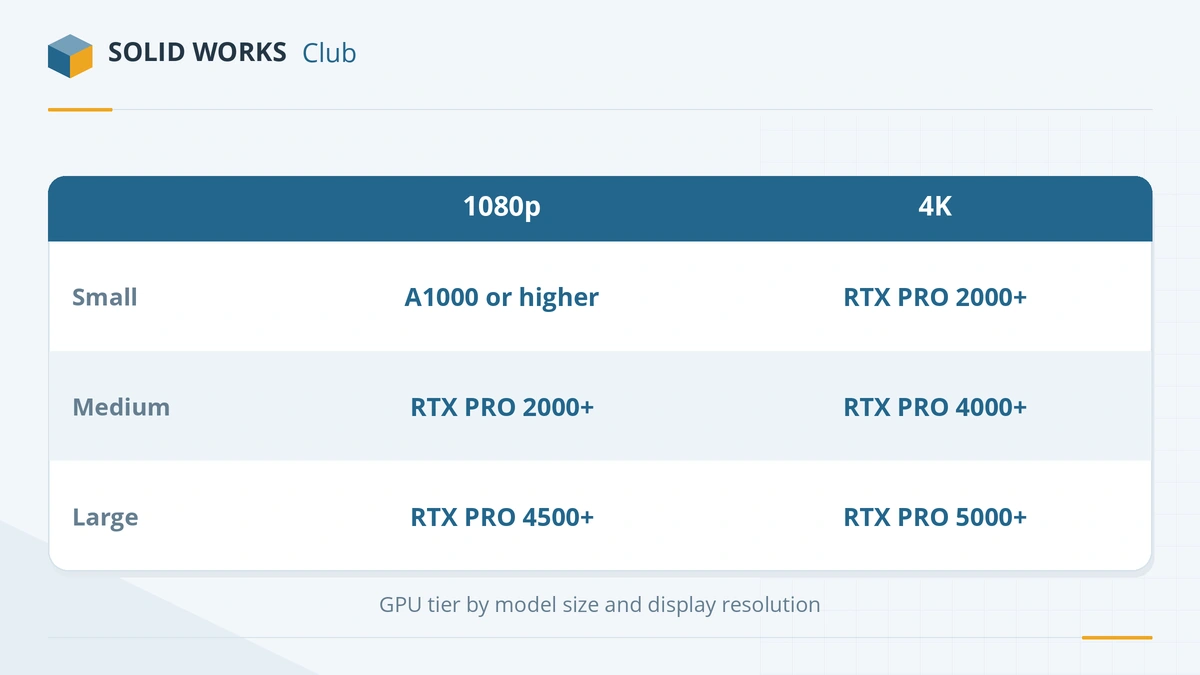
Puget Systems sizes graphics cards by how many triangles your models put on screen and by your monitor's resolution (source):
| Model complexity | 1080p / 1440p | 4K |
|---|---|---|
| Under 1 million triangles (parts, small assemblies) | RTX A1000 or better | RTX PRO 2000 or better |
| Over 1 million triangles (medium assemblies) | RTX PRO 2000 or better | RTX PRO 4000 or better |
| Over 10 million triangles (large assemblies) | RTX PRO 4500 or better | RTX PRO 5000 or better |
Most parts and assemblies of a few hundred components fall in the first two rows. If you are not sure, a large assembly with detailed fasteners and imported vendor models is usually in the second or third.
Our desktop picks
| Card | Memory | Certified | Best for |
|---|---|---|---|
| NVIDIA RTX PRO 2000 Blackwell | 16 GB | Yes | Parts, drawings, medium assemblies — 70 W, fits small towers |
| NVIDIA RTX 2000 Ada | 16 GB | Yes | Parts, drawings, medium assemblies — previous generation, still sold |
| AMD Radeon PRO W7500 | 8 GB | Yes | Parts, drawings, medium assemblies — 70 W, slot-powered |
| AMD Radeon PRO W7600 | 8 GB | Yes | Parts, drawings, medium assemblies |
| NVIDIA RTX PRO 4000 Blackwell | 24 GB | Yes | Large assemblies, 4K screens — also an SFF edition |
| AMD Radeon PRO W7700 | 16 GB | Yes | Large assemblies, 4K screens — ECC memory |
| NVIDIA RTX PRO 4500 Blackwell | 32 GB | Yes | Very large assemblies, Visualize |
| AMD Radeon AI PRO R9700 | 32 GB | Yes | Very large assemblies, Visualize — 300 W; top SPECapc composite in Puget's tests |
| NVIDIA RTX PRO 5000 Blackwell | 48 or 72 GB | Yes | Extreme datasets, AI and rendering |
| AMD Radeon PRO W7900 | 48 GB | Yes | Extreme datasets, AI and rendering — top SPECapc composite in Puget's tests |
| NVIDIA RTX PRO 6000 Blackwell | 96 GB | Yes | Extreme datasets, AI and rendering — far beyond what SOLIDWORKS modelling needs |
Memory sizes from NVIDIA and AMD product pages; certification from the SOLIDWORKS list, checked 2026-11-06.
Our pick for most people: NVIDIA RTX PRO 2000 Blackwell. It is certified, has 16 GB of memory, draws only 70 W and fits small towers. Puget uses it in its own SOLIDWORKS modelling workstation (source).
For large assemblies: RTX PRO 4000 or 4500 Blackwell, or AMD Radeon AI PRO R9700. In Puget's December 2025 professional GPU roundup, AMD's W7900 and R9700 had the top SPECapc for SOLIDWORKS composite scores, and Puget concluded that NVIDIA does not offer the best value in SOLIDWORKS. NVIDIA remains the safer choice if you also render in Visualize, which favours NVIDIA cards.
Laptop GPUs
Laptops use their own versions of the same chips, with less memory:
| Laptop GPU | Memory | Use |
|---|---|---|
| NVIDIA RTX PRO 500 Blackwell | 6 GB | Learning, parts, small assemblies |
| NVIDIA RTX PRO 1000 Blackwell | 8 GB | Learning, parts, small assemblies |
| NVIDIA RTX PRO 2000 Blackwell | 8 GB | Everyday design, medium assemblies |
| NVIDIA RTX PRO 3000 Blackwell | 12 GB | Everyday design, medium assemblies |
| NVIDIA RTX PRO 4000 Blackwell | 16 GB | Large assemblies, Visualize |
| NVIDIA RTX PRO 5000 Blackwell | 24 GB | Large assemblies, Visualize |
Source: NVIDIA laptop GPU comparison. GoEngineer treats the RTX PRO 1000 (8 GB) as the recommended minimum for a SOLIDWORKS laptop (source). Laptops built around these GPUs are in best laptops for SOLIDWORKS.
What a better GPU will not fix
- Slow rebuilds and slow file opening depend on the processor and the drive. See the CPU guide.
- Out-of-memory problems with big assemblies need more system RAM. See how much RAM SOLIDWORKS needs.
- Crashes from the wrong driver are fixed by installing the certified driver, explained in certified graphics cards.
Building a whole machine? See the SOLIDWORKS PC build.
Problems with the card you have? See unsupported graphics card fixes.
Frequently asked questions
What is the best graphics card for SOLIDWORKS?
+
It depends on model size. Puget Systems recommends an RTX PRO 2000 or better for medium assemblies at 1080p, an RTX PRO 4000 or better for the same at 4K, and an RTX PRO 4500 or 5000 for assemblies over 10 million triangles. In Puget's SPECapc tests, AMD's Radeon PRO W7900 and Radeon AI PRO R9700 had the top composite scores.
Do I need an RTX PRO 6000 for SOLIDWORKS?
+
No. Its 96 GB of memory is built for AI and huge renders. SOLIDWORKS modelling will not use it, and the money is better spent on a faster processor or more RAM.
How much VRAM does SOLIDWORKS need?
+
No official figure is published. Entry professional cards with 8–16 GB handle typical work; large assemblies at 4K benefit from 24 GB or more. For GPU rendering in Visualize, Javelin lists at least 4 GB.
Is a GeForce RTX card good for SOLIDWORKS?
+
It is fast and cheap for its power, and fine for learning, but it is not certified. Expect no certified driver, possible unsupported-graphics warnings and no official RealView support. For paid work, choose a certified card.
Related
- SOLIDWORKS certified graphics cards and driversWhich graphics cards are certified for SOLIDWORKS 2026, why GeForce cards are not, how to find the certified driver for your card, and what RealView needs.
- Best PC build for SOLIDWORKS in 2026Three SOLIDWORKS desktop builds for 2026 — entry, everyday design and large assemblies — with CPU, certified GPU, RAM and NVMe storage, plus DIY vs prebuilt.
- Best CPU for SOLIDWORKS in 2026Why SOLIDWORKS needs a fast CPU rather than many cores, the best Intel and AMD processors for modelling and simulation in 2026, and why ARM is not supported.
- Best laptops for SOLIDWORKS in 2026The best laptops for SOLIDWORKS in 2026 — certified Dell, HP and Lenovo mobile workstations by tier, with CPU, RTX PRO GPU and RAM options, and what to avoid.