Project 5
How to model a bolt and nut in SOLIDWORKS
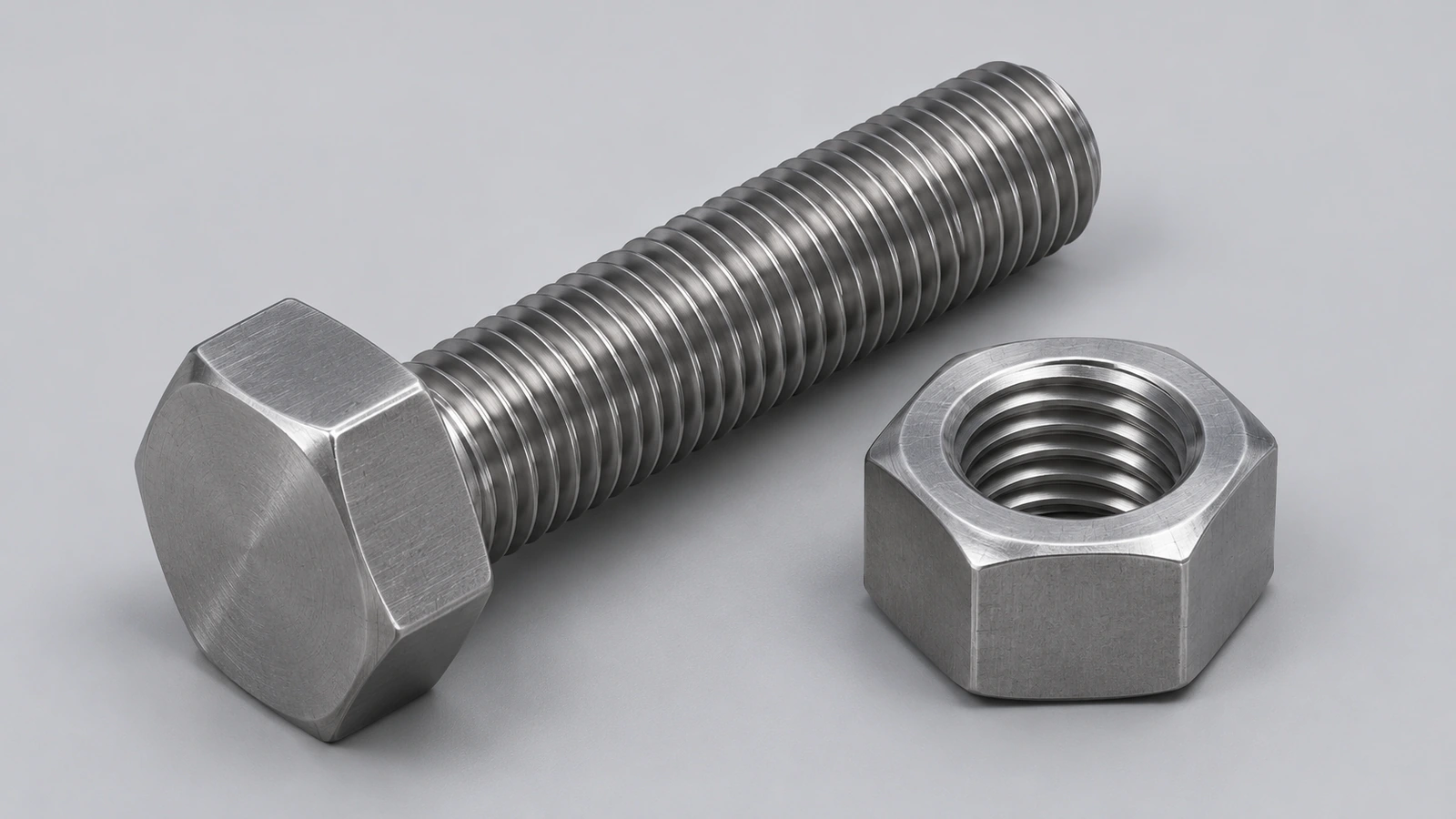
Modelling a bolt and nut teaches polygons, chamfers and threads — and why you rarely need to: Toolbox already holds thousands of standard fasteners. This project models an ISO 4017 M10 × 40 bolt and an ISO 4032 M10 nut with dimensions from the standards, then shows when to use Toolbox and Smart Fasteners instead.
 Kevin Walsh
- Level
- Project
- Time
- 30 min
- Material
- Mild steel, 7.85 g/cm³
- Check mass
- 44.82 g total
Specification
| Parameter | Value |
|---|---|
| Thread | M10 × 1.5 (coarse) |
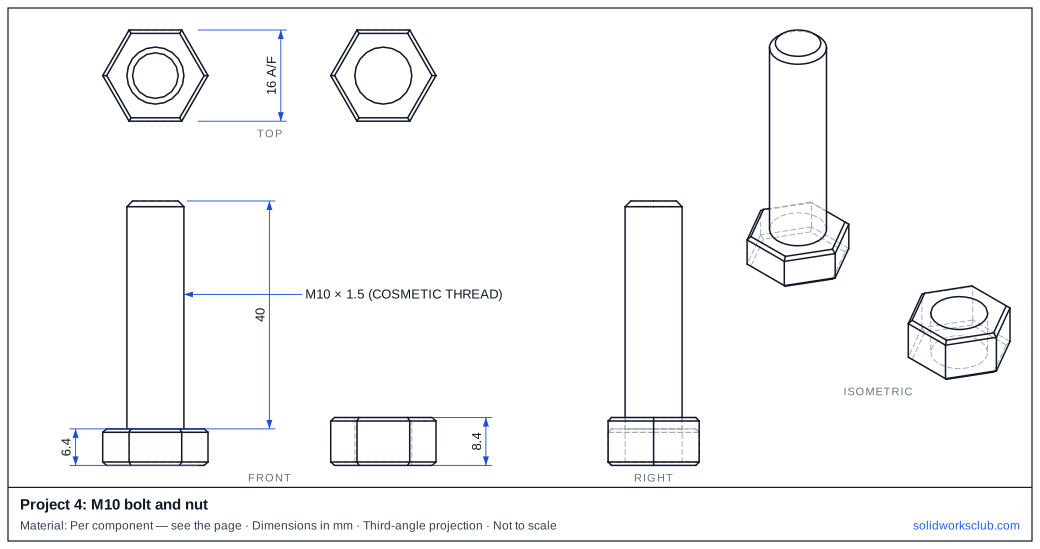
| Across flats s (bolt and nut) | 16 mm |
| Bolt head height k | 6.4 mm |
| Nut height m (max) | 8.4 mm |
| Across corners e (min) | 17.77 mm |
| Bolt length | 40 mm |
The drawing
Step by step
1. Hex head
Polygon with 6 sides, 16 mm across flats, extrude 6.4. Chamfer the top and bottom edges (a revolved cut gives the classic washer face).
2. Shank
Ø10 × 40 from the head, with a chamfer at the end.
3. Thread
Add a cosmetic thread (Insert → Annotations → Cosmetic Thread) for drawings — almost no rebuild cost. Use the Thread feature only if you need physical threads, for 3D printing for example.
4. Nut
Hexagon 16 A/F × 8.4, Ø10 hole with a cosmetic thread, chamfers both sides.
5. Or use Toolbox
In an assembly, drag a bolt from Design Library → Toolbox onto a Hole Wizard hole: size, length and mates are set automatically. Smart Fasteners fill all holes at once.
Check your result
- Head 16 mm across flats, 6.4 mm high.
- Nut 8.4 mm high.
- Our STEP models weigh 44.82 g together in mild steel (plain Ø10 shank and bore, threads cosmetic).
Compare your model with the STEP file above — it opens in SOLIDWORKS and most other CAD programs.
Download files
Commands used
Show solution
- Hex head. Polygon with 6 sides, 16 mm across flats, extrude 6.4. Chamfer the top and bottom edges (a revolved cut gives the classic washer face).
- Shank. Ø10 × 40 from the head, with a chamfer at the end.
- Thread. Add a cosmetic thread (Insert → Annotations → Cosmetic Thread) for drawings — almost no rebuild cost. Use the Thread feature only if you need physical threads, for 3D printing for example.
- Nut. Hexagon 16 A/F × 8.4, Ø10 hole with a cosmetic thread, chamfers both sides.
- Or use Toolbox. In an assembly, drag a bolt from Design Library → Toolbox onto a Hole Wizard hole: size, length and mates are set automatically. Smart Fasteners fill all holes at once.
Sources
- Westfield Fasteners — ISO 4017 hex head screw dimensions (PDF)
- fasten.it — DIN EN ISO 4017 dimensions
- fasten.it — DIN EN ISO 4032 hexagon nuts
- Westfield Fasteners — DIN 934 hex nuts (PDF)
- Bolt Depot — Metric thread pitch table
- GoEngineer — Performance of cosmetic and physical threads (Jun 2017)
- Hawk Ridge — Automating fasteners with Toolbox (Aug 2023)
- Hawk Ridge — Smart Fasteners (Aug 2023)
- Hawk Ridge — Deep dive into Hole Wizard (Jul 2018)
Checked November 2026. SOLID WORKS Club is independent; menu names can differ slightly between releases.
Frequently asked questions
What size spanner fits an M10 ISO bolt?
+
16 mm — ISO 4017 and ISO 4032 give 16 mm across flats for M10. The older DIN 934 nut is 17 mm, so state which standard you model.
Should I model real threads?
+
Usually not. Cosmetic threads show on drawings and cost almost no rebuild time; physical threads are only worth it for printing or detailed analysis.
Related
- How to model a ball bearing in SOLIDWORKSModel a 6201 deep groove ball bearing in SOLIDWORKS: 12 × 32 × 10 envelope, inner and outer rings with raceways, seven balls, a circular pattern and mates.
- How to model a bottle with a thread in SOLIDWORKSModel a bottle in SOLIDWORKS: revolved body with a shoulder arc, shell and a neck thread made with the Thread feature's bottle profile or a sweep along a helix.
- SOLIDWORKS polygon tool (hexagons and more)How to sketch a hexagon or any regular polygon in SOLIDWORKS: 3 to 40 sides, inscribed vs circumscribed circle, across-flats size, rotation and full definition.
- Intermediate SOLIDWORKS exercises19 intermediate SOLIDWORKS exercises: sweeps, lofts, shells, draft, Hole Wizard and three small assemblies, each with a drawing, STEP file and check mass.