Surfacing · Lesson 1
Surfaces vs solids in SOLIDWORKS
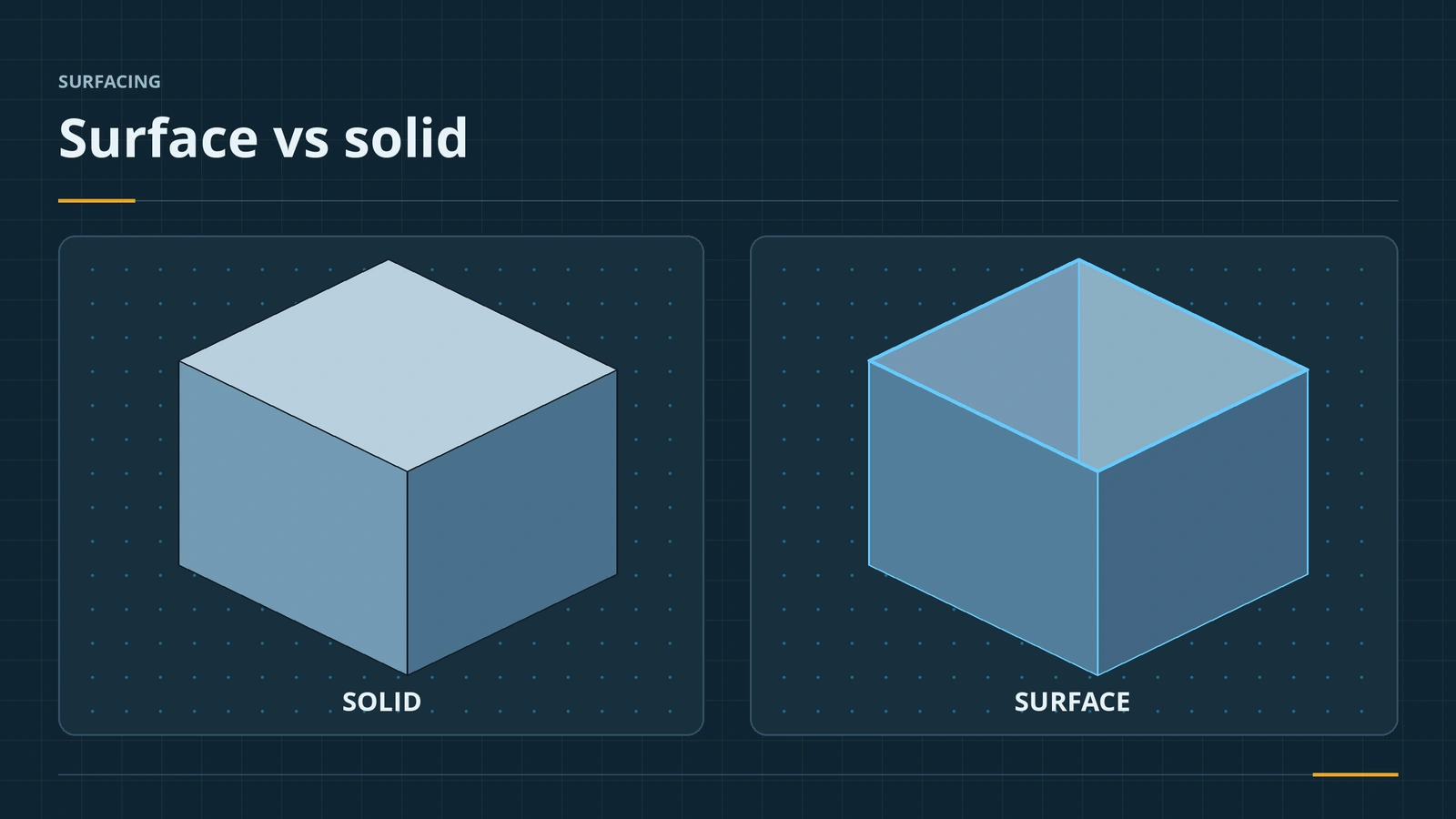
A solid is watertight: every edge bounds two faces, it has a volume and a mass. A surface has zero thickness and its open edges bound only one face. SOLIDWORKS lets you mix both — hybrid modelling — and surfaces are best kept for shapes solids cannot make. Learn to read open edges, continuity and the Check tool before building anything complex.
 Kevin Walsh
Where to find it
Surfaces tab (right-click CommandManager → Surfaces); Evaluate → Check, Zebra Stripes, Curvature
Continuity
| Level | Name in SOLIDWORKS | Zebra stripes |
|---|---|---|
| C0 / G0 | Contact | Do not line up |
| C1 / G1 | Tangent, Tangency to Face | Line up with a sharp kink |
| C2 / G2 | Curvature, Curvature to Face | Flow smoothly across the edge |
Curvature display colours faces from black (flattest) through blue and green to red (most curved); a sudden colour change at an edge means only contact or tangency. An open surface becomes a solid with Thicken. Surfaces are separate bodies, like those in multibody parts.
Step by step
-
1
Show the Surfaces tab and folders
Right-click a CommandManager tab and tick Surfaces. In Tools → Options → FeatureManager set Solid Bodies and Surface Bodies to Show.
-
2
Make a solid and a surface version
Extrude a 50 × 40 rectangle 30 mm as a solid. Then use Extruded Surface on the same sketch, 30 mm — you get four walls with open top and bottom.
-
3
Compare them
Mass Properties gives the solid a volume. The surface has area only; its open edges show blue, solid edges black.
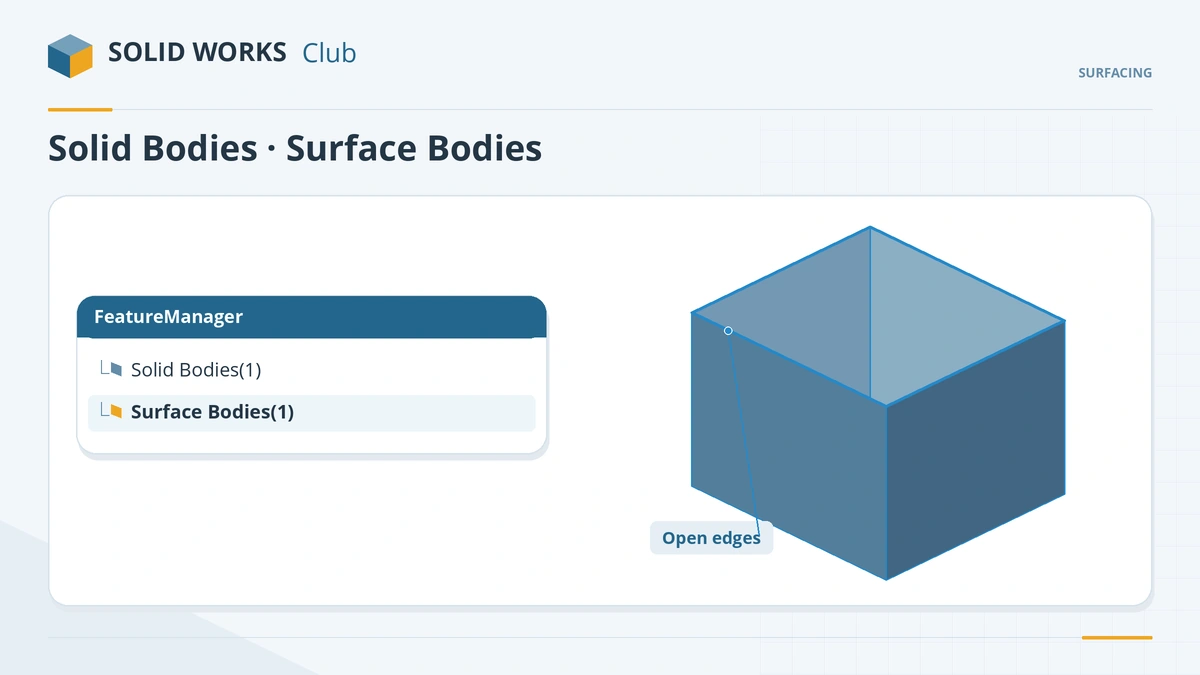
Open surface edges show blue; solid and knitted edges black. -
4
Run Check
Evaluate → Check on the surface reports Open surface(s) — the edges that stop it from being a solid.
Common mistakes
- Surfacing everything — use solids where they can make the shape and surfaces only where needed.
- Surfaces that look closed but are separate bodies — they must be knitted.
- Judging smoothness by eye — use zebra stripes and curvature display.
Lesson 1 of 7 in the surfacing course.
Practice
Model the 50 × 40 × 30 box as a solid and as six planar surfaces (lessons 2 and 6 show how). Check: the solid's volume is 60,000 mm³; the six surfaces have a total area of 9,400 mm² and no volume until they are knitted.
Sources
- Solid Solutions — Convert surfaces to solid bodies (Aug 2023)
- GoEngineer — Insights of SOLIDWORKS surfacing: tips and tricks (Nov 2019)
- GoEngineer — 3 surfacing tools to try (Dec 2018)
- Javelin — Reverse engineering: surface modeling, part 1 (Jan 2023)
- GoEngineer — Investigating continuity and curvature, part 3 (Nov 2018)
- GoEngineer — Surface continuity, part 2 (Nov 2018)
- Hawk Ridge — Continuity and curvature, part II (Dec 2017)
- Solid Solutions — Curvature in SOLIDWORKS (2015)
- Javelin — Using zebra stripes (May 2023)
- GoEngineer — Check tool tutorial (Jul 2022)
Checked November 2026. SOLID WORKS Club is independent; menu names can differ slightly between releases.
Frequently asked questions
What is the difference between a surface and a solid in SOLIDWORKS?
+
A solid encloses a volume and has mass. A surface has zero thickness and no mass; its open edges bound only one face.
What do G0, G1 and G2 mean?
+
Contact, tangent and curvature continuity (also written C0, C1, C2). Each level includes the one below.
How do I check surface smoothness?
+
Use Zebra Stripes and Curvature display on the Evaluate tab, and surface curvature combs (since 2015).
How do I find gaps in a surface model?
+
Run Evaluate → Check and look for open surfaces; clicking a result highlights the edges.
Related
- Extruded, revolved and planar surfacesBasic SOLIDWORKS surfaces: Extruded Surface from open or closed sketches, Revolved Surface around a centerline, Planar Surface caps, sweep and loft.
- Knit Surface and Create SolidKnit SOLIDWORKS surfaces into one body or a solid: Knit Surface, Create Solid, gap control, seed faces, and finding gaps with Check when no solid forms.
- SOLIDWORKS multibody partsWhat multibody parts are in SOLIDWORKS, how Merge result and Feature Scope work, Save Bodies to make an assembly, and when an assembly is better.
- SOLIDWORKS Mass PropertiesHow to use Mass Properties in SOLIDWORKS: mass, volume, centre of mass and inertia, units, coordinate systems, overrides, Measure and Section Properties.