Surfacing · Lesson 2
Extruded, revolved and planar surfaces
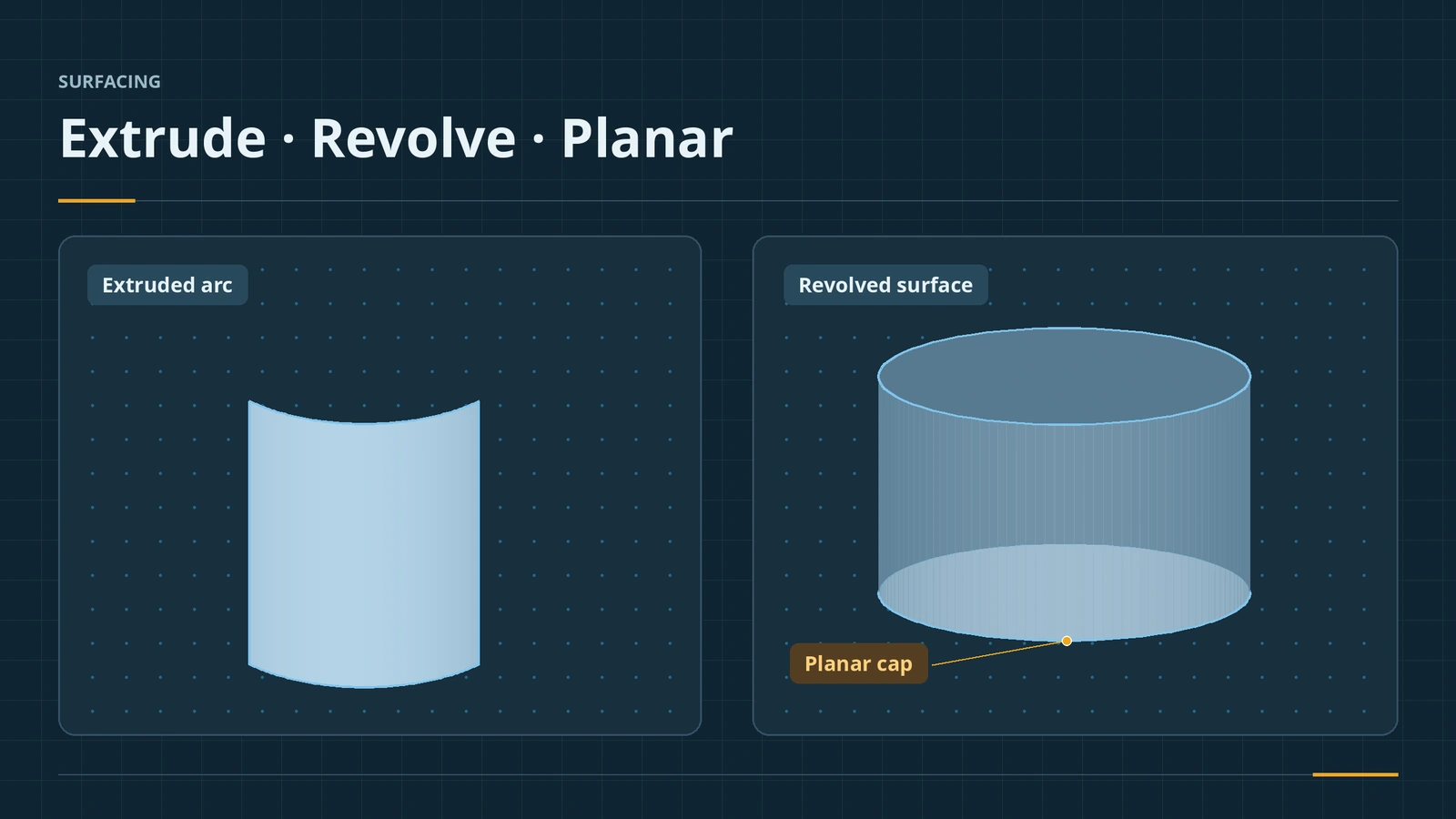
The simplest surfaces work like their solid twins without the material: Extruded Surface pushes a sketch along a direction, Revolved Surface spins it around a centerline, and Planar Surface fills a flat closed boundary — often to cap the open end of a surface model before knitting. Open sketches are fine, which is where surfaces start to differ from solids.
 Kevin Walsh
Where to find it
Surfaces tab → Extruded Surface, Revolved Surface, Planar Surface; Insert → Surface
Basic surface features
| Feature | Input | Notes |
|---|---|---|
| Extruded Surface | Open or closed sketch, or edges | Up To Surface available; 2011 added extruding from a face with cap or knit options |
| Revolved Surface | Profile and centerline | Selected Contours picks regions |
| Planar Surface | Closed coplanar sketch or edges | Caps openings |
| Swept Surface | Profile and path | Guide curves need a pierce or coincident relation |
| Lofted Surface | Two or more profiles | Start/end constraints; Close Loft option |
Solid versions: Extruded Boss and Revolve.
Step by step
-
1
Extrude an open arc
On the Front plane sketch a 90° arc of radius 50. Extruded Surface, Blind 100 mm. The result is a curved sheet with no thickness.
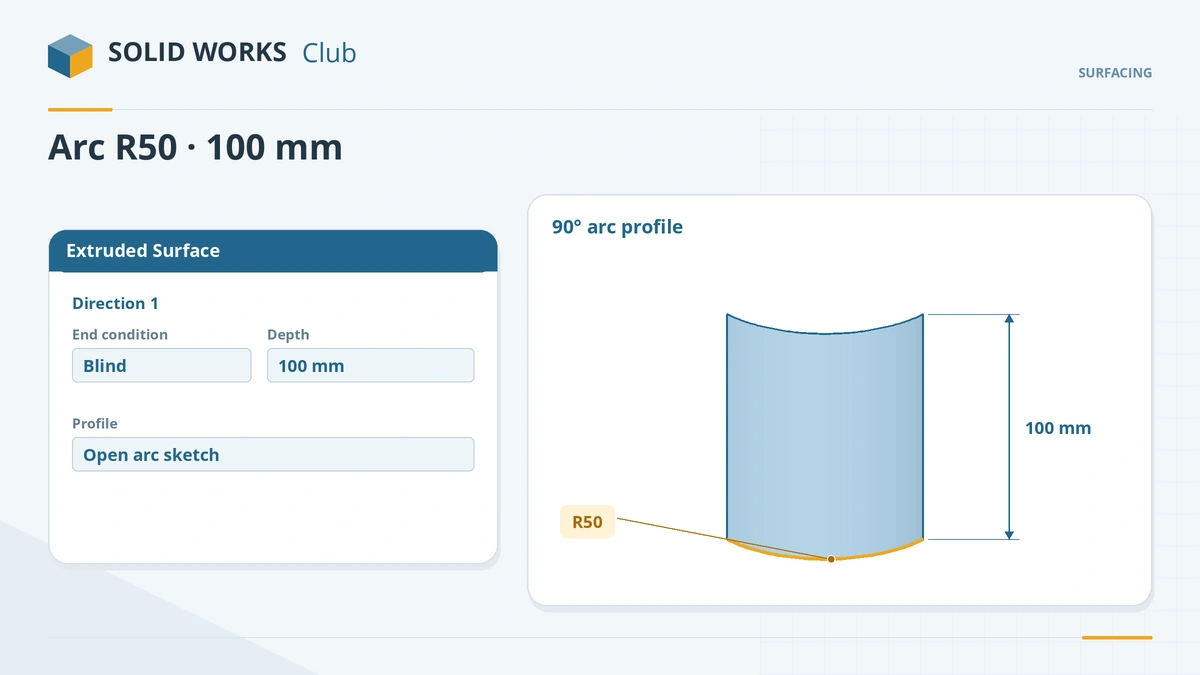
Surfaces accept open sketches such as a single arc. -
2
Revolve a line
On the Front plane sketch a vertical 60 mm line 20 mm from a vertical centerline. Revolved Surface, 360° — an open cylinder.
-
3
Cap it
Planar Surface, select the circular bottom edge of the cylinder as the bounding entity. The bottom is closed; the top stays open.
Common mistakes
- Using solid features on open sketches — solids need closed profiles; use the surface version.
- Planar Surface on a non-flat or self-intersecting boundary — it needs one closed, coplanar contour.
- Leaving surfaces separate — caps and walls are different bodies until knitted.
Lesson 2 of 7 in the surfacing course.
Practice
Make the R50 × 90° arc extruded 100 mm and the R20 × 60 mm revolved cylinder. Check: with Measure (or Mass Properties on the surface), the arc surface is 7,853.98 mm² and the open cylinder 7,539.82 mm² (2π × 20 × 60).
Sources
- Javelin — Surface Extrude without a sketch (Jul 2018)
- Digital Engineering 24/7 — Early look at SolidWorks 2011 Premium (Sep 2010)
- Hawk Ridge — Up To Surface end condition (Oct 2023)
- SOLIDWORKS Help 2024 — Revolved Surface
- SOLIDWORKS Help 2024 — Planar Surface
- SOLIDWORKS Help 2024 — Swept Surface
- CATI — Choosing the right surface patching tool (Mar 2022)
- SOLIDWORKS Tech Blog — Surface and advanced modeling skills, part 1 (May 2020)
- Javelin — Reverse engineering: surface modeling, part 1 (Jan 2023)
Checked November 2026. SOLID WORKS Club is independent; menu names can differ slightly between releases.
Frequently asked questions
How do I make an extruded surface in SOLIDWORKS?
+
Sketch an open or closed profile and use Extruded Surface on the Surfaces tab. Faces or edges of existing bodies can be extruded without a sketch.
What is a planar surface used for?
+
Filling a flat closed boundary, typically to cap the open ends of a surface model before knitting it into a solid.
Can I extrude a surface without a sketch?
+
Yes. Select a face's boundary edges or a surface's edges and set the direction with a line or edge.
Does Up To Surface work for surfaces?
+
Yes. Extruded Surface offers the Up To Surface end condition, like Extruded Boss and Cut.
Related
- Trim Surface — standard and mutualTrim SOLIDWORKS surfaces with Trim Surface: standard vs mutual trim, keep or remove selections, split all, natural vs linear, Untrim and Extend.
- SOLIDWORKS Extruded Boss/BaseHow to use Extruded Boss/Base in SOLIDWORKS: every end condition from Blind to Mid Plane, Direction 2, draft, thin features, Selected Contours and Merge result.
- SOLIDWORKS RevolveHow to use Revolved Boss/Base and Revolved Cut in SOLIDWORKS: sketch half a profile, choose the axis, set the angle and fix open-sketch errors.
- Surfaces vs solids in SOLIDWORKSSurfaces vs solids in SOLIDWORKS: zero-thickness bodies, open edges, hybrid modelling, the Surfaces tab, continuity (contact, tangent, curvature), Check.