Sketching · Lesson 7
SOLIDWORKS splines — free-form curves
A spline is a smooth free-form curve through points you click. Use it for shapes that lines and arcs cannot describe — handles, bottles, curved covers. SOLIDWORKS has a standard Spline (through points), a Style Spline (shaped by control points, like a Bezier curve), an Equation Driven Curve for mathematical shapes, and Fit Spline to turn lines and arcs into one smooth curve. Fewer points almost always make a better spline.
 Kevin Walsh
Where to find it
Sketch tab → Spline flyout (Spline, Style Spline, Equation Driven Curve)
The spline tools
| Tool | How it works | Use for |
|---|---|---|
| Spline | Passes through clicked points | General free-form outlines |
| Style Spline | Control polygon pulls the curve (Bezier) | Smooth styled shapes; since 2014 |
| Equation Driven Curve | From an equation, explicit or parametric | Cams, spirals, mathematical profiles |
| Fit Spline | Turns lines/arcs into one spline (Tools → Spline Tools) | Smoothing a chain of segments |
| Curve Through XYZ Points | From a list of coordinates in a text file | Imported data, sweep paths |
Conic (since 2013) is a related curve between two endpoints whose shape is set by a value called Rho — below 0.5 it is elliptical, 0.5 parabolic, above 0.5 hyperbolic.
Free-form curves are also the basis of 3D paths — see 3D sketches.
Step by step
-
1
Draw the spline
Click Spline and click 4–5 points from left to right. Double-click the last point or press Esc to finish.
-
2
Shape it with handles
Select the spline. Each point shows a handle: drag the diamond to change the direction and the arrow to change how strongly the curve follows it. Handles can be dimensioned for exact angles.
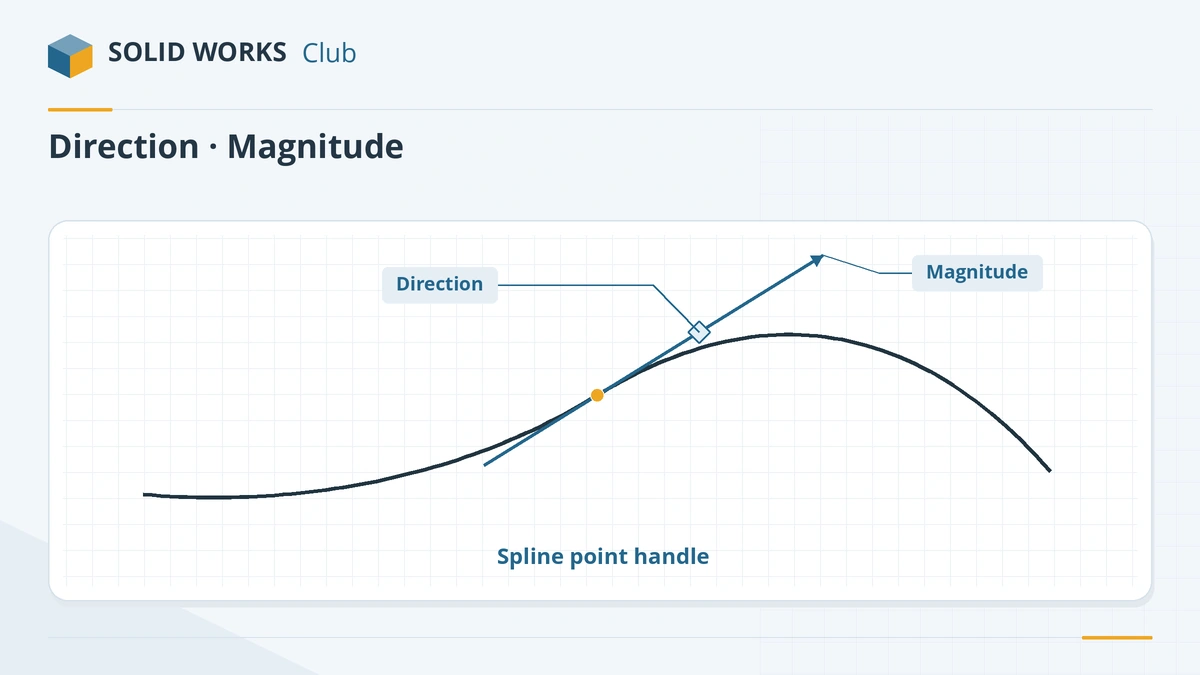
The diamond sets direction; the arrow sets how strongly the curve follows it. -
3
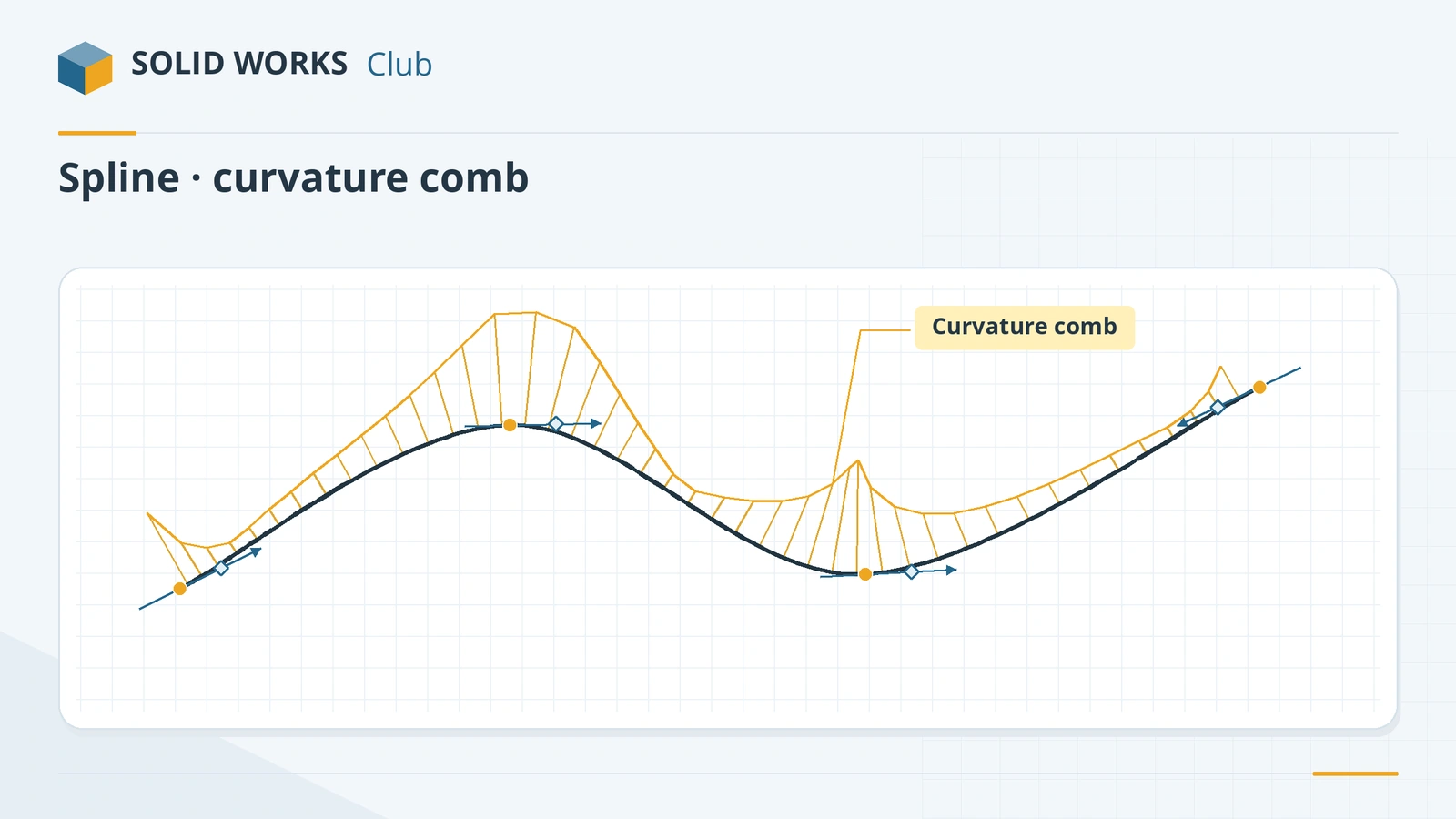
Check smoothness with curvature combs
Right-click the spline → Show Curvature Combs. A smooth comb means a smooth surface later; sudden jumps show bumps. Adjust Scale and Density to read it.
-
4
Add or remove points
Right-click → Insert Spline Point to add one. Remove points you do not need — every extra point makes the curve harder to control.
-
5
Close the shape and fully define it
Join the spline ends to lines or other curves, then dimension the points' positions. Splines are often left partly under defined in concept work, but production parts should be fully defined.
Common mistakes
- Clicking too many points. Start with as few as possible; resellers sum it up as less is more.
- Splines that wiggle where you wanted a smooth curve — check with curvature combs before building features on them.
- Using a spline for something an arc can do. Arcs are easier to dimension and to make on a machine.
Lesson 7 of 17 in the sketching course.
Practice
Inside a 100 × 40 mm rectangle area, draw a spline with 4 points from the bottom-left to the bottom-right corner that rises to about 30 mm in the middle, close it with a line along the bottom, and extrude it 10 mm. There is no single right volume — instead check that the curvature comb is smooth with no sudden spikes, then dimension the spline points and see how many more dimensions or handle relations it still needs before the status bar says Fully Defined.
Sources
- GoEngineer — Ultimate guide to SOLIDWORKS splines (Oct 2022)
- Hawk Ridge — Using splines in SOLIDWORKS (updated Sep 2026)
- CADimensions — Bad spline day
- Hawk Ridge — Equation driven curves in SOLIDWORKS (Apr 2024)
- Javelin — Creating curvature using Fit Spline (May 2023)
- GoEngineer — Curve Through XYZ Points
- SOLIDWORKS Tech Blog — Reverse arc and spline tangency (2018)
- Javelin — Segment a SOLIDWORKS spline
- SOLIDWORKS blog — Conics in SOLIDWORKS 2013
Checked November 2026. SOLID WORKS Club is independent; menu names can differ slightly between releases.
Frequently asked questions
What is the difference between a Spline and a Style Spline?
+
A Spline passes through the points you click. A Style Spline is shaped by control points that pull the curve without lying on it, like a Bezier curve, which gives smoother results for styled shapes. Since 2015 you can convert between them.
How do I make a spline smoother?
+
Use fewer points, adjust the handles, and check the curvature comb. Fit Spline can also turn a chain of lines and arcs into a single smooth spline.
Can I draw a curve from an equation?
+
Yes. Equation Driven Curve, in the Spline flyout, takes an explicit equation (y as a function of x) or parametric equations (x and y as functions of t).
How do I make a curve from a list of points?
+
Use Insert → Curve → Curve Through XYZ Points and load a text file of coordinates. It creates a curve feature you can use for sweeps.
Related
- SOLIDWORKS arc toolsHow to sketch arcs in SOLIDWORKS: Centerpoint Arc, Tangent Arc and 3 Point Arc, when to use each, how to reverse tangency and why not to trim circles.
- 3D sketches in SOLIDWORKSHow to draw a 3D sketch in SOLIDWORKS: start it, switch planes with Tab, use the space handle and Along X/Y/Z relations, and build sweep paths.
- Fully defined sketches in SOLIDWORKSWhat a fully defined sketch is in SOLIDWORKS, how to read blue, black and red geometry, find under defined sketches and use Fully Define Sketch safely.
- SOLIDWORKS polygon tool (hexagons and more)How to sketch a hexagon or any regular polygon in SOLIDWORKS: 3 to 40 sides, inscribed vs circumscribed circle, across-flats size, rotation and full definition.