Sketching · Lesson 10
Fully defined sketches in SOLIDWORKS
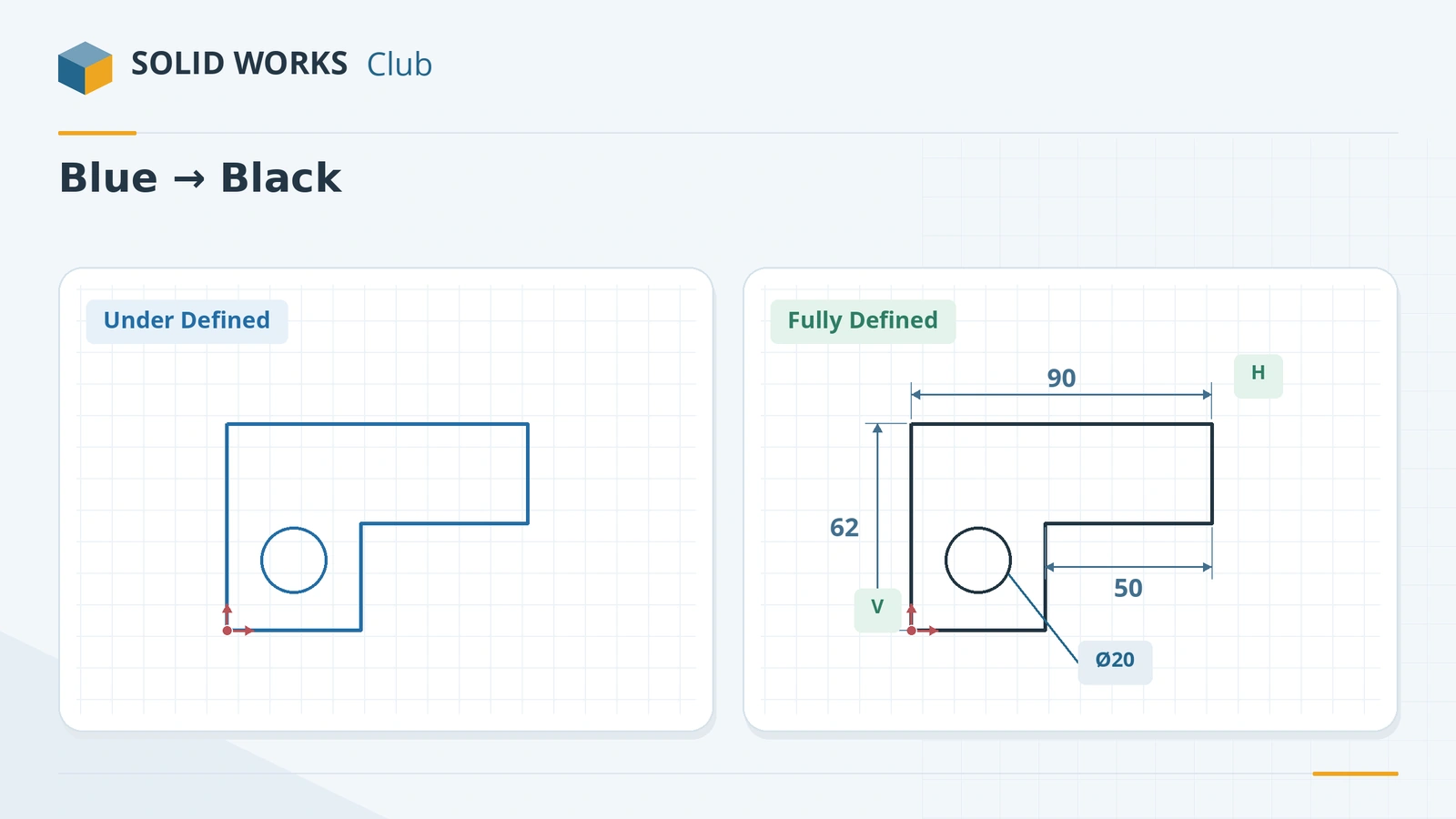
A sketch is fully defined when its dimensions and relations leave nothing free to move: every line has a size, a direction and a position. SOLIDWORKS shows it in black, writes Fully Defined in the status bar and drops the (-) from the sketch name in the tree. It is not required, but fully defined sketches change only the way you tell them to, which is why nearly every training course asks for them.
 Kevin Walsh
Where to find it
Status bar (bottom right); Sketch tab → Display/Delete Relations flyout → Fully Define Sketch
Sketch states
| State | Colour | Tree prefix | What to do |
|---|---|---|---|
| Under defined | Blue | (-) |
Add dimensions or relations |
| Fully defined | Black | none | Nothing — move on |
| Over defined | Red | (+) |
Remove or make driven a conflicting dimension or relation |
| Cannot be solved | Red | (?) |
Use SketchXpert (click the status bar message) |
Fully Define Sketch options
| Option | Choices |
|---|---|
| Entities | All entities in sketch, or selected entities |
| Relations | Which relation types it may use (all on by default) |
| Dimension scheme | Baseline, Chain or Ordinate — separately for horizontal and vertical |
| Datum | Origin, a model edge or vertex, or a point or line in the sketch |
| Placement | Above, below, left or right of the sketch |
It works best on lines and points; add Equal relations to arcs yourself. A System Option, Use fully defined sketches, makes SOLIDWORKS insist on fully defined new sketches — useful for teams that want to enforce the habit. If the sketch turns red instead of black, see sketch errors.
Step by step
-
1
Read the state
Look at the status bar at the bottom right: Under Defined, Fully Defined or Over Defined. Blue entities can still move; black ones cannot.
-
2
Drag to find what is free
Drag a blue line or point. Whatever moves is missing a dimension or a relation — add exactly what describes your intent, nothing more.
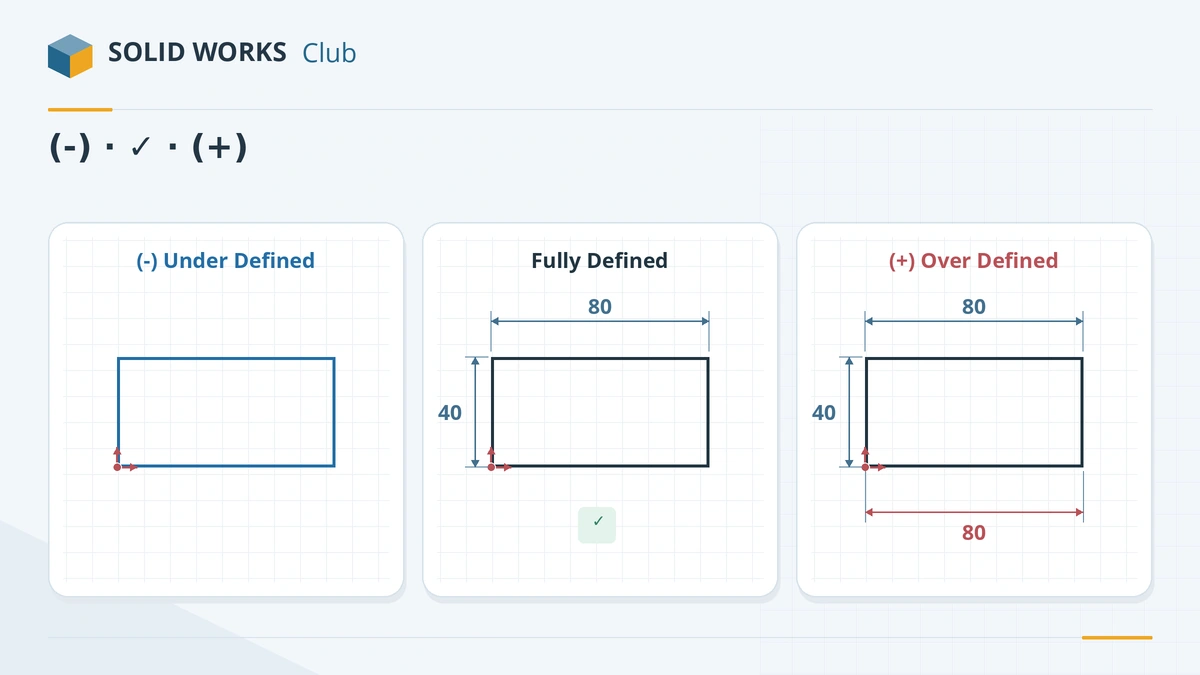
Under defined, fully defined and over defined — the colours and tree prefixes. -
3
Tie the sketch to the origin
A sketch can be fully sized and still float. A coincident relation or a dimension to the origin fixes its position.
-
4
Or let SOLIDWORKS finish it
While editing the sketch, open Display/Delete Relations → Fully Define Sketch. Choose All entities, which relation types it may add, a dimension scheme (Baseline, Chain or Ordinate) and a datum — usually the origin. Click Calculate, review the result, then the green tick.
-
5
Find under defined sketches in the tree
Under defined sketches show (-) before their name. Type
(-)into the FeatureManager filter to list them all.
Common mistakes
- Running Fully Define Sketch before adding your own key dimensions. It adds whatever fills the gaps, not necessarily your design intent. Add the important ones first.
- Expecting Undo to be easy after Fully Define Sketch — once accepted, only Ctrl + Z reverses it.
- Adding a dimension to a black sketch. It over defines it; make it driven instead.
- Leaving one point blue on a line that looks black — drag the endpoints to check.
Lesson 10 of 17 in the sketching course.
Practice
Sketch a 60 × 40 rectangle with its bottom-left corner on the origin and a 20 × 20 notch cut out of the top-right corner (six lines). Fully define it with exactly four dimensions (60, 40, 20, 20) and relations — no Fix. Extrude 10 mm. Check: volume 20,000 mm³, and the sketch name in the tree has no (-).
Sources
- Hawk Ridge — How to use Fully Define Sketch
- GoEngineer — Fully Define Sketch
- Javelin — How to use the Fully Define Sketch tool (Jul 2026)
- Hawk Ridge — Seek and destroy under defined sketches
- CADimensions — Sketch troubleshooting guide
- CADimensions — How do I use SketchXpert?
- Javelin — How to fix sketch errors (Sep 2026)
Checked November 2026. SOLID WORKS Club is independent; menu names can differ slightly between releases.
Frequently asked questions
What does fully defined mean in SOLIDWORKS?
+
All sizes, directions and positions in the sketch are set by dimensions and relations, so nothing can move. The geometry is black and the status bar says Fully Defined.
Do sketches have to be fully defined?
+
No, SOLIDWORKS lets you build features from under defined sketches. But they can change shape unexpectedly when you edit other features, so resellers and training courses recommend fully defining production parts.
What does (-) mean before a sketch name?
+
The sketch is under defined. (+) means over defined and (?) means the sketch cannot be solved.
Can SOLIDWORKS fully define a sketch automatically?
+
Yes, with Fully Define Sketch in the Display/Delete Relations flyout. It adds dimensions and relations to everything still free. Add your design-intent dimensions first, then let it fill the rest.
Related
- SOLIDWORKS Smart DimensionHow to use Smart Dimension in SOLIDWORKS: linear, angular, diameter and arc length dimensions, Shift for circle edges, the Modify box and equations.
- SOLIDWORKS sketch relationsAll SOLIDWORKS sketch relations explained: horizontal, coincident, tangent, equal, symmetric, fix and more, plus how to add, view and delete them.
- Construction geometry and centerlinesHow construction geometry works in SOLIDWORKS: centerlines, For construction, converting entities, and using them as mirror lines, revolve axes and references.
- SOLIDWORKS sketch errors — over defined, unsolvable and open sketchesFix SOLIDWORKS sketch errors: over defined, no solution found, dangling relations, open or self-intersecting contours, with SketchXpert and Repair Sketch.