Sheet metal · Lesson 7
Sheet metal corners
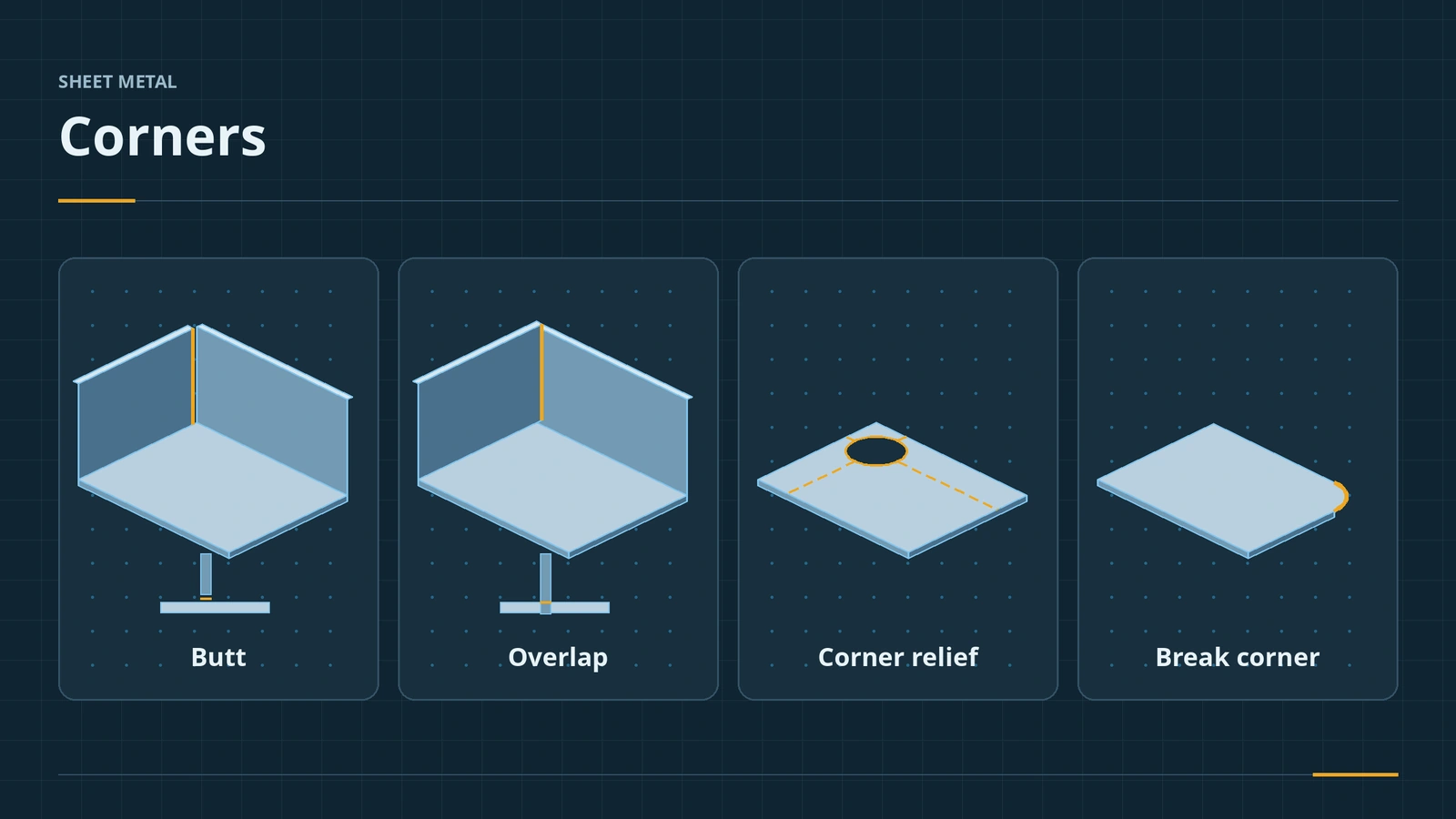
Where two flanges meet, the corner needs a decision. Closed Corner extends one flange to meet the other with a butt, overlap or underlap; Break Corner rounds or chamfers sharp outside corners; Corner Relief cuts a relief where two or three bends meet so the part can be formed; Welded Corner fills the seam for parts that will be welded.
 Kevin Walsh
Where to find it
Sheet Metal tab → Corners flyout: Closed Corner, Welded Corner, Break Corner/Corner Trim, Corner Relief
Corner tools
| Tool | Options |
|---|---|
| Closed Corner | Butt, overlap, underlap; gap distance; overlap ratio; open bend region; coplanar faces; narrow corner; auto propagation |
| Break Corner / Corner Trim | Fillet or chamfer; in the flat, circular, square or bend waist relief |
| Corner Relief | 2 bend (default) or 3 bend (2017+); rectangular, circular, tear, obround, constant width |
| Welded Corner | Fills the corner seam for welded parts |
| Corner treatment | Checkbox in the Flat-Pattern feature for smoother flat corners |
For one feature with mitred corners, use Miter Flange.
Step by step
-
1
Make an open corner
On a 100 × 60 base flange (2 mm), add 30 mm edge flanges to one long and one short edge. They meet at an open corner.
-
2
Closed Corner
Corners → Closed Corner. Select the end face of one flange under Faces to Extend; Auto propagation finds the face to match.
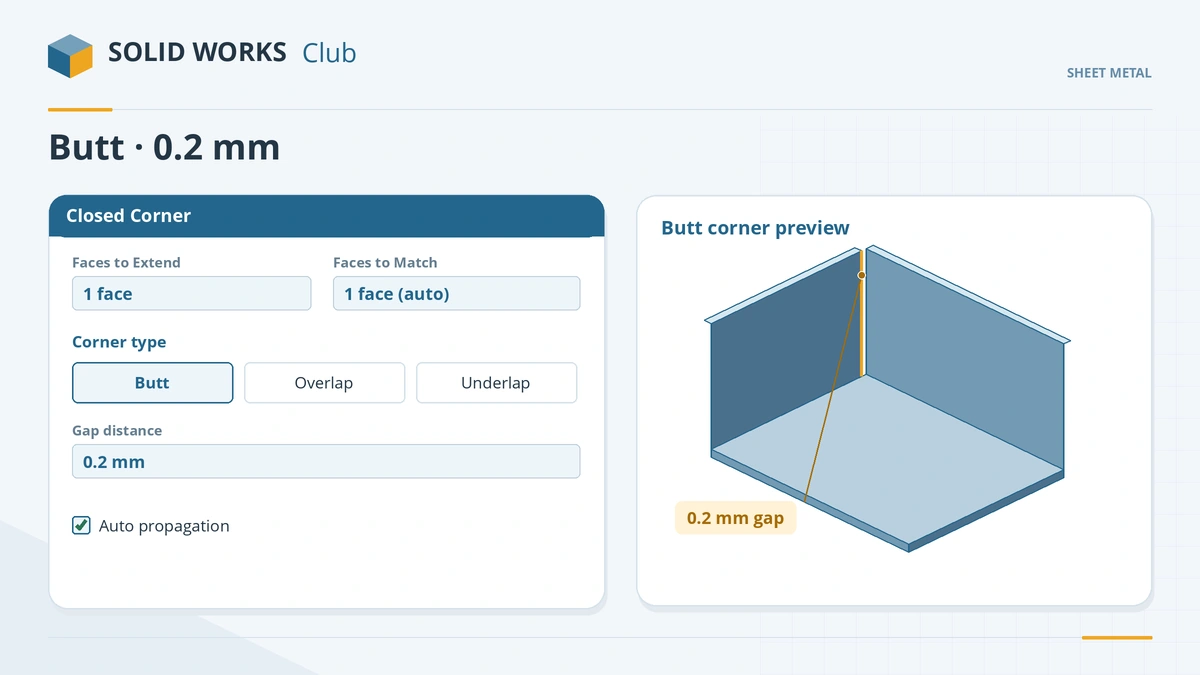
Extend one flange to meet the other with a butt, overlap or underlap. -
3
Set type and gap
Corner type Butt, gap distance 0.2 mm. Select the face coplanar with the bend region first if the bend area does not close cleanly. Click the tick.
-
4
Break the outside corners
Break Corner/Corner Trim, select the thickness edges at the outer corners, type Fillet, radius 5.
Common mistakes
- Picking faces in the wrong order — Javelin notes the bend region closes cleanly only if the coplanar face is selected first.
- Corner reliefs on three-bend corners whose bend lines do not meet at one point.
- Relying on auto relief alone — Corner Relief gives more control where bends meet.
Lesson 7 of 13 in the sheet metal course.
Practice
Close the corner between the two 30 mm flanges with a butt corner and a 0.2 mm gap. Check: the measured gap between the two flanges at the corner is 0.2 mm, and Flatten still gives one blank.
Sources
- SOLIDWORKS Help 2024 — Closed corners
- Javelin — Closing corners like a pro (Dec 2022)
- SOLIDWORKS Tech Blog — Part Reviewer: complex sheet metal, part 6 (Aug 2016)
- DriveWorks — Sheet metal features reference
- CATI — Sheet metal chamfer (Jun 2011)
- Javelin — Auto vs corner relief (Dec 2010)
- GoEngineer — Sheet metal bend notches (Mar 2025)
- Javelin — 3 bend corner relief (Nov 2016)
- GrabCAD — Tutorial: welded corner in sheet metal
- Javelin — Sheet metal corner treatment (Mar 2023)
- GoEngineer — SOLIDWORKS 2026 parts and features (Oct 2025)
- Javelin — Part modeling: what's new in SOLIDWORKS 2026 (Oct 2025)
Checked November 2026. SOLID WORKS Club is independent; menu names can differ slightly between releases.
Frequently asked questions
How do I close a sheet metal corner in SOLIDWORKS?
+
Use Closed Corner: select the faces to extend, choose butt, overlap or underlap, set the gap distance and click OK.
What is the difference between break corner and corner relief?
+
Break Corner rounds or chamfers sharp outside corners. Corner Relief cuts material where bends meet so the part can be bent.
Since when is three-bend corner relief available?
+
Since SOLIDWORKS 2017. The three bend lines must meet at one point.
What is new for corners in 2026?
+
Break Corner has an "Internal corners only" option for inside corners.
Related
- Miter Flange in SOLIDWORKS sheet metalUse the SOLIDWORKS Miter Flange: sketch a profile normal to an edge, run it along connected edges, set gap, offsets and position, and avoid errors.
- Edge Flange in SOLIDWORKS sheet metalAdd a SOLIDWORKS edge flange: length to outer or inner virtual sharp, flange position, angle, Edit Flange Profile, custom relief and multi-length.
- Flat patterns in SOLIDWORKS sheet metalHow the SOLIDWORKS flat pattern works: Flatten, Flat-Pattern options, Unfold and Fold for cuts across bends, bend lines and flat drawing views.
- Forming tools in SOLIDWORKS sheet metalUse SOLIDWORKS forming tools: place tools from the Design Library, make your own with the Forming Tool feature and .sldftp files, and Stamp.