Requirements & Hardware
Best laptops for students using SOLIDWORKS
A student laptop for SOLIDWORKS needs Windows 11 Pro or Education, an Intel or AMD processor, at least 16 GB of RAM — 32 GB is better — and either an entry professional GPU or a certified integrated one. Certified models such as the Lenovo ThinkPad P16s Gen 4, HP ZBook 8 G1i and Dell Pro Precision 5 16 fit. A gaming laptop also works for coursework, with caveats.
 Kevin Walsh
Minimum and recommended specs
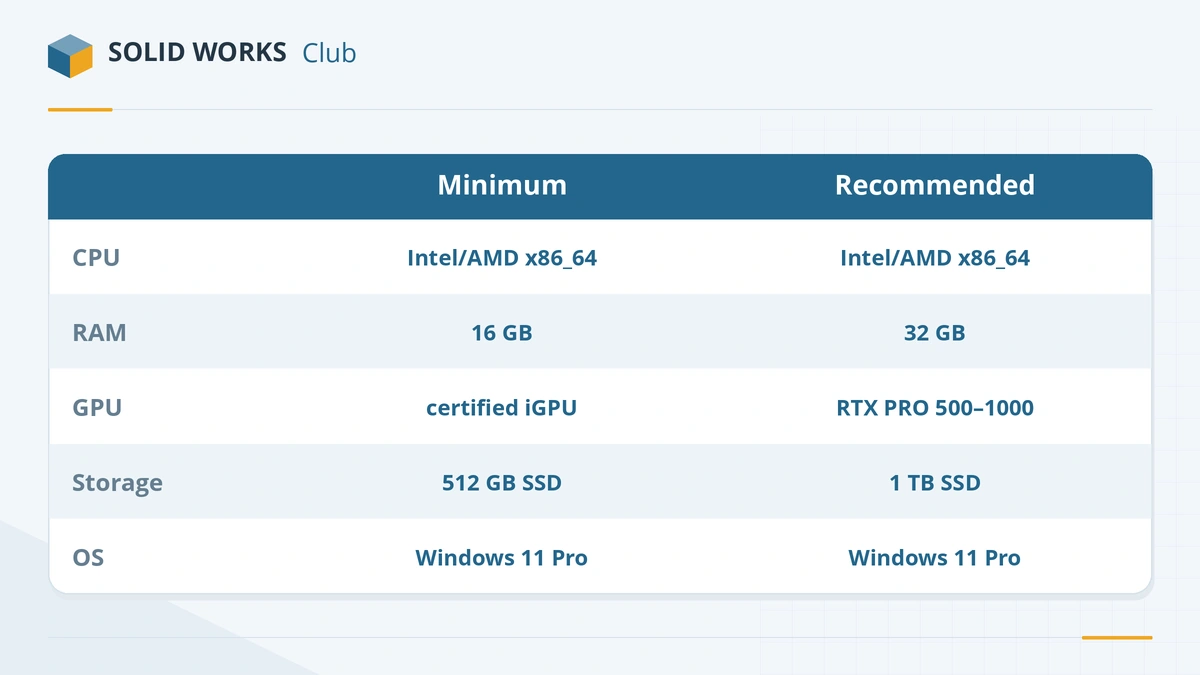
| Minimum for coursework | Recommended | |
|---|---|---|
| Operating system | Windows 11 Pro or Education | Windows 11 Pro or Education |
| Processor | Recent Intel Core Ultra 5 / AMD Ryzen 5 (H-series) | Core Ultra 7 / Ryzen 7 (H-series) |
| Memory | 16 GB (official minimum) | 32 GB (official recommendation) |
| Graphics | Certified integrated GPU (AMD Radeon 890M, Intel Arc 130T / 140T) | NVIDIA RTX PRO 500 or 1000 |
| Storage | 512 GB SSD | 1 TB NVMe SSD |
| Screen | 14 inches | 15–16 inches, 1920×1200 or higher |
Requirements from the official page; recommendations are ours.
Certified laptops that suit students
| Laptop | Screen | Processor | Graphics | Memory |
|---|---|---|---|---|
| Lenovo ThinkPad P16s Gen 4 | 16 in | Core Ultra 5 225H – 9 285H (also AMD version) | RTX PRO 500 (6 GB) / RTX PRO 1000 (8 GB) | up to 96 GB |
| HP ZBook 8 G1i 16 | 16 in | Core Ultra 5 225U – 9 285H | Intel Arc or NVIDIA RTX 500 | up to 64 GB |
| Dell Pro Precision 5 16 | 16 in | Core Ultra 5 336H – 9 386H | Integrated, RTX PRO 500 (6 GB), 1000 or 2000 (8 GB) | up to 64 GB LPCAMM2 |
| Dell Pro Max 16 (MC16250) | 16 in | Intel Core Ultra | Integrated or RTX PRO | see Dell configurator |
All of these are on the SOLIDWORKS certification list for 2026 (checked 2026-11-06). Choose a configuration with 32 GB and a dedicated RTX PRO GPU if your budget allows — you will keep the laptop for several years of increasingly large projects. Student discounts from Dell, HP and Lenovo often apply to these business lines.
Gaming laptops
Gaming laptops with GeForce RTX graphics give a lot of speed for the money, and many universities accept them. Carleton University describes a GeForce RTX 4070 laptop as very good but untested by SOLIDWORKS, acceptable for students' smaller files. The trade-offs:
- No certified driver; SOLIDWORKS may report an unsupported graphics card.
- RealView and some graphics options may be unavailable.
- Heavier, louder and shorter battery life than a business workstation.
- Many ship with Windows 11 Home, which SOLIDWORKS does not support.
If you choose one, install the latest NVIDIA Studio driver, set SOLIDWORKS to use the GeForce GPU in Windows graphics settings and upgrade to Windows 11 Pro or Education.
MacBooks and ARM laptops
- MacBook: SOLIDWORKS runs only in Parallels with Windows 11 on Arm, under emulation. It is workable on a Mac with 32 GB or more, but not certified, and some add-ins (CAM, Electrical) do not run.
- Snapdragon/ARM Windows laptops: not supported — SOLIDWORKS needs an Intel or AMD processor.
Get the software free
Since July 1, 2026, eligible students get SOLIDWORKS Design Standard for free — see the student edition guide. Before you buy a laptop, run your shortlist through the PC checker.
Frequently asked questions
What laptop do I need for SOLIDWORKS as a student?
+
A Windows 11 laptop with an Intel or AMD processor, 16 GB of RAM or more (32 GB recommended), an SSD and either a professional NVIDIA RTX PRO GPU or a certified integrated GPU. Check your university's own requirements first — some departments list exact specs.
Is a gaming laptop OK for SOLIDWORKS at university?
+
Usually, for coursework. Carleton University, for example, calls a GeForce RTX 4070 laptop very good for its students' smaller files while noting it is not tested by SOLIDWORKS. You may see an unsupported graphics warning and lose RealView.
Can I use a MacBook for engineering school?
+
You can, but SOLIDWORKS runs only inside Parallels Desktop with Windows 11 on Arm, which is not certified and needs a Mac with 32 GB of memory for comfortable use. Check whether your course allows that, or use xDesign for Students.
Does the free student edition work on Windows 11 Home?
+
SOLIDWORKS does not support Windows Home editions, and that includes the student edition. Many universities give students free Windows 11 Education licences — ask your IT department before buying a Pro upgrade.
Related
- How to get the free SOLIDWORKS student edition (2026)Since July 1, 2026, students get SOLIDWORKS Design Standard free, no .edu email needed. Who qualifies, how to download it, its limits and the $60 Premium.
- Budget laptops for SOLIDWORKSHow to get a SOLIDWORKS laptop on a budget in 2026 — entry certified workstations, refurbished previous-generation models, where to save and where not to.
- Best laptops for SOLIDWORKS in 2026The best laptops for SOLIDWORKS in 2026 — certified Dell, HP and Lenovo mobile workstations by tier, with CPU, RTX PRO GPU and RAM options, and what to avoid.
- SOLIDWORKS on Mac: every option in 2026There is no SOLIDWORKS for macOS. Run it in Parallels on Apple silicon or Intel Macs, view files with eDrawings for Mac, or design in the browser with xDesign.