Sheet metal · Lesson 12
Lofted bends — square to round
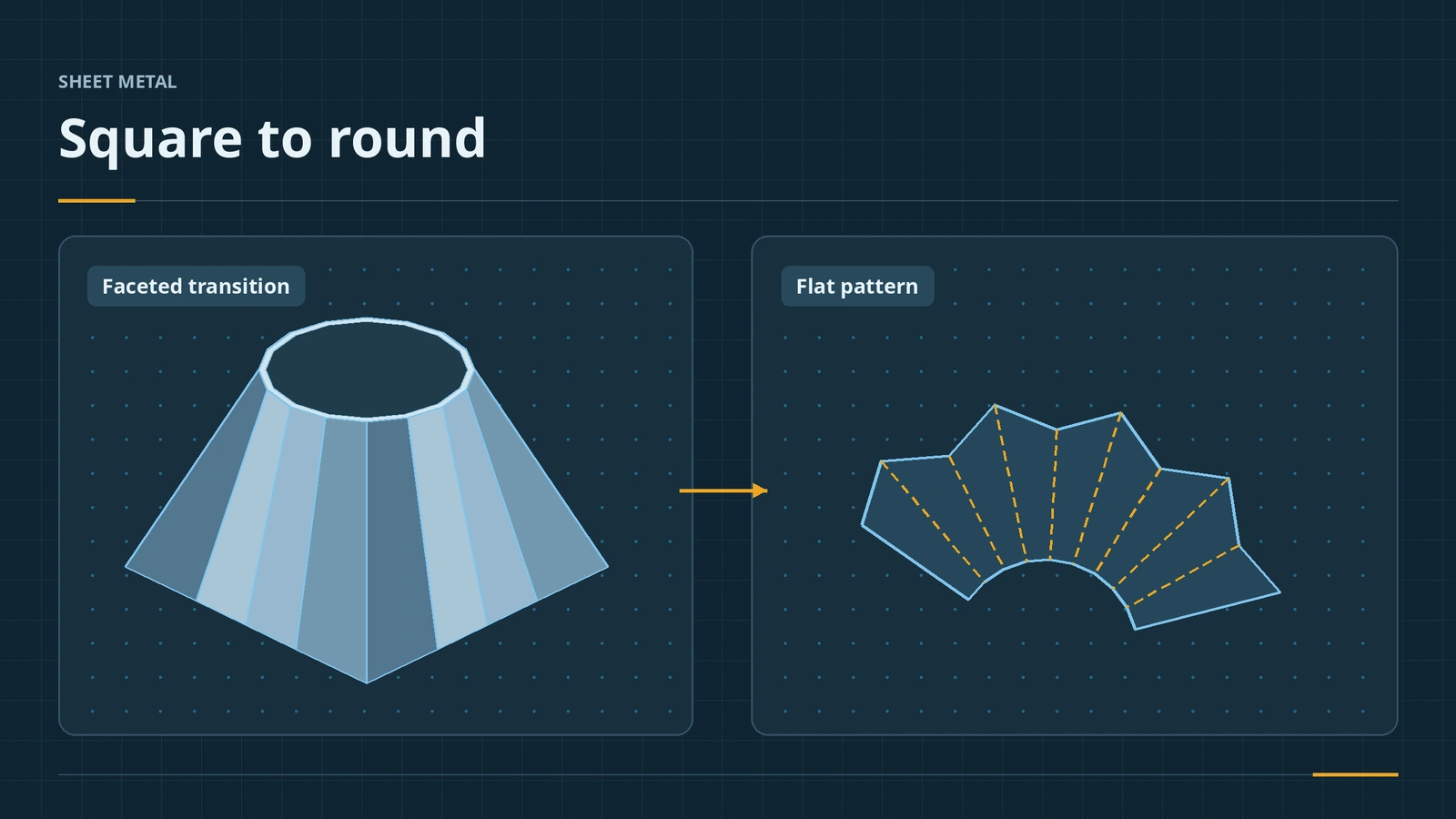
Lofted Bend makes sheet metal transitions — square to round, rectangle to circle, hoppers and ducts — between two open profiles. Choose Bent for parts made on a press brake with real bend lines, or Formed for smooth rolled shapes. Either way you get a flat pattern you can cut.
 Kevin Walsh
Where to find it
Sheet Metal tab → Lofted-Bend
Bent vs formed
| Bent | Formed | |
|---|---|---|
| Made by | Press brake | Rolling or forming |
| Bend lines in flat | Yes | No |
| Gauge table / K-factor | Available | Hidden |
| Profiles | Open, sharp corners allowed | Open, smooth (fillet corners) |
| Faceting | Chord tolerance, number of bends, segment length or angle | Maximum deviation |
Refer to endpoint decides whether bends start at a sharp corner or neighbouring bends approximate an arc. Solid lofts are explained in Loft.
Step by step
-
1
Sketch two open profiles
On the Top plane sketch a 100 × 100 square centred on the origin; on a plane 80 mm above it, a Ø60 circle. Leave a small gap (0.5 mm) in each profile at the same side — the profiles must be open.
-
2
Start Lofted-Bend
Lofted-Bend, choose Bent, select both sketches by clicking points near the gaps so they match. Crossed yellow preview lines mean the picks do not match.
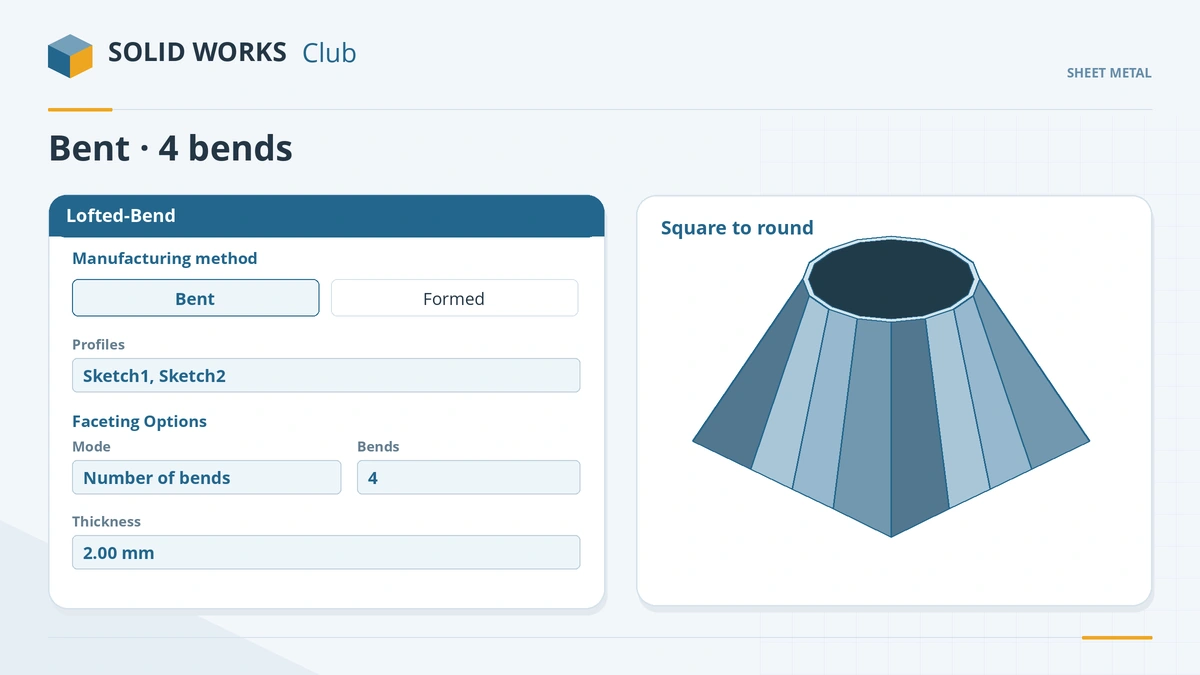
Bent makes real bends; set faceting by number of bends, segment length or tolerance. -
3
Set faceting and thickness
Under faceting choose Number of Bends, enter 4, set thickness 2 and click the tick.
-
4
Flatten
Flatten. With Bent the flat shows bend lines like any sheet metal part.
Common mistakes
- Closed profiles — Lofted Bend needs open sketches.
- Mismatched picks that twist the loft.
- Formed method with a sharp-cornered square — Formed needs all entities joined smoothly, so fillet the corners.
Lesson 12 of 13 in the sheet metal course.
Practice
Make the 100 × 100 to Ø60 transition, 80 mm tall, Bent, 2 mm. Check: Flatten gives one flat blank with bend lines; switch to Formed (after filleting the square's corners) and the bend lines disappear.
Sources
- GoEngineer — Lofted bend manufacturing methods: bent and formed (May 2025)
- Hawk Ridge — Lofted bend for a square to round (Aug 2017)
- Javelin — SOLIDWORKS 2014 bent lofted bends (Nov 2013)
Checked November 2026. SOLID WORKS Club is independent; menu names can differ slightly between releases.
Frequently asked questions
How do I make a square to round in SOLIDWORKS sheet metal?
+
Sketch an open square and an open circle on two planes, then use Lofted-Bend with the Bent method for press-brake bends.
What is the difference between bent and formed lofted bends?
+
Bent makes real bends with bend lines and can use a gauge table. Formed makes a smooth shape and hides the K-factor and relief settings.
When was the Bent option added?
+
In SOLIDWORKS 2014. Before that, lofted bends were formed only.
Why does my lofted bend twist?
+
The points picked on the two profiles do not match. Reselect them near the same corner or gap.
Related
- SOLIDWORKS LoftHow to use Lofted Boss/Base in SOLIDWORKS: profiles on offset planes, profile order, guide curves, end tangency, and fixing twisted lofts.
- Flat patterns in SOLIDWORKS sheet metalHow the SOLIDWORKS flat pattern works: Flatten, Flat-Pattern options, Unfold and Fold for cuts across bends, bend lines and flat drawing views.
- Convert to Sheet Metal and Insert BendsTurn a solid or imported STEP part into SOLIDWORKS sheet metal: Convert to Sheet Metal, bend and rip edges, Insert Bends for shelled parts, Rip.
- Export a flat pattern to DXF for laser cuttingExport a SOLIDWORKS sheet metal flat pattern to DXF or DWG for laser cutting: entities, alignment, cleanup, bend line layers and 1:1 units.