Sheet metal · Lesson 4
Hems in SOLIDWORKS sheet metal
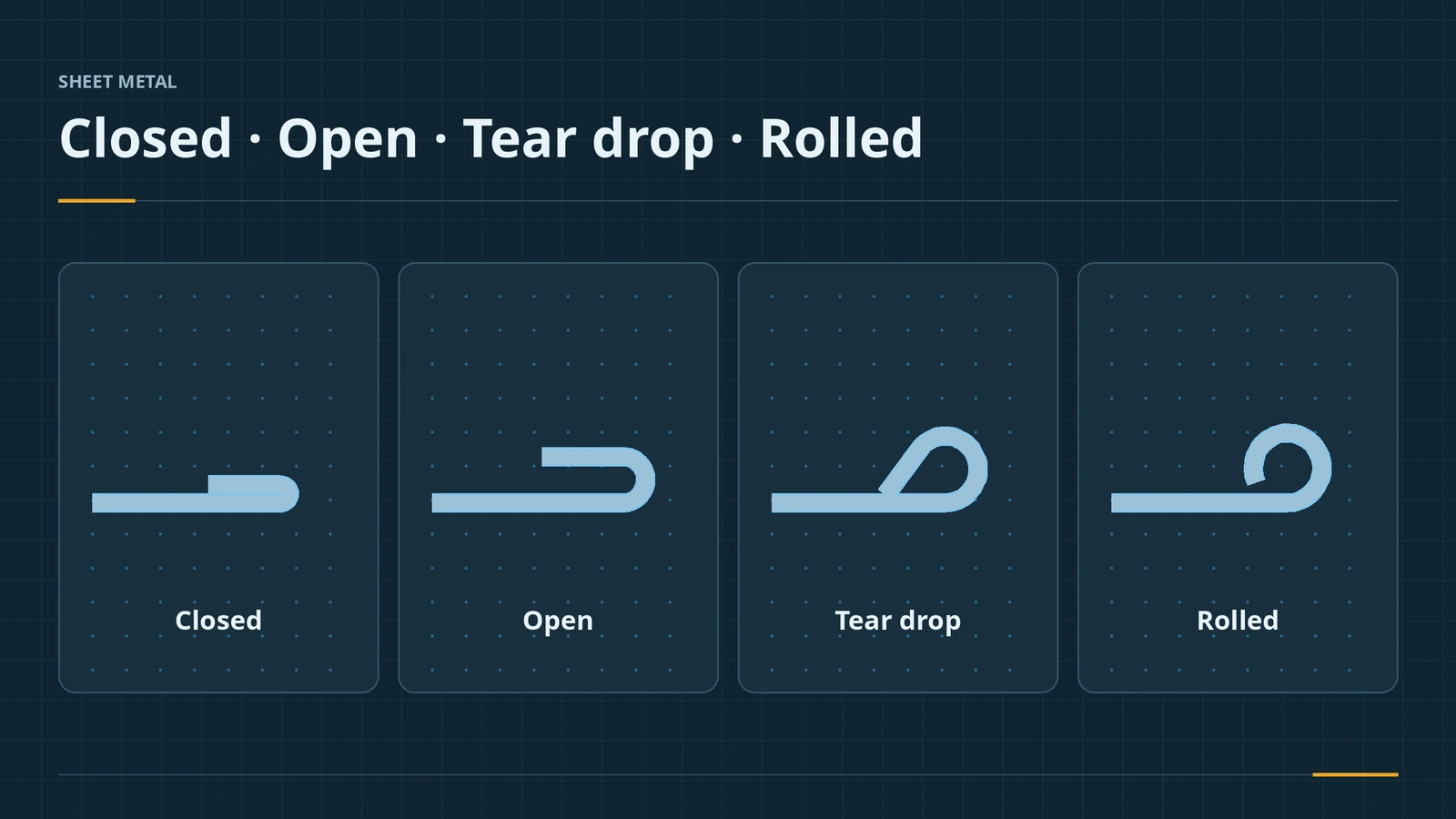
A hem folds the edge of a sheet back on itself. It stiffens the edge, hides burrs and removes a sharp edge people could cut themselves on. SOLIDWORKS offers closed, open, tear drop and rolled hems, placed inside or outside the edge, with settings for length, gap, angle and radius.
 Kevin Walsh
Where to find it
Sheet Metal tab → Hem; select an edge
Hem types
| Type | Set by | Use |
|---|---|---|
| Closed | Length | Flat fold, no gap — stiff, safe edge |
| Open | Length and gap | Fold with a gap, easier on harder materials |
| Tear drop | Angle and radius | Rounded fold with closed tip |
| Rolled | Angle and radius | Curl, for example 270° |
Hems can also take a custom bend allowance and miter gap. The next feature, Jog, offsets a wall with two bends.
Step by step
-
1
Select the edge
Open the bracket from lesson 2. Hem, click the top outer edge of the 30 mm flange.
-
2
Choose the type
Type Closed, position Material Inside, length 10 mm. A closed hem has no gap.
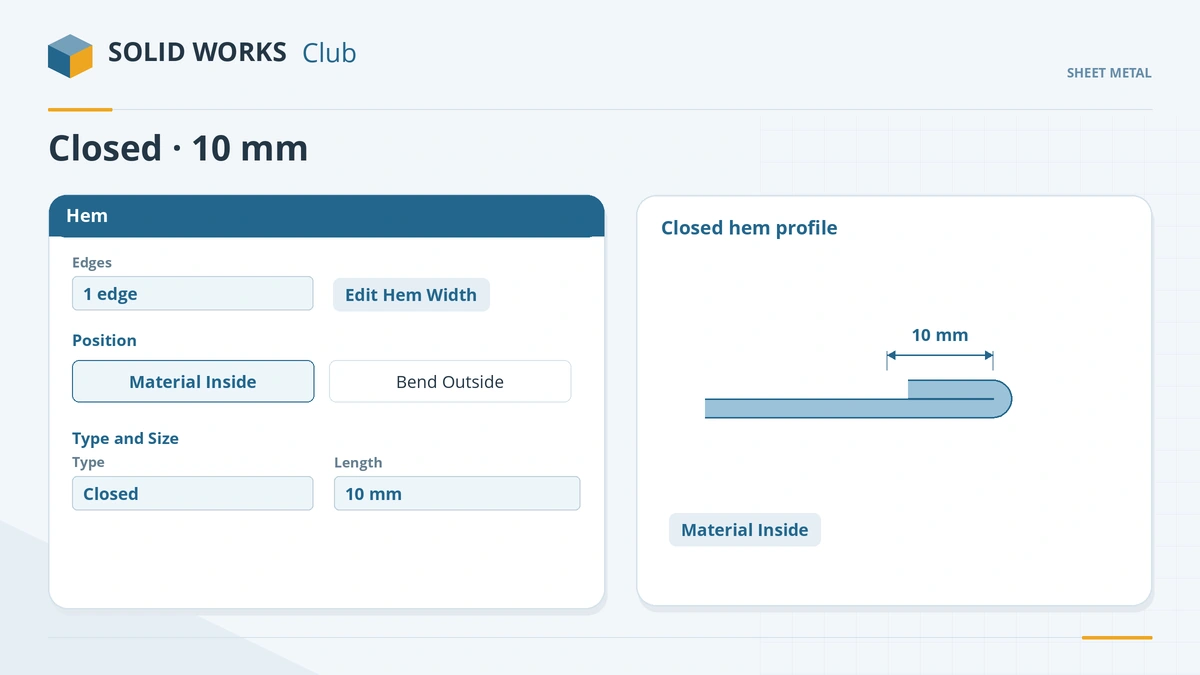
Choose the hem type, its position and length. -
3
Adjust the width
Edit Hem Width opens a sketch: drag the ends inward and dimension them for a partial hem. Click the tick.
Common mistakes
- Hems too short for the press brake tools — a rule of thumb is about 10 × the thickness.
- Hems on neighbouring edges that clash at the corner — they mitre differently from a miter flange; check the corner or model the hem as a miter flange.
- Closed hems on hard material that cracks — use an open or tear drop hem.
Lesson 4 of 13 in the sheet metal course.
Practice
Add a 10 mm closed hem to the top edge of the 30 mm flange. Check: measured across the top, the hemmed edge is 4 mm thick — two layers of 2 mm with no gap.
Sources
- TriMech — Making sheet metal parts easy (Sep 2018)
- Conceptia — Working with the Hem command (Mar 2018)
- 3D Engineer — Hem, CSWP sheet metal (Nov 2009)
- DriveWorks — Sheet metal features reference
- CADSoftUSA — Sheet metal tools and commands (Mar 2026)
- SOLIDWORKS Tech Blog — Part Reviewer: complex sheet metal, part 6 (Aug 2016)
- SOLIDWORKS blog — Sheet metal tutorial PDF (Mark Eilers)
Checked November 2026. SOLID WORKS Club is independent; menu names can differ slightly between releases.
Frequently asked questions
How do I add a hem in SOLIDWORKS?
+
Click Hem on the Sheet Metal tab, select an edge, choose the type and position, set length, gap or radius, and click OK.
What hem types are there?
+
Closed, Open, Tear Drop and Rolled. Rolled hems are set by radius and roll angle, for example 270°.
Why use a hem?
+
To stiffen the edge, hide burrs and avoid sharp edges.
How long should a hem be?
+
A rule of thumb is about 10 times the material thickness, so the bending tools have room to grip it.
Related
- Edge Flange in SOLIDWORKS sheet metalAdd a SOLIDWORKS edge flange: length to outer or inner virtual sharp, flange position, angle, Edit Flange Profile, custom relief and multi-length.
- Miter Flange in SOLIDWORKS sheet metalUse the SOLIDWORKS Miter Flange: sketch a profile normal to an edge, run it along connected edges, set gap, offsets and position, and avoid errors.
- Jog in SOLIDWORKS sheet metalUse the SOLIDWORKS sheet metal Jog: one sketched line, fixed face, jog offset and dimension position, jog position, angle, Fix projected length.
- Flat patterns in SOLIDWORKS sheet metalHow the SOLIDWORKS flat pattern works: Flatten, Flat-Pattern options, Unfold and Fold for cuts across bends, bend lines and flat drawing views.