Advanced parts · Lesson 7
SOLIDWORKS design tables
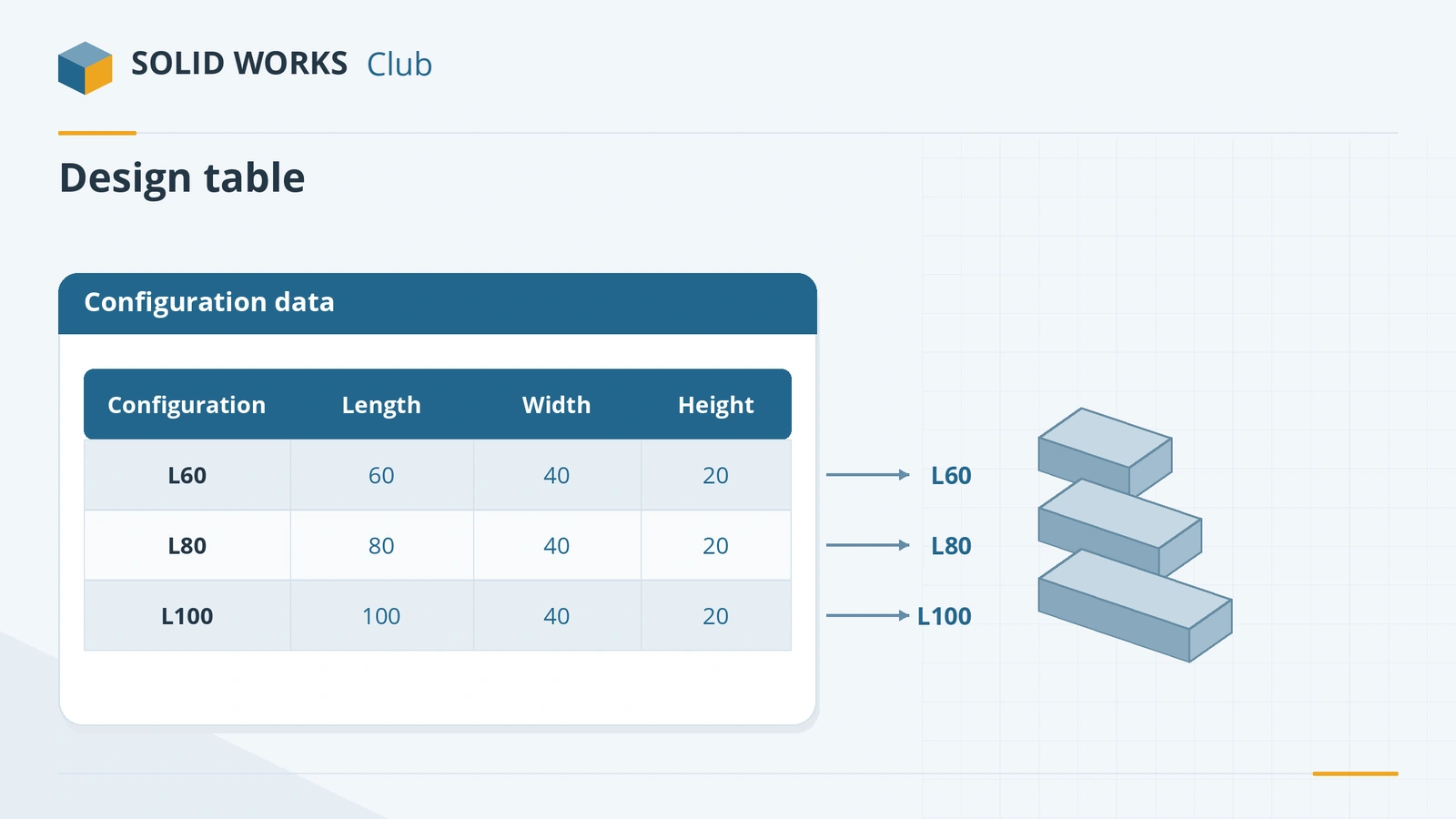
A design table is an Excel sheet embedded in a part or assembly. Each row is a configuration and each column a parameter — a dimension, a feature's suppression state or a custom property. Edit the sheet and SOLIDWORKS creates and updates the configurations. It is the fastest way to build a family of standard parts. Microsoft Excel must be installed.
 Kevin Walsh
Where to find it
Insert → Tables → Excel Design Table
Design table structure
| Cell | Holds |
|---|---|
| Column A | Configuration names, one per row |
Name@Feature header |
A dimension value per configuration |
| Feature name header | Suppression state of a feature |
$PRP@Property header |
A configuration-specific custom property |
Options worth knowing
- Auto-create fills the table from dimensions you pick.
- Edit control — allow model edits to update the table, or block them so the table is the only source.
- Link to file — keep the sheet as an external Excel file.
- Edit Table in New Window for big tables.
- Configurations created by a table show an icon in the ConfigurationManager; Configuration Publisher and Routing components rely on design tables.
For a few configurations, the built-in configuration tables are simpler. To drive sizes with formulas instead, see equations.
Step by step
-
1
Prepare the part
Use an 80 × 50 × 20 mm block. Rename the dimensions: Length, Width and Height (for example Length@Sketch1).
-
2
Insert the design table
Insert → Tables → Excel Design Table, choose Auto-create, and pick the three dimensions when asked. An Excel sheet opens inside SOLIDWORKS.
-
3
Fill in rows
Column A holds configuration names. Add rows L60, L80, L100 with Length 60, 80, 100; Width 50 and Height 20 in every row.
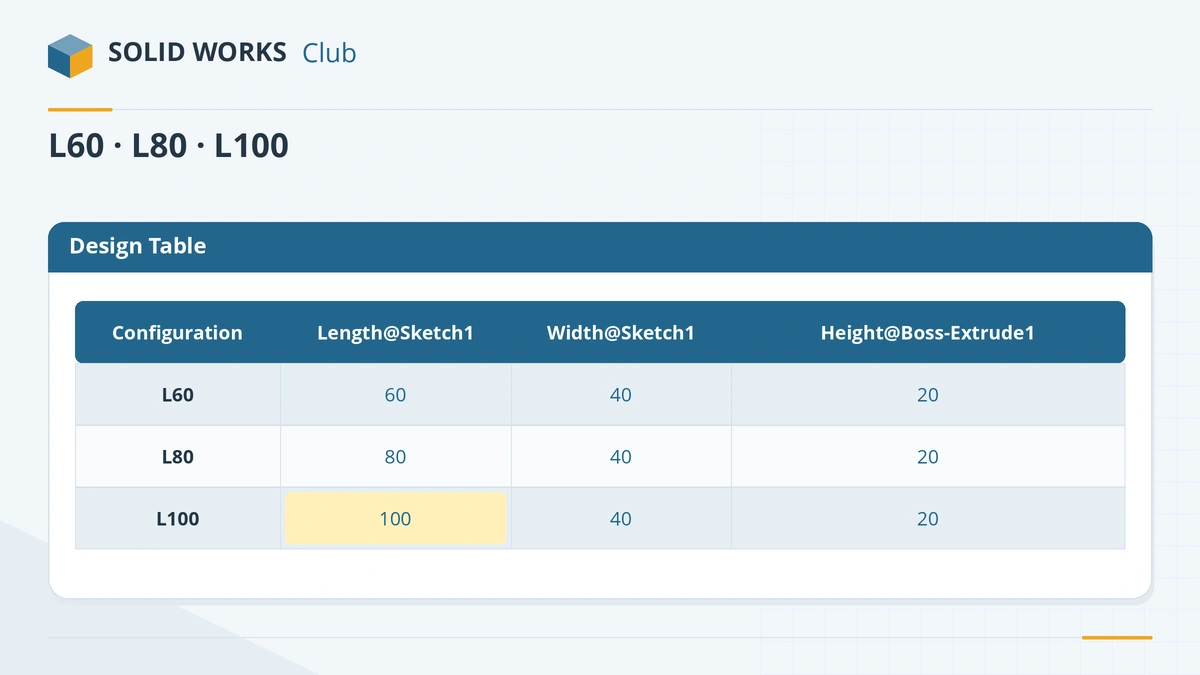
One row per configuration, one column per parameter. -
4
Close and check
Click outside the sheet. SOLIDWORKS reports the new configurations — they appear in the ConfigurationManager with a table icon.
Common mistakes
- Unnamed dimensions such as D1@Sketch4 — the table is hard to read and easy to break. Rename first.
- Editing a configured value in the model while the table blocks model edits — or the reverse, losing table values to model edits. Choose the edit control option deliberately.
- Hundreds of configurations in one part — file size and rebuilds grow. Split very large families.
- Opening the file on a PC without Excel — the design table cannot be edited there.
Lesson 7 of 16 in the advanced parts course.
Practice
Create the three configurations L60, L80 and L100 from the design table. Check: volumes 60,000, 80,000 and 100,000 mm³.
Sources
- GoEngineer — Design tables made easy (Mar 2022)
- Javelin — SOLIDWORKS design tables (Apr 2020)
- TriMech — How to create and edit design tables
- Hawk Ridge — Utilizing configurations
- SOLIDWORKS Tech Blog — Configuration Publisher (2018)
- GoEngineer — Overriding mass properties with design tables (Sep 2026)
Checked November 2026. SOLID WORKS Club is independent; menu names can differ slightly between releases.
Frequently asked questions
Do I need Excel for SOLIDWORKS design tables?
+
Yes. Microsoft Excel must be installed to create and edit design tables. Configuration Tables are a built-in alternative that does not need Excel.
How are dimensions named in a design table?
+
As Name@Feature or Name@Sketch, for example Length@Sketch1. Rename dimensions before creating the table so the headers make sense.
Can a design table set custom properties?
+
Yes. A $PRP@ column, for example $PRP@Description, sets a configuration-specific property and creates it if it does not exist.
Can a design table override mass?
+
Yes, with a $SW-MASS column, according to GoEngineer — useful for purchased parts modelled in simplified form.
Related
- SOLIDWORKS configurationsHow to use configurations in SOLIDWORKS: add them, change dimensions and suppress features per configuration, configuration tables and display states.
- SOLIDWORKS equationsHow to use equations in SOLIDWORKS: the Equations dialog, typing = in a dimension, units, configurable equations, and IIF statements to suppress features.
- SOLIDWORKS global variablesHow to create global variables in SOLIDWORKS, use them in dimensions and equations, avoid the units pitfall, and link them to an external text file.
- SOLIDWORKS Mass PropertiesHow to use Mass Properties in SOLIDWORKS: mass, volume, centre of mass and inertia, units, coordinate systems, overrides, Measure and Section Properties.