Versions & What's New
SOLIDWORKS 2025: release date, features and support
SOLIDWORKS 2025 became generally available on November 15, 2024. Its final service pack, SP5, came out in October 2025, and hotfixes end on December 31, 2026. It matters for one reason above all: SOLIDWORKS 2025 is the last release that runs on Windows 10.
 Kevin Walsh

- Version
- SOLIDWORKS 2025 (rev. 33)
- Released
- Nov 15, 2024
- Supported OS
- Windows 11 or 10, 64-bit
- Status
- Hotfixes until Dec 31, 2026
Highlights
- Last release to support Windows 10 (through 2025 SP5).
- Smoother variable-size fillets and a selection accelerator for chamfers.
- Copy components together with their advanced and mechanical mates.
- Multiple approval stamps on drawings; faster repair of broken sketch dimensions.
- Can save parts, assemblies and drawings back to 2024 or 2023.
SOLIDWORKS 2025 dates and support
| SOLIDWORKS 2025 | |
|---|---|
| Announced | September 16, 2024 |
| General availability (SP0) | Nov 15, 2024 |
| Final service pack | SP5, Oct 2025 |
| Hotfixes until | Dec 31, 2026 |
| Operating system | Windows 11 or 10, 64-bit; Windows Server 2025 from SP3 |
| Save as previous version | To 2024 or 2023 |
The last SOLIDWORKS for Windows 10
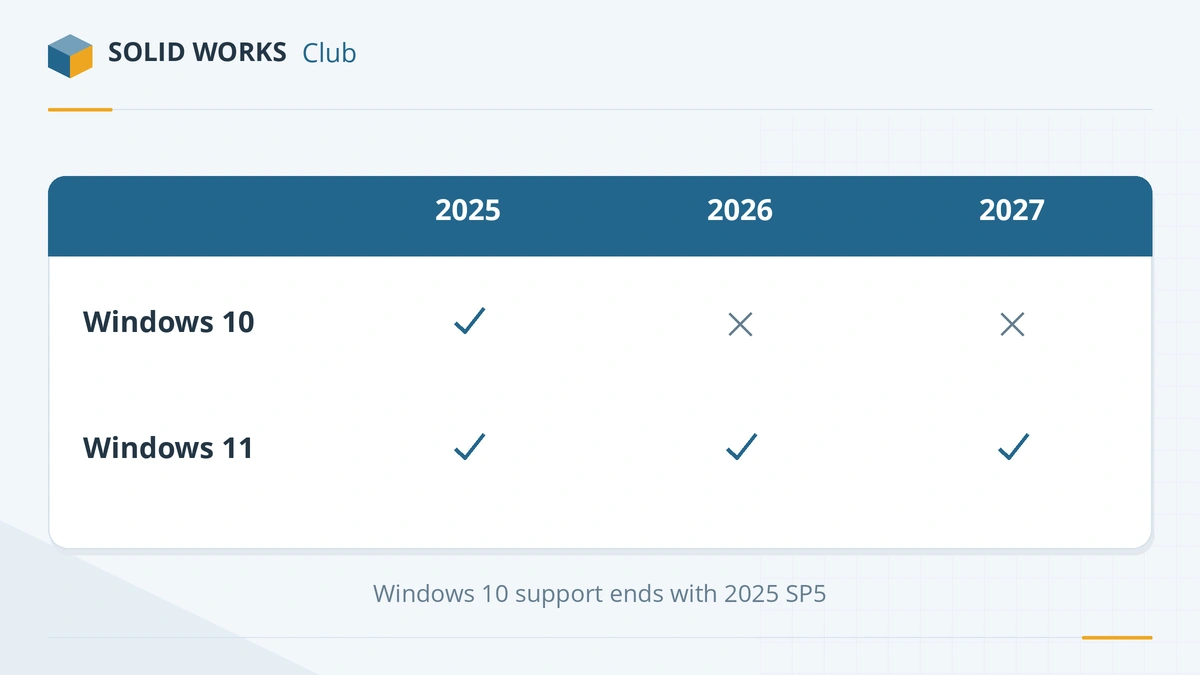
The official system requirements list Windows 10 64-bit as supported up to SOLIDWORKS 2025 SP5. SOLIDWORKS 2026 and 2027 run only on Windows 11 (and Windows Server 2022/2025). If part of your team cannot move to Windows 11 yet (see our Windows 11 guide), 2025 SP5 is the version to standardise on — but plan the move before hotfixes end on Dec 31, 2026.
Top new features in SOLIDWORKS 2025
- Smoother variable-size fillets that blend continuously along the edge.
- Selection accelerator for chamfers — select connected edges faster.
- Copy components with their mates, including advanced and mechanical mates.
- Real-time notifications while you work on a model.
- Multi-approval stamps on drawings for sign-off workflows.
- Faster repair of sketches with broken dimensions.
- Z-up orientation option and new SpeedPak and assembly loading options.
- Bend notch feature for sheet metal.
These are drawn from Dassault's launch announcement and the 2025 What's New livestream; resellers' reviews add many smaller changes.
Should you still install SOLIDWORKS 2025?
Install it only if you need Windows 10, or a customer requires 2025 files and you have no subscription to save back from a newer release. For new installs on Windows 11, start with SOLIDWORKS 2026. See the versions overview for every release and its support status, and SOLIDWORKS 2024 for the release before.
Sources
Frequently asked questions
When was SOLIDWORKS 2025 released?
+
Dassault announced SOLIDWORKS 2025 on September 16, 2024, and it became generally available on November 15, 2024. The final service pack, SP5, was released in October 2025.
Is SOLIDWORKS 2025 the last version for Windows 10?
+
Yes. The official system requirements state that 2025 SP5 is the last release to support Windows 10. SOLIDWORKS 2026 and later need Windows 11.
Is SOLIDWORKS 2025 still supported?
+
Partly. It no longer receives service packs, but hotfixes continue until December 31, 2026, according to the official lifecycle table.
Can SOLIDWORKS 2025 open 2026 files?
+
Not normally — older releases cannot open files from newer ones. The user of SOLIDWORKS 2026 can save the file back to 2025 with Save As previous version, which needs an active subscription.
Related
- SOLIDWORKS 2026: release date, new features and supportSOLIDWORKS 2026 was released on November 14, 2025. Top new features, the SOLIDWORKS Design name, Windows 11 only, FD releases and support until 2027.
- SOLIDWORKS 2024: release date, features and supportSOLIDWORKS 2024 SP0 came out on November 6, 2023. It introduced saving to older versions, plus collinear dimensions and sheet metal and weldment upgrades.
- SOLIDWORKS release schedule: service packs, FD releases and supportWhen SOLIDWORKS releases come out — Preview, PR, SP0 to SP5 and the FD releases since 2026 — plus support end dates and the best time to upgrade.
- SOLIDWORKS versions and the latest releaseThe latest SOLIDWORKS version is 2026 (2027 is in pre-release). Every release from 2020 to 2027 with dates, Windows support and end of support.