Versions & What's New
SOLIDWORKS 2024: release date, features and support
SOLIDWORKS 2024 SP0 was released on November 6, 2023. It is best known for one long-requested feature: saving parts, assemblies and drawings to the two previous releases. Its last service pack, SP5, came out in October 2024, and hotfix support ended on December 31, 2025.
 Kevin Walsh

- Version
- SOLIDWORKS 2024 (rev. 32)
- Released
- Nov 6, 2023 (SP0)
- Supported OS
- Windows 11 or 10, 64-bit
- Status
- End of support (Dec 31, 2025)
Highlights
- Save as previous version — parts, assemblies and drawings to 2023 or 2022.
- Collinear chain dimensions and reattaching dangling dimensions.
- Defeature rule sets, including a silhouette rule.
- Insert an assembly into a part to make a multibody part.
- Sheet metal slot propagation, stamp tool and corner management for structure systems.
SOLIDWORKS 2024 dates and support
| SOLIDWORKS 2024 | |
|---|---|
| Launch livestream | September 27, 2023 |
| SP0 release | Nov 6, 2023 |
| Final service pack | SP5, Oct 2024 |
| Hotfixes until | Dec 31, 2025 (ended) |
| Operating system | Windows 11 or 10, 64-bit; not Windows Server 2016 |
Save as previous version
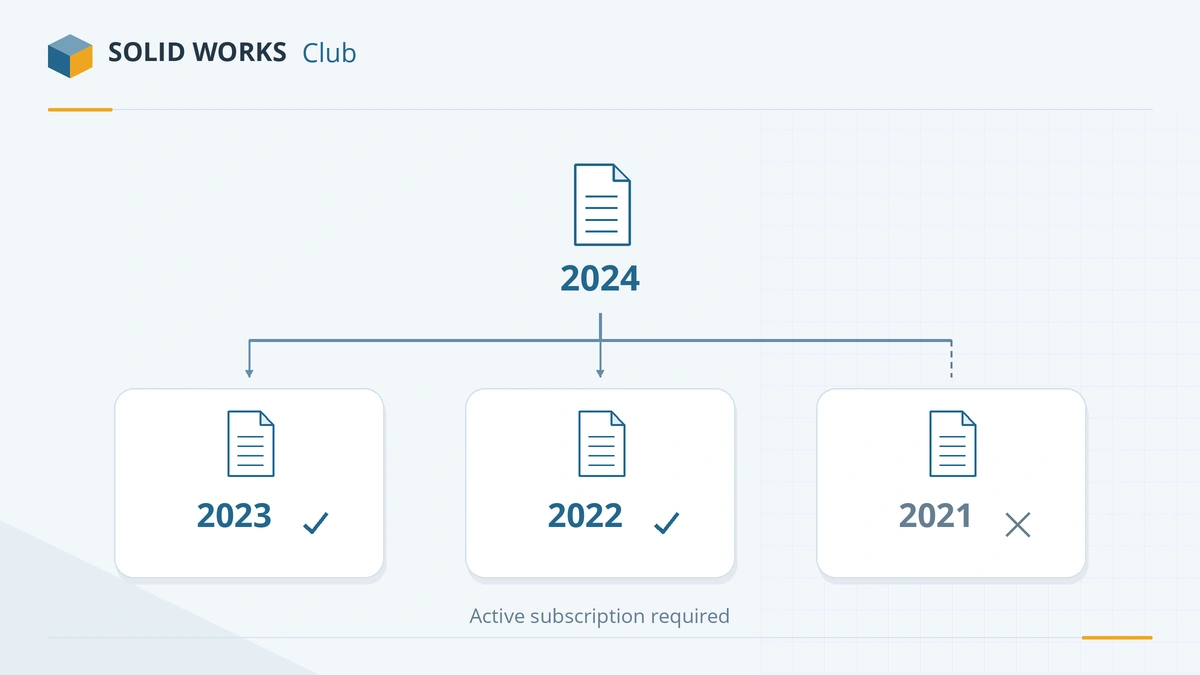
Before 2024, a file saved in a newer release could never be opened in an older one. SOLIDWORKS 2024 added Save As previous version for parts, assemblies and drawings, as described in the What's New in SOLIDWORKS 2024 PDF. The rules, which still apply in later releases:
- You can go back two releases only — from 2024 to 2023 or 2022. This limit cannot be extended.
- It needs an active subscription; 3DEXPERIENCE (named-user) licenses count as subscribed.
- Pack and Go supports saving to a previous version.
- Anything the older release does not support has to be fixed manually after saving.
Check any combination of versions with our version compatibility tool.
Other top features in SOLIDWORKS 2024
- Collinear chain dimensions — keep chain dimensions in line with one command.
- Reattach dangling dimensions and see overridden dimensions more clearly.
- Defeature rule sets, including a silhouette rule, for lighter models to share.
- Insert an assembly into a part to make a multibody part.
- Sheet metal: slot propagation, a stamp tool and normal cut for tab and slot.
- Corner management for structure systems and weldments.
- Repair missing references in linear and circular component patterns.
Should you still use SOLIDWORKS 2024?
Only if a customer contract requires it. 2024 no longer receives fixes. A newer release can save files back to 2024 — from 2025 or 2026 — which is usually the better route. The release before 2024 is SOLIDWORKS 2023; the full timeline is in our SOLIDWORKS version history.
Sources
Frequently asked questions
When was SOLIDWORKS 2024 released?
+
SOLIDWORKS 2024 was presented in a livestream on September 27, 2023, and SP0 was released on November 6, 2023, according to the official support lifecycle table.
Can SOLIDWORKS 2024 save to older versions?
+
Yes — it was the first release that could. It saves parts, assemblies and drawings to the two previous releases, 2023 and 2022, and requires an active subscription. Features the older release lacks may need fixing by hand.
Is SOLIDWORKS 2024 still supported?
+
No. Hotfix support for SOLIDWORKS 2024 ended on December 31, 2025. The software keeps working, but receives no further fixes.
Related
- SOLIDWORKS 2025: release date, features and supportSOLIDWORKS 2025 was released on November 15, 2024. Its top features, why it is the last version for Windows 10, and hotfix support until December 31, 2026.
- SOLIDWORKS 2023: release date, features and supportSOLIDWORKS 2023 SP0 came out on November 21, 2022, with automatic lightweight mode, mate repair and STEP export per component. Support ended on Dec 31, 2024.
- SOLIDWORKS version history: every release since 1995Every SOLIDWORKS release from SolidWorks 95 to 2027 with release years, revision numbers and file version codes, plus company milestones since 1993.
- SOLIDWORKS versions and the latest releaseThe latest SOLIDWORKS version is 2026 (2027 is in pre-release). Every release from 2020 to 2027 with dates, Windows support and end of support.