Reference
eDrawings: the free SOLIDWORKS file viewer
eDrawings is Dassault's viewer for 3D and 2D CAD files. The free eDrawings Viewer opens SOLIDWORKS parts, assemblies and drawings, plus STEP, IGES, DWG and DXF, on Windows and Mac, with mobile apps for iOS and Android. It can rotate, section and explode models and measure them if the sender allowed it. eDrawings Professional, included with SOLIDWORKS Professional and Premium, adds web export, VR/AR and an API.
 Kevin Walsh

Editions
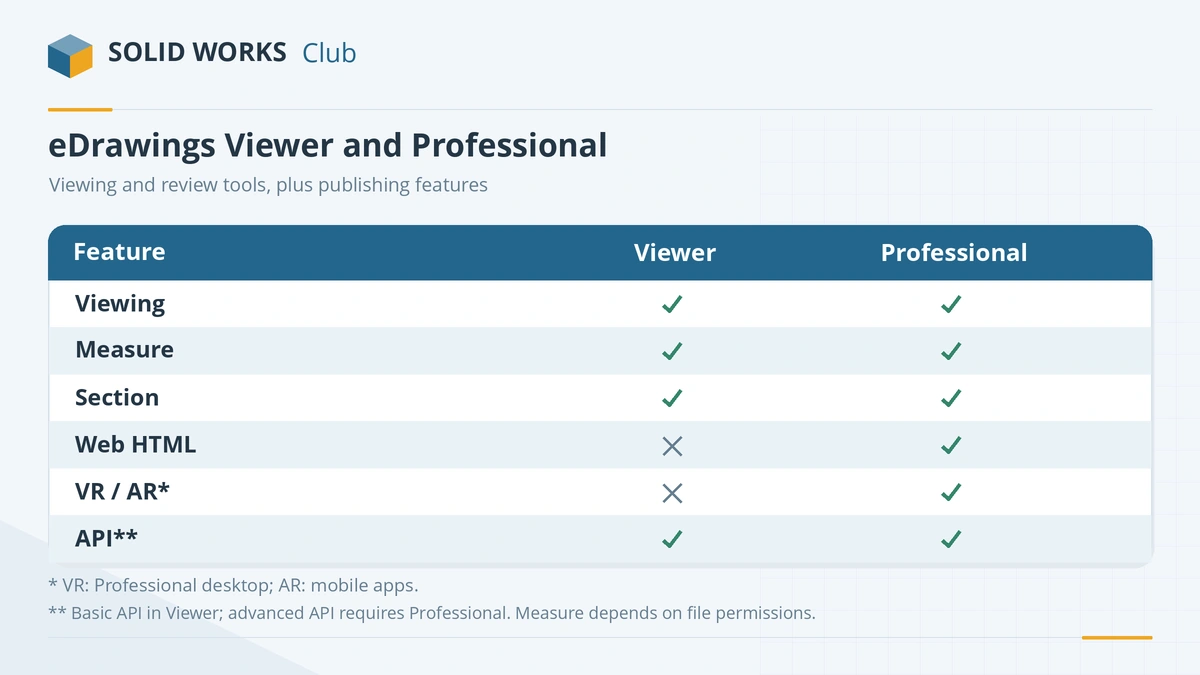
| eDrawings Viewer | eDrawings Professional | |
|---|---|---|
| Price | Free | Included with SOLIDWORKS Professional and Premium |
| View parts, assemblies, drawings | Yes | Yes |
| Rotate, section, explode, configurations, animations | Yes | Yes |
| Measure | If enabled in the file | Yes |
| Save as Web HTML | — | Yes |
| VR / AR, API, review-enabled files | — | Yes |
Resellers describe the split slightly differently — GoEngineer and Javelin disagree on markup — so treat this as a guide. Since SOLIDWORKS 2026 SP4, eDrawings is always included with SOLIDWORKS Design (What's New 2026). Edition contents per GoEngineer.
Download
- Windows: the free Viewer from the eDrawings download page (email registration), or from the SOLIDWORKS installation media.
- Mac: free in the Mac App Store.
- iPhone and iPad: App Store, with augmented reality at 1:1 scale.
- Android: Dassault has released an Android app; check Google Play for the current version.
What it opens
The mobile and Mac apps list SOLIDWORKS parts, assemblies and drawings, eDrawings files (.eprt, .easm, .edrw), IGES, JT, STEP and IFC for 3D, and DWG and DXF for 2D.
| macOS | eDrawings versions supported |
|---|---|
| macOS 27 Golden Gate | eDrawings 2027 onwards |
| macOS 26 Tahoe | eDrawings 2026 onwards |
| macOS 15 Sequoia | eDrawings 2025 onwards |
| macOS 14 Sonoma | eDrawings 2024 onwards |
From the official system requirements.
Publishing eDrawings files from SOLIDWORKS
- In SOLIDWORKS, set Tools → Options → System Options → Export → eDrawings, including Enable Measure if reviewers should be able to measure (Hawk Ridge).
- Choose File → Save As and pick eDrawings (.eprt, .easm or .edrw).
- Send the file. It is much smaller than the SOLIDWORKS file and cannot be turned back into one — useful when you want people to see a design without getting the model.
Other ways to open SOLIDWORKS files are in open SOLIDWORKS files without SOLIDWORKS. Mac users who need the full program should read SOLIDWORKS on Mac.
Downloaded models from GrabCAD or 3D ContentCentral can be checked in eDrawings first — see GrabCAD vs 3D ContentCentral.
Frequently asked questions
Is eDrawings free?
+
The eDrawings Viewer for Windows and the Mac app are free. On iPhone and iPad the app was listed at $2.99 on the Canadian App Store when we checked. eDrawings Professional is paid and included with SOLIDWORKS Professional and Premium.
Can eDrawings measure SOLIDWORKS files?
+
Yes, if measuring was enabled when the file was published. In SOLIDWORKS this is set under Tools → Options → System Options → Export → eDrawings (Enable Measure).
Does eDrawings work on Mac?
+
Yes. eDrawings is the only SOLIDWORKS product with a native Mac app. The official requirements list eDrawings 2026 for macOS 14 Sonoma to macOS 26 Tahoe, and eDrawings 2027 up to macOS 27.
Can I edit a model in eDrawings?
+
No. eDrawings is for viewing and reviewing. eDrawings files (.eprt, .easm, .edrw) cannot be converted back into editable SOLIDWORKS files.
Related
- How to open SOLIDWORKS files without SOLIDWORKSHow to open SLDPRT, SLDASM and SLDDRW files without SOLIDWORKS — free eDrawings, online viewers, Onshape, Fusion, Rhino and converters — and which can edit.
- What is an SLDDRW file?An SLDDRW file is a SOLIDWORKS 2D drawing linked to its part or assembly. How to open it without SOLIDWORKS and convert it to PDF, DWG or DXF for others.
- SOLIDWORKS on Mac: every option in 2026There is no SOLIDWORKS for macOS. Run it in Parallels on Apple silicon or Intel Macs, view files with eDrawings for Mac, or design in the browser with xDesign.
- SOLIDWORKS file formats and extensionsEvery SOLIDWORKS file extension explained — SLDPRT, SLDASM, SLDDRW, templates, libraries and tables — plus the import and export formats and 3D Interconnect.