Comparisons
What CAD software should you learn in 2026?
For a career in mechanical or product design, learn SOLIDWORKS first: it is free for students, widely requested by manufacturers and the skills transfer to every other parametric CAD. Learn AutoCAD for architecture, construction and drafting jobs; add CATIA or Creo if you target aerospace, automotive or a large OEM; and Fusion if you mainly make things yourself.
 Kevin Walsh

Pick by career goal
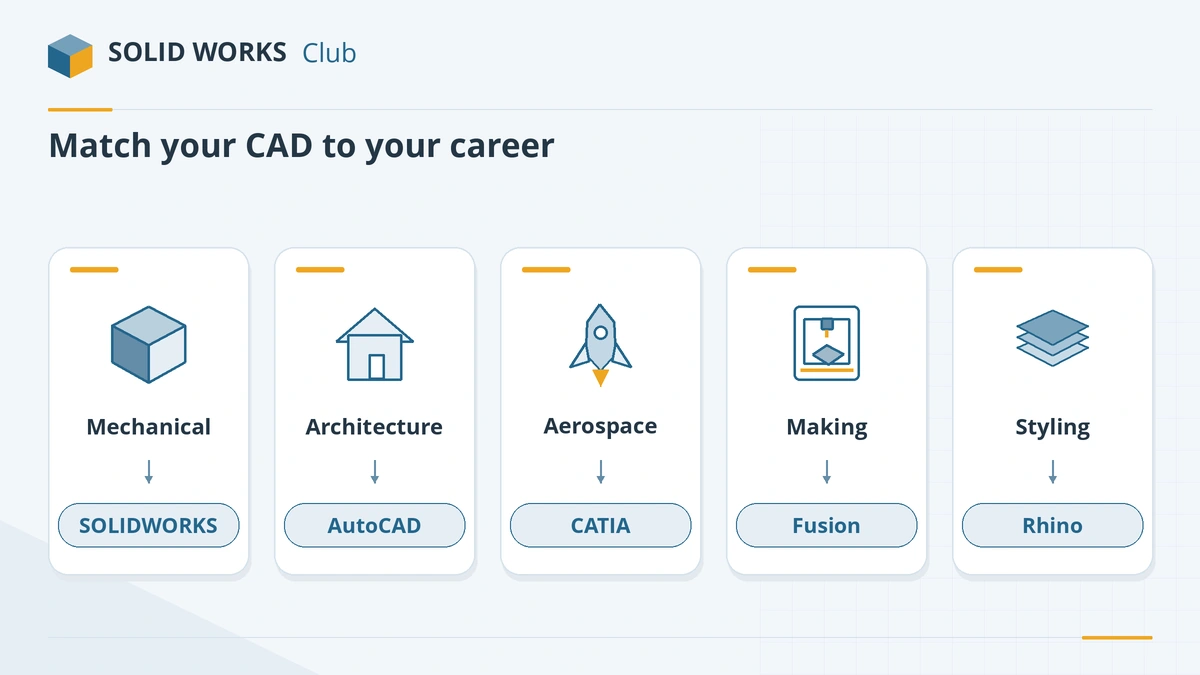
| Your goal | Learn first | Add later |
|---|---|---|
| Mechanical or product design engineer | SOLIDWORKS | Inventor or Creo, depending on employer |
| Aerospace or automotive | SOLIDWORKS (free to learn) | CATIA |
| Large OEMs using PTC Windchill | SOLIDWORKS or Creo | Creo |
| Architecture, construction, facilities | AutoCAD | Revit |
| Making, CNC and 3D printing at home | Fusion | SOLIDWORKS for Makers |
| Industrial design and styling | Rhino | SOLIDWORKS for engineering hand-off |
| Visualisation, animation, games | Blender | — |
What the job data says
There is no reliable, current global market-share study for CAD; vendors don't publish their user numbers. The best public signals are job ads and user surveys, each with limits:
- UK job ads (ITJobsWatch, six months to November 2026): AutoCAD 554 ads (median £45,000), SOLIDWORKS 97 ads (median £50,000), CATIA 32 ads (median £57,500). SOLIDWORKS ads more than doubled from a year earlier. The site tracks IT-skills ads, so samples are small.
- User survey (CNCCookbook 2024): among professional users who answered, Fusion 28.8% and SOLIDWORKS 26.5%. The sample is about 400 people, mostly from CNC and maker communities, so Fusion is over-represented compared with engineering companies.
The pattern in this UK sample: AutoCAD has the most jobs overall because it spans many industries; among 3D mechanical tools, SOLIDWORKS appears far more often than Inventor, Creo or Fusion; CATIA jobs are fewer but pay more.
Skills transfer
Parametric CAD tools share the same ideas: sketches with dimensions and relations, features built in order, assemblies with mates or constraints, and drawings generated from the model. Once you know one well, switching to another takes days or weeks. Pick the one that best fits your first job target and do not worry about choosing "wrong".
How to start for free
- Students: SOLIDWORKS Design Standard is free; Fusion, Onshape, Inventor, Creo and Solid Edge also have free student editions.
- Hobbyists: SOLIDWORKS for Makers costs $48 a year; free alternatives include FreeCAD and Fusion for Personal Use.
- Check your computer with the PC checker before you install anything.
Prove your skills
Certification helps on a CV, especially early in your career. SOLIDWORKS has the CSWA (associate), CSWP (professional) and CSWE (expert) exams; students on the $60 Premium licence get exam vouchers. Start with the certification guide, our free CSWA practice test and is SOLIDWORKS certification worth it?. To compare every major CAD tool, see the CAD comparison matrix.
Chose SOLIDWORKS? Start with the 30-day learning plan.
Frequently asked questions
Which CAD software is most in demand?
+
By volume, AutoCAD, because it spans architecture, construction and engineering. In UK job ads tracked by ITJobsWatch over six months to November 2026, AutoCAD appeared in 554 ads and SOLIDWORKS in 97 — but SOLIDWORKS ads had a higher median salary, and in that sample it appeared far more often than Inventor, Creo or Fusion.
Is SOLIDWORKS worth learning in 2026?
+
Yes, if you want to work in mechanical or product design. It is free for students, it has a recognised certification path (CSWA, CSWP, CSWE), and its concepts carry over to Inventor, Creo, CATIA, Fusion and Onshape.
How long does it take to learn SOLIDWORKS?
+
Most people can model simple parts within a few days and reach the level of the entry CSWA exam after a few weeks of regular practice. Professional speed with assemblies and drawings takes months of real projects.
Should I learn Fusion or SOLIDWORKS first?
+
SOLIDWORKS if you aim for an engineering job; Fusion if you want to make things at home with a 3D printer or CNC machine. Learning the second one later takes days, not months.
Related
- How to get the free SOLIDWORKS student edition (2026)Since July 1, 2026, students get SOLIDWORKS Design Standard free, no .edu email needed. Who qualifies, how to download it, its limits and the $60 Premium.
- SOLIDWORKS vs Fusion: which should you choose in 2026?SOLIDWORKS vs Autodesk Fusion in 2026 — $2,820 vs $680 a year, desktop vs cloud, Windows vs Mac, CAM and large assemblies, with a verdict for each user.
- SOLIDWORKS vs AutoCAD: 3D design or 2D drafting?SOLIDWORKS vs AutoCAD explained — 3D parametric design vs 2D drafting, who uses each, prices, Mac support, DWG and DXF exchange, and whether you need both.
- CAD software comparison chart (2026)SOLIDWORKS, Fusion, Onshape, Inventor, CATIA, Creo, Solid Edge, FreeCAD, AutoCAD, Rhino and Blender side by side — price, platforms, kernel, CAM, file import.