Comparisons
SOLIDWORKS vs Fusion: which should you choose in 2026?
Fusion costs $680 a year against $2,820 for SOLIDWORKS Standard, runs natively on a Mac and includes CAM, PCB design and cloud collaboration. SOLIDWORKS is the stronger tool for large assemblies, detailed drawings and established engineering teams, and in UK job-ad data it appears in far more vacancies. Makers and start-ups usually start with Fusion; engineering companies usually standardise on SOLIDWORKS.
 Kevin Walsh
Hobbyists and makers
Fusion (free Personal Use)
Free for non-commercial use with CAM included; SOLIDWORKS for Makers costs $48 a year.
Engineering students
SOLIDWORKS
Free for students since July 2026 and widely requested by mechanical engineering employers.
Companies with large assemblies
SOLIDWORKS
Better at big assemblies, drawings and configurations, with a large reseller and add-in ecosystem.
| SOLIDWORKS | Autodesk Fusion | |
|---|---|---|
| Developer | Dassault Systèmes | Autodesk |
| Current version (Nov 2026) | 2026 (2027 in pre-release) | Continuous cloud updates |
| Commercial price (US list) | $2,820 – $4,716/yr (Standard – Premium) | $680/yr or $85/mo; Fusion for Design $2,190/yr |
| Free or low-cost options | Free for students (Standard); Makers $48/yr; free trial | Personal Use free (10 editable documents, under $1,000/yr revenue); free for education; startups ~$150 for 3 years |
| Runs on | Windows 11 (x86_64) | Windows, macOS, browser; mobile apps for viewing |
| Mac | Only in Parallels (not certified on Apple silicon) | Native app |
| Files and data | Local files; PDM or 3DEXPERIENCE cloud optional | Cloud with local cache; offline up to two weeks |
| Modelling approach | Parametric, history-based | Parametric, history-based, plus direct, T-spline and mesh |
| Geometry kernel | Parasolid | Autodesk ShapeManager |
| CAM | SOLIDWORKS CAM (with subscription editions) | Included (2.5–3-axis); 4–5-axis with Manufacturing extension |
| Simulation | Premium edition and Simulation add-ons | Included basics; advanced studies with extensions |
| Opens SOLIDWORKS files | Native | Imports .sldprt/.sldasm on paid licences (not Personal Use) |
| Best for | Mechanical product design, machinery, sheet metal | Start-ups, makers, CNC and 3D printing, electronics enclosures |
Checked 2026-11-06. Sources: Autodesk — Fusion subscription types; Autodesk — Fusion subscription FAQ; Autodesk — Fusion for hobbyists; Autodesk Help — Fusion offline mode; Autodesk Help — Fusion supported file formats; Autodesk — Fusion roadmap 2026; Xometry — Fusion 360 vs SolidWorks
Price
| SOLIDWORKS | Fusion | |
|---|---|---|
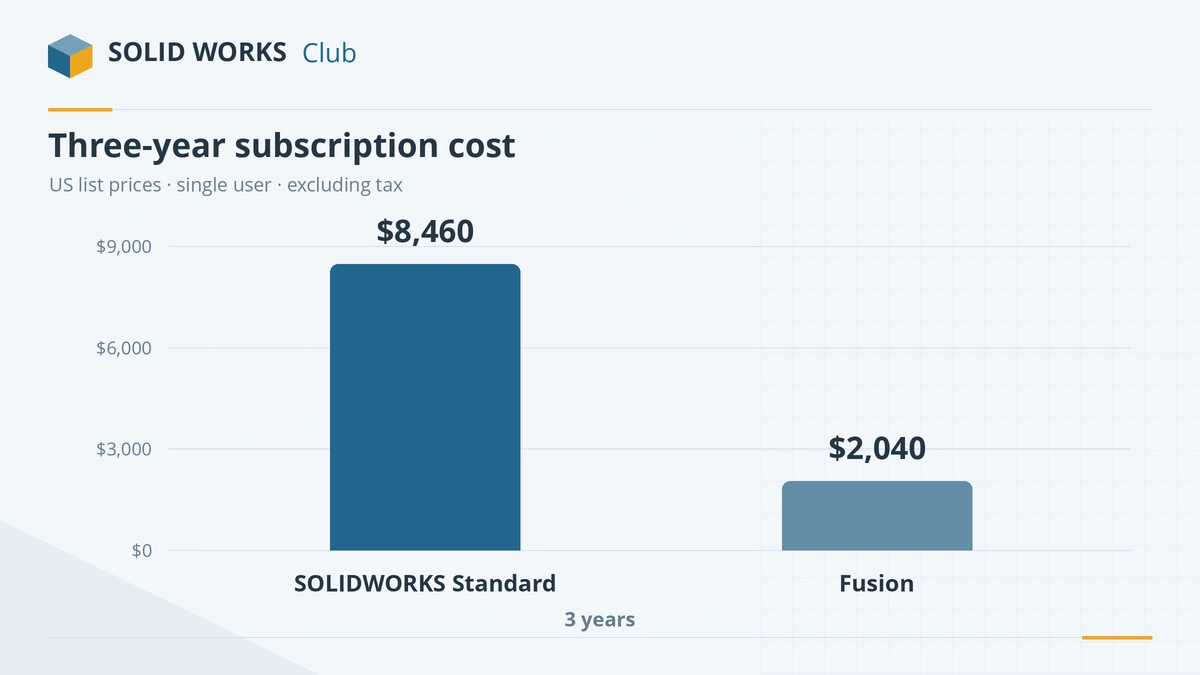
| 1 year | $2,820 (Standard) – $4,716 (Premium) | $680 (base) – $2,190 (Fusion for Design) |
| 3 years | $8,460 (Standard) | $2,040 (3-year term) |
| Monthly | Not sold monthly online; quarterly terms through resellers | $85 a month |
| Perpetual licence | Yes, through resellers | No |
| Free for hobbyists | No — Makers costs $48 a year | Yes — Personal Use (with limits) |
| Free for students | Yes, Design Standard | Yes |
SOLIDWORKS prices from our pricing guide; Fusion prices from Autodesk's subscription types page. Fusion's extras — simulation, generative design, advanced machining — come as extensions from about $595 a year each, or in the Fusion for Manufacturing and Fusion for Design bundles.
The main differences
Desktop vs cloud. SOLIDWORKS is a Windows desktop program that works on local files; data management (PDM or the 3DEXPERIENCE platform) is optional. Fusion keeps your designs in Autodesk's cloud with a local cache. That makes sharing and version history easy, but it means your files live on Autodesk's servers and offline work is limited to about two weeks.
Mac. Fusion runs natively on macOS. SOLIDWORKS runs on a Mac only inside a Windows virtual machine — see SOLIDWORKS on Mac.
What is included. Fusion's base subscription includes CAD, CAM for 2.5- and 3-axis milling, basic simulation, PCB design and essential data management. SOLIDWORKS Standard includes CAD, sheet metal, weldments, molds and SOLIDWORKS CAM; simulation and routing need Premium. Compare the SOLIDWORKS editions in Standard vs Professional vs Premium.
Large assemblies and drawings. Xometry's comparison rates SOLIDWORKS stronger for very large assemblies, high-end surfacing, design validation and formal version control, and Fusion simpler, lighter on hardware and cheaper. SOLIDWORKS also has more mature drawing tools, configurations and design tables.
AI. Both are adding AI. SOLIDWORKS 2027 brings prompt-to-geometry and assembly analysis through its AI companions; Autodesk's 2026 Fusion roadmap promises an AI assistant, text-to-command and "neural CAD", presented as plans rather than commitments.
Moving files between them
- SOLIDWORKS → Fusion: paid Fusion licences import .sldprt and .sldasm. Personal Use cannot.
- Fusion → SOLIDWORKS: export STEP from Fusion and open it in SOLIDWORKS. You get solid geometry, not the feature history.
Which should you choose?
Choose Fusion if you are a hobbyist, a small start-up, a CNC or 3D-printing shop, or a Mac user, and your assemblies stay modest. Choose SOLIDWORKS if you design machinery or products with large assemblies and detailed drawings, work with suppliers who send native SOLIDWORKS files, or want the skill most mechanical employers ask for. Not sure? The license picker helps with the SOLIDWORKS side, and what CAD to learn in 2026 looks at careers. For a cloud alternative from another vendor, see SOLIDWORKS vs Onshape.
Frequently asked questions
Is Fusion as good as SOLIDWORKS?
+
For parts, small assemblies, CNC machining and 3D printing, Fusion is comparable and much cheaper. Comparison sources such as Xometry rate SOLIDWORKS stronger for large assemblies, rigorous version control and demanding drawings. Which is "better" depends on what you design.
Is Fusion free?
+
Fusion for Personal Use is free for non-commercial projects that earn under $1,000 a year. It limits you to 10 active editable documents and restricts some CAM, drawing and import/export features — including importing SOLIDWORKS files. Students and educators get the full version free.
Can Fusion open SOLIDWORKS files?
+
Yes, on paid Fusion licences: it imports .sldprt and .sldasm files. Autodesk lists SOLIDWORKS import for all licence types except Personal Use. Autodesk says imports are converted into Fusion's own history-based format; check complex features after converting.
Should I learn SOLIDWORKS or Fusion?
+
If you want a job in mechanical design, learn SOLIDWORKS — it is free for students. If you mainly make things yourself, especially with a CNC machine or 3D printer, Fusion gets you there faster. The skills transfer well between them.
Does Fusion work offline?
+
Partly. Fusion stores data in Autodesk's cloud with a local cache and can run offline for up to two weeks, but you cannot save new versions or see history until you reconnect. SOLIDWORKS works on local files with no connection needed.
Related
- SOLIDWORKS vs Onshape: desktop or cloud CAD?SOLIDWORKS vs Onshape in 2026 — local files vs browser-only cloud CAD, $2,820 vs $1,500 a year, collaboration, Mac and Chromebook, and which suits you.
- The best free SOLIDWORKS alternatives in 2026The best free alternatives to SOLIDWORKS in 2026 — FreeCAD, Solid Edge Community Edition, Fusion Personal Use, Onshape Free and more — with the limits of each.
- What CAD software should you learn in 2026?Which CAD to learn in 2026 by career — SOLIDWORKS for mechanical design, AutoCAD for drafting, CATIA and Creo for OEMs, Fusion for makers — with job data.
- SOLIDWORKS for Makers (2026)SOLIDWORKS for Makers costs $48 a year or $15 a month for personal projects earning under $2,000. What's included, limits, offline use, Mac options and refunds.