Comparisons
SOLIDWORKS vs Onshape: desktop or cloud CAD?
Onshape runs entirely in a web browser, on any computer including Macs and Chromebooks, with built-in version control and real-time collaboration. It costs $1,500 a year for Standard against $2,820 for SOLIDWORKS Standard. SOLIDWORKS works offline on local files, handles complex models and large assemblies better and has a much bigger ecosystem. Both use the Parasolid geometry kernel.
 Kevin Walsh

Distributed teams
Onshape
Everyone edits the same model in the browser, with branching and merging built in.
Mac and Chromebook users
Onshape
Runs in any modern browser; SOLIDWORKS needs Windows.
Complex products and offline work
SOLIDWORKS
Local files, mature drawings and configurations, and a large add-in ecosystem.
| SOLIDWORKS | Onshape | |
|---|---|---|
| Developer | Dassault Systèmes | PTC |
| Current version (Nov 2026) | 2026 (2027 in pre-release) | Continuous (three-week release cycle) |
| Commercial price (US list) | $2,820 – $4,716/yr (Standard – Premium) | Standard $1,500/yr; Professional $2,500/yr; Enterprise by quote |
| Free or low-cost options | Free for students (Standard); Makers $48/yr; free trial | Free plan (non-commercial, all documents public); free Student plan; Startup Program |
| Runs on | Windows 11 (x86_64) | Any browser; iOS and Android apps |
| Mac | Only in Parallels (not certified on Apple silicon) | Yes (browser) |
| Files and data | Local files; PDM or 3DEXPERIENCE cloud optional | Cloud-only, built-in version control and branching; needs internet |
| Modelling approach | Parametric, history-based | Parametric, history-based, cloud-native |
| Geometry kernel | Parasolid | Parasolid |
| CAM | SOLIDWORKS CAM (with subscription editions) | Professional and above (CAM Studio) |
| Simulation | Premium edition and Simulation add-ons | Professional and above |
| Opens SOLIDWORKS files | Native | Imports .sldprt (1999–2026); assemblies as Pack and Go zip |
| Best for | Mechanical product design, machinery, sheet metal | Distributed teams, Mac and Chromebook users, education |
Checked 2026-11-06. Sources: Onshape — pricing; Onshape Help — supported file formats; Onshape Help — hardware and browsers; PTC — Onshape AI Advisor (Oct 2025); Xometry — SolidWorks vs Onshape
Price
| SOLIDWORKS | Onshape | |
|---|---|---|
| Entry commercial plan | $2,820/yr (Standard) | $1,500/yr (Standard) |
| With simulation, CAM, rendering | $4,716/yr (Premium) | $2,500/yr (Professional) |
| Enterprise / PLM | Quote | Enterprise by quote |
| Hobbyists | Makers $48/yr (private files) | Free plan (all documents public) |
| Students | Free (Design Standard) | Free Student plan |
Onshape prices from its pricing page, billed annually. Note what each tier includes: Onshape Standard has no simulation, CAM or rendering; those start with Professional. SOLIDWORKS Standard has no built-in simulation either; see the editions compared.
The main differences
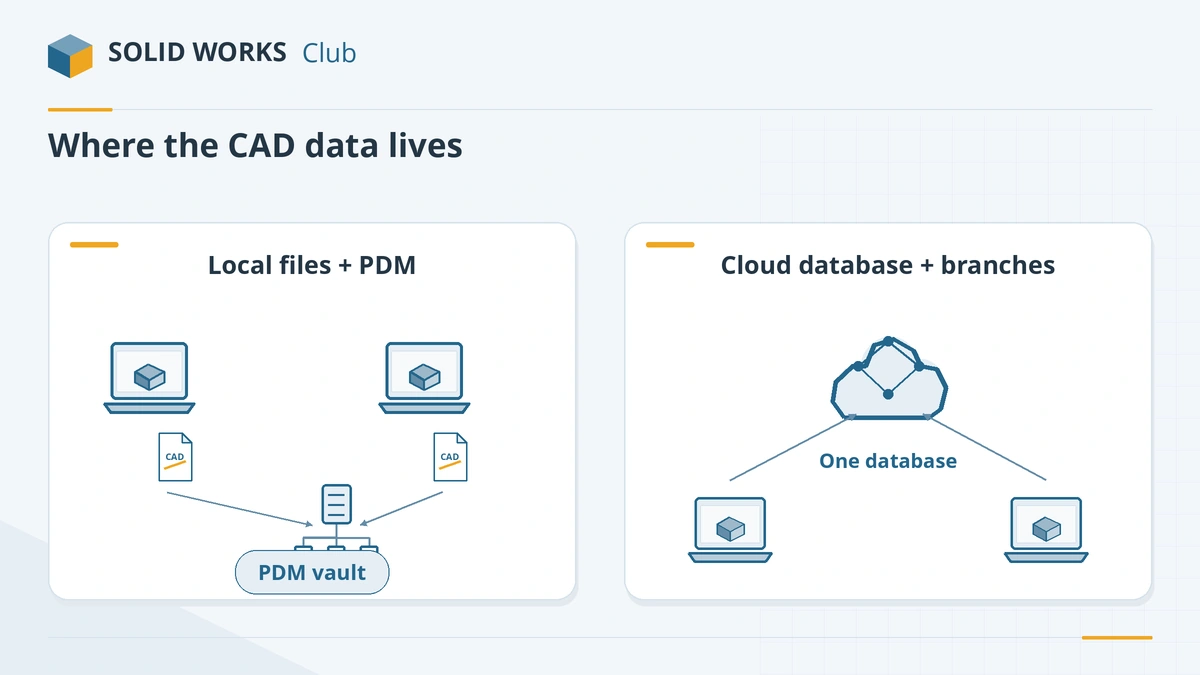
Where your data lives. SOLIDWORKS saves files on your computer or a server; PDM or the 3DEXPERIENCE platform add version control. Onshape has no files at all: everything lives in one cloud database with versions, branches and merges built in, like software version control. Nobody overwrites anyone else's work, but you need a connection to do anything.
Platforms. Onshape runs in Chrome, Firefox, Edge, Opera and Safari, plus iOS and Android apps — so Macs, Linux PCs and Chromebooks all work. SOLIDWORKS needs Windows 11 on an Intel or AMD PC.
Modelling depth. Both are parametric, history-based modellers on the same Parasolid kernel, so basic modelling feels similar. Xometry's comparison finds SOLIDWORKS stronger for complex models and Onshape easier to learn with a smaller community. SOLIDWORKS also has more specialised tools — weldments, molds, routing, a huge library of add-ins and a big pool of experienced users and resellers.
Updates. Onshape updates every three weeks for everyone. SOLIDWORKS ships a major release each autumn plus service packs and, since 2026, feature drops — see the release schedule.
AI. Onshape added an AI Advisor in October 2025; SOLIDWORKS 2027 adds prompt-to-geometry and assembly analysis through its AI assistants.
Moving files between them
- SOLIDWORKS → Onshape: upload .sldprt files directly; upload assemblies as a Pack and Go zip. Drawings (.slddrw) are not listed as importable.
- Onshape → SOLIDWORKS: export STEP or Parasolid. Because both share Parasolid, geometry usually transfers cleanly, without the feature history.
Which should you choose?
Choose Onshape if your team is spread out, uses Macs or Chromebooks, or wants zero IT overhead, and your products are moderately complex. Choose SOLIDWORKS if you need offline work, complex assemblies and drawings, specialised modules, or compatibility with customers and suppliers who use SOLIDWORKS. Dassault's own browser CAD, xDesign, is another option for Mac users — see xDesign for Makers and the Mac alternatives. For the other popular cloud option, see SOLIDWORKS vs Fusion.
Frequently asked questions
Is Onshape better than SOLIDWORKS?
+
It is better for collaboration, platform freedom and IT simplicity — there is nothing to install or update. Xometry and other comparisons rate SOLIDWORKS stronger for complex modelling, and it works without an internet connection.
Is Onshape free?
+
The Free plan is for non-commercial use only, and every document you create on it is public. Students get a free Student plan, and qualifying start-ups can get free Professional licences through the Startup Program.
Can Onshape open SOLIDWORKS files?
+
Yes. Onshape imports .sldprt files from SOLIDWORKS 1999 to 2026, and assemblies when you upload them as a Pack and Go zip. The feature tree is not carried over.
Does Onshape work offline?
+
No. Onshape's own requirements say a reliable internet connection is the primary requirement, and it has no offline mode.
Was Onshape made by former SOLIDWORKS people?
+
Yes. Onshape was founded by a team that included SOLIDWORKS founder Jon Hirschtick; PTC, the maker of Creo, now owns it.
Related
- SOLIDWORKS vs Fusion: which should you choose in 2026?SOLIDWORKS vs Autodesk Fusion in 2026 — $2,820 vs $680 a year, desktop vs cloud, Windows vs Mac, CAM and large assemblies, with a verdict for each user.
- Best SOLIDWORKS alternatives for Mac in 2026CAD that runs natively on a Mac in 2026 — Fusion, Onshape, xDesign, Shapr3D, Rhino, FreeCAD — compared with running SOLIDWORKS in Parallels.
- The best free SOLIDWORKS alternatives in 2026The best free alternatives to SOLIDWORKS in 2026 — FreeCAD, Solid Edge Community Edition, Fusion Personal Use, Onshape Free and more — with the limits of each.
- SOLIDWORKS xDesign for Makers vs desktop SOLIDWORKS for MakersxDesign for Makers runs SOLIDWORKS in a browser on Mac, Chromebook or tablet for $48 a year. How it differs from desktop Makers and which to choose.