Comparisons
SOLIDWORKS vs Creo: ease of use or high-end power?
PTC Creo is a high-end parametric CAD system used by large manufacturers for complex products, heavy machinery and advanced surfacing. SOLIDWORKS is easier to learn, has published prices from $2,820 a year and suits most small and mid-size engineering teams. PTC does not publish Creo prices; resellers quote roughly $2,400–$3,600 a year for the entry Design Essentials package.
 Kevin Walsh

Small and mid-size teams
SOLIDWORKS
Faster to learn, transparent pricing and a large pool of experienced users.
Large OEMs with Windchill
Creo
Strong on very large assemblies, surfacing and PTC's PLM stack.
Students
SOLIDWORKS first
Both have free student versions; SOLIDWORKS skills are asked for more widely.
| SOLIDWORKS | PTC Creo | |
|---|---|---|
| Developer | Dassault Systèmes | PTC |
| Current version (Nov 2026) | 2026 (2027 in pre-release) | Creo 13 / Creo+ (June 2026) |
| Commercial price (US list) | $2,820 – $4,716/yr (Standard – Premium) | Not published by PTC; resellers quote from about $2,400–$3,600/yr for Design Essentials |
| Free or low-cost options | Free for students (Standard); Makers $48/yr; free trial | Creo Education Free Edition; free Creo+ for qualifying startups |
| Runs on | Windows 11 (x86_64) | Windows 10/11 Pro or Enterprise |
| Mac | Only in Parallels (not certified on Apple silicon) | No |
| Files and data | Local files; PDM or 3DEXPERIENCE cloud optional | Local files; Windchill PLM |
| Modelling approach | Parametric, history-based | Parametric, history-based; strong surfacing and large assemblies |
| Geometry kernel | Parasolid | GRANITE |
| CAM | SOLIDWORKS CAM (with subscription editions) | Higher packages and extensions |
| Simulation | Premium edition and Simulation add-ons | Linear static in Design Essentials; more in higher packages |
| Opens SOLIDWORKS files | Native | Yes, with Creo Unite (licence required) |
| Best for | Mechanical product design, machinery, sheet metal | Large OEM programmes, heavy machinery, complex surfacing |
Checked 2026-11-06. Sources: PTC — Creo packages; PTC — Creo 13 announcement (Jun 2026); PTC — Creo Education Free Edition; Tristar — Creo pricing; Xometry — Creo vs SolidWorks; PTC Support — Creo Unite
Price and packages
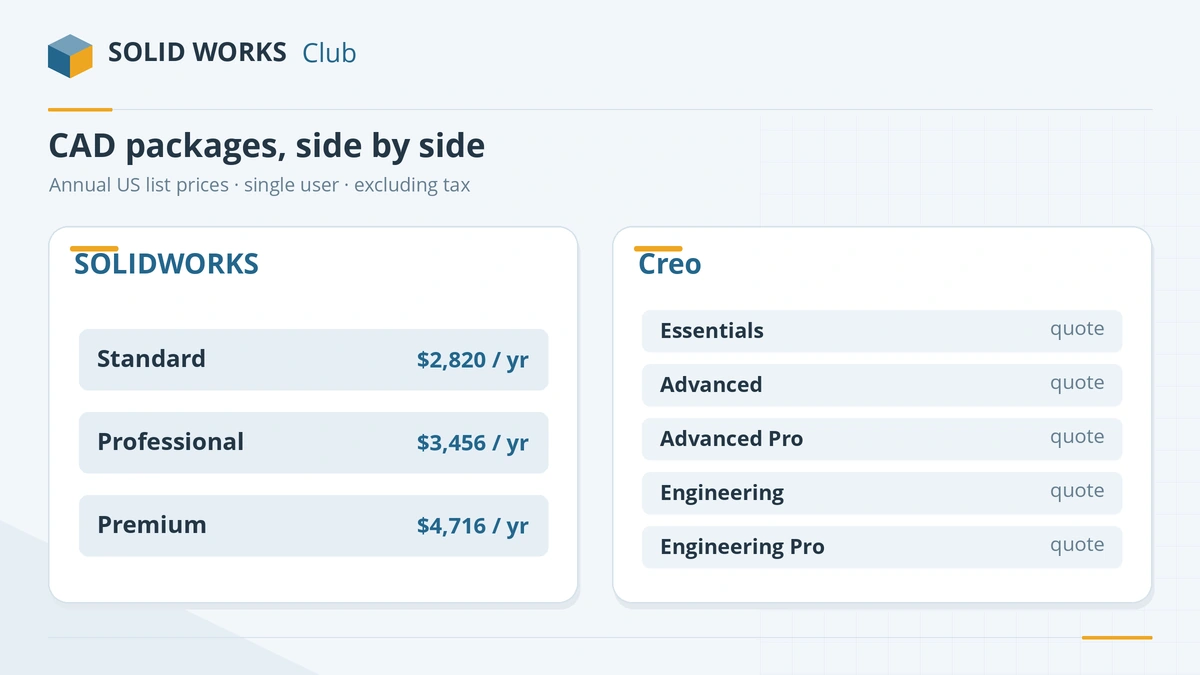
| SOLIDWORKS edition | US price / year | Creo package | Price |
|---|---|---|---|
| Standard | $2,820 | Design Essentials | Quote (resellers: ~$2,400–$3,610) |
| Professional | $3,456 | Design Advanced | Quote |
| Premium | $4,716 | Design Advanced Professional | Quote |
| — | — | Design Engineering / Engineering Professional | Quote |
Creo package names from PTC's packages page; reseller price from Tristar and estimate from Xometry. Creo is modular: you add extensions for CAM, advanced simulation or generative design as needed. Creo licences can be node-locked or floating. SOLIDWORKS can also be bought perpetually — see subscription vs perpetual.
The main differences
Scale and depth. Creo is aimed at large, complex products and companies that run PTC's Windchill PLM. Its surfacing, large-assembly management and modular extensions go further than SOLIDWORKS out of the box. SOLIDWORKS covers most mechanical design with less setup.
Ease of use. Xometry calls Creo's learning curve steep compared with SOLIDWORKS. SOLIDWORKS is known for an approachable interface, and far more free learning material exists for it.
What's new. Creo 13 (June 2026) adds an AI assistant, assembly-level electronics simulation, generative design in assembly context and more 5-axis CAM (PTC). SOLIDWORKS 2027 brings its own AI tools — see what's new in SOLIDWORKS 2027.
Cloud. PTC sells Creo+ with SaaS licensing and real-time collaboration, and owns the browser-based Onshape — compared in SOLIDWORKS vs Onshape.
Moving files between them
- SOLIDWORKS → Creo: Creo Unite opens native SOLIDWORKS parts and assemblies, with the right licence.
- Creo → SOLIDWORKS: SOLIDWORKS' 3D Interconnect can open Creo parts and assemblies as solid bodies; STEP is the universal option.
Which should you choose?
Choose SOLIDWORKS for most product and machinery design, especially in small and mid-size companies. Choose Creo if you join or supply a company built around PTC and Windchill, or design very large, complex products where its modular depth pays off. The other high-end option is CATIA; all tools are side by side in the CAD comparison matrix.
Frequently asked questions
Is Creo harder than SOLIDWORKS?
+
Generally, yes. Xometry describes Creo's learning curve as steep compared with SOLIDWORKS. Its strength is in large, complex products, which take more setup and discipline.
How much does Creo cost?
+
PTC does not publish list prices; its store sends you to a quote. Reseller Tristar lists Design Essentials at $3,610, and Xometry estimates about $2,400 a year for Essentials up to around $20,000 for the top packages.
Can Creo open SOLIDWORKS files?
+
Yes. Creo Unite opens SOLIDWORKS parts and assemblies without converting them, but it needs a Creo SOLIDWORKS collaboration licence. Creo Design Essentials includes Creo Unite technology.
Is there a free version of Creo?
+
Students and educators can use the free Creo Education edition, and qualifying start-ups can get Creo+ free. There is no free licence for hobbyists.
Related
- SOLIDWORKS vs CATIA: same company, different jobsSOLIDWORKS vs CATIA — both from Dassault, but CATIA costs from $7,229 a year and targets aerospace and automotive. Which fits your work and career.
- SOLIDWORKS vs Onshape: desktop or cloud CAD?SOLIDWORKS vs Onshape in 2026 — local files vs browser-only cloud CAD, $2,820 vs $1,500 a year, collaboration, Mac and Chromebook, and which suits you.
- CAD software comparison chart (2026)SOLIDWORKS, Fusion, Onshape, Inventor, CATIA, Creo, Solid Edge, FreeCAD, AutoCAD, Rhino and Blender side by side — price, platforms, kernel, CAM, file import.
- What CAD software should you learn in 2026?Which CAD to learn in 2026 by career — SOLIDWORKS for mechanical design, AutoCAD for drafting, CATIA and Creo for OEMs, Fusion for makers — with job data.