Versions & What's New
SOLIDWORKS Design: the name change explained
SOLIDWORKS Design is the new name of the SOLIDWORKS 3D CAD application — the software itself did not change. Dassault renamed the product line in September 2025 so that "SOLIDWORKS" refers to the whole brand and "SOLIDWORKS Design" to the CAD tool, alongside SOLIDWORKS Simulation, PDM and PLM. From the 2026 release, the new name appears in the interface.
 Kevin Walsh
Why SOLIDWORKS was renamed
Dassault's official name-change page says the update was made "to help distinguish the SOLIDWORKS brand from the SOLIDWORKS CAD product". "Design" was added to match the naming of the other SOLIDWORKS products, such as Simulation, PDM and PLM. In practice:
- SOLIDWORKS = the brand and the whole family of products.
- SOLIDWORKS Design = the 3D CAD application most people simply call "SOLIDWORKS".
The SOLIDWORKS blog's roundup of 2026 enhancements confirms that the new name shows up in the SOLIDWORKS interface, the Windows application menu and the desktop shortcut.
Old and new names (September 2025)
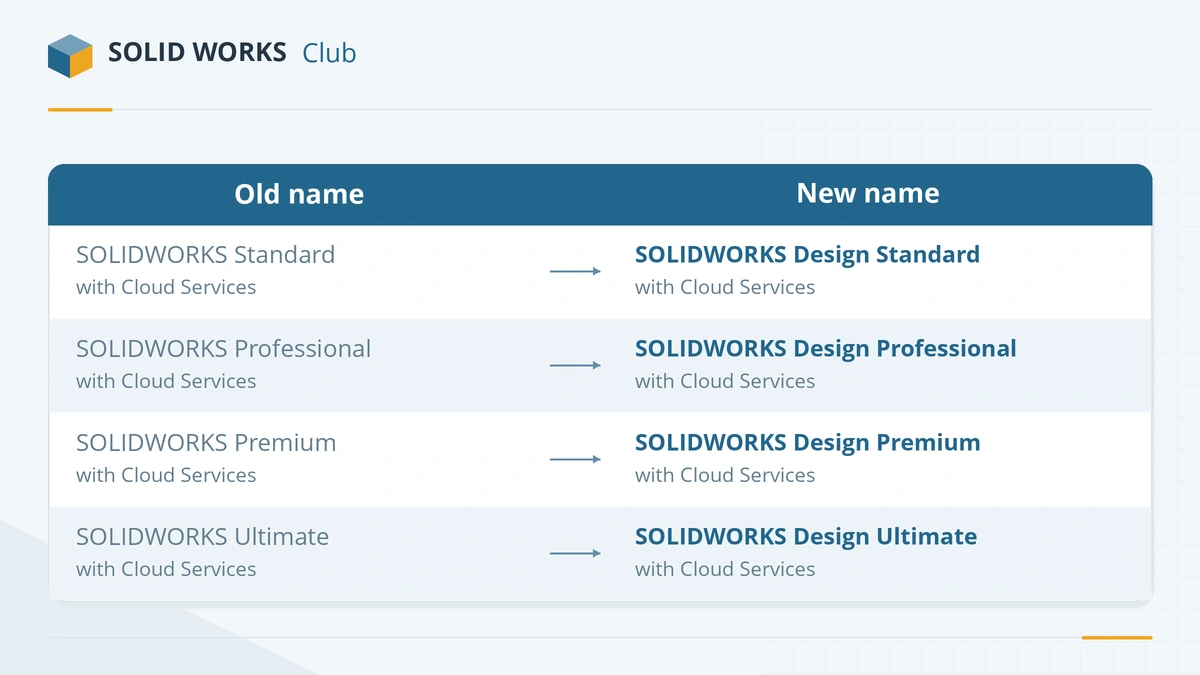
| Old name | New name (Sept 2025) |
|---|---|
| SOLIDWORKS Standard with Cloud Services | SOLIDWORKS Design Standard Connected |
| SOLIDWORKS Professional with Cloud Services | SOLIDWORKS Design Professional Connected |
| SOLIDWORKS Premium with Cloud Services | SOLIDWORKS Design Premium Connected |
| SOLIDWORKS Ultimate | SOLIDWORKS Design Ultimate Connected |
| 3DEXPERIENCE SOLIDWORKS Professional | SOLIDWORKS Design Professional Augmented |
| 3DEXPERIENCE SOLIDWORKS Premium | SOLIDWORKS Design Premium Augmented |
| 3DEXPERIENCE SOLIDWORKS Ultimate | SOLIDWORKS Ultimate Augmented |
| SOLIDWORKS Cloud Offer | SOLIDWORKS xDesign |
| Cloud PLM Standard / Professional | SOLIDWORKS PLM Standard / Professional Augmented |
Unchanged: SOLIDWORKS PDM Pro, SOLIDWORKS Manage, SOLIDWORKS Simulation (Standard, Professional, Premium), Flow Simulation, Motion, SOLIDWORKS CAM and SOLIDWORKS Inspection.
The names in use today
The Connected and Augmented suffixes did not last. According to reseller CADimensions, by the first quarter of 2026 the two license models had settled on these names, which also match the wording on Dassault's own AI and pricing pages:
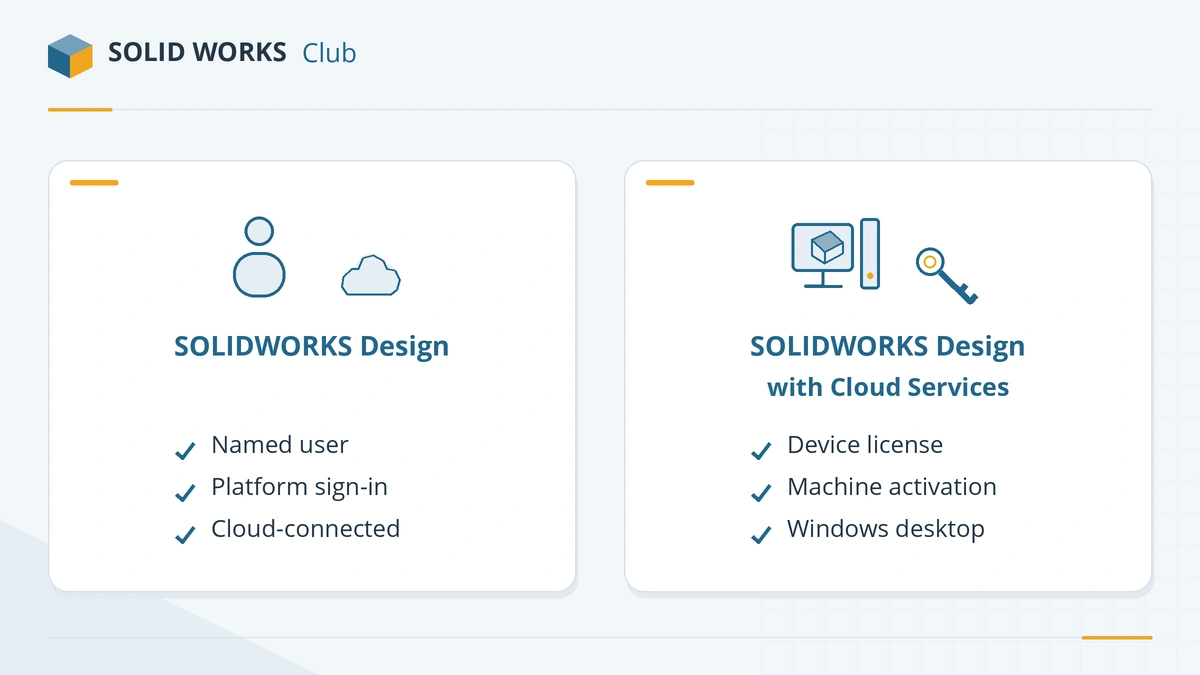
| SOLIDWORKS Design | SOLIDWORKS Design with Cloud Services | |
|---|---|---|
| Earlier names | 3DEXPERIENCE SOLIDWORKS, SOLIDWORKS Connected | SOLIDWORKS, SOLIDWORKS Desktop, SOLIDWORKS with Cloud Services |
| License tied to | Your 3DEXPERIENCE login (named user) | A computer (activation) |
| Installed from | The 3DEXPERIENCE platform / dashboard | Installer downloaded from your account |
| Cloud services | Built in, required | Optional |
Sources disagree on exactly which product carried the "Connected" label in the interim, so we show the official September 2025 table above as published.
How to tell which one you have
- You start SOLIDWORKS from the 3DEXPERIENCE dashboard and sign in → SOLIDWORKS Design (named user).
- You downloaded an installer, entered a serial number and activated the PC → SOLIDWORKS Design with Cloud Services or an older desktop license.
- In SOLIDWORKS, Help → About SOLIDWORKS shows the version and service pack; the serial number is shown there too for activated desktop licenses.
What the rename does not change
Your files, add-ins, editions and prices stay the same. Edition differences are covered in Standard vs Professional vs Premium. Search engines, job ads and most users still say just "SOLIDWORKS", so on this site we use both names. The rename arrived with SOLIDWORKS 2026; earlier name changes, back to the 1995 original, are in the version history.
Frequently asked questions
Is SOLIDWORKS Design the same as SOLIDWORKS?
+
Yes. SOLIDWORKS Design is the new name of the SOLIDWORKS 3D CAD application. Files, features and editions (Standard, Professional, Premium) are the same; only the product name changed.
When did SOLIDWORKS change its name?
+
Dassault announced the new product names in September 2025, and the SOLIDWORKS 2026 release shows "SOLIDWORKS Design" in the interface, the Windows application menu and the desktop shortcut.
What is the difference between SOLIDWORKS Design and SOLIDWORKS Design with Cloud Services?
+
SOLIDWORKS Design is the named-user offer installed from the 3DEXPERIENCE platform, where cloud services are built in and you sign in with your 3DEXPERIENCE ID. SOLIDWORKS Design with Cloud Services is the traditional desktop offer activated on a computer, with optional cloud access. Both run the same CAD application.
What did "Connected" and "Augmented" mean?
+
They were suffixes in the September 2025 naming scheme — for example "SOLIDWORKS Design Standard Connected" and "SOLIDWORKS Design Premium Augmented". By early 2026, resellers reported that these suffixes had been dropped in favour of SOLIDWORKS Design and SOLIDWORKS Design with Cloud Services.
Related
- SOLIDWORKS 2026: release date, new features and supportSOLIDWORKS 2026 was released on November 14, 2025. Top new features, the SOLIDWORKS Design name, Windows 11 only, FD releases and support until 2027.
- SOLIDWORKS AI assistants: AURA, LEO and MARIE explainedWhat the SOLIDWORKS AI companions AURA, LEO and MARIE do, which licenses include them, how AI tokens are counted and priced, and how to start using them.
- SOLIDWORKS Standard vs Professional vs PremiumWhat SOLIDWORKS Standard, Professional and Premium include in 2026, what each costs, and which edition you need — rendering, Toolbox, simulation, routing.
- SOLIDWORKS version history: every release since 1995Every SOLIDWORKS release from SolidWorks 95 to 2027 with release years, revision numbers and file version codes, plus company milestones since 1993.