Comparisons
SOLIDWORKS vs Solid Edge: history-based or synchronous?
Solid Edge and SOLIDWORKS are close rivals for machinery and sheet metal design, and both run on the Parasolid kernel. Solid Edge's synchronous technology lets you push and pull geometry directly while keeping dimensions, which is fast for editing imported models. SOLIDWORKS relies on a classic feature history and has the larger user base. Solid Edge also has a free Community Edition for personal use.
 Kevin Walsh
Hobbyists on Windows
Solid Edge Community Edition
Free for personal use; SOLIDWORKS for Makers costs $48 a year.
Shops editing lots of imported models
Solid Edge
Synchronous technology edits dumb geometry without rebuilding a feature tree.
Teams hiring CAD users
SOLIDWORKS
Bigger talent pool, more training material and reseller support.
| SOLIDWORKS | Solid Edge | |
|---|---|---|
| Developer | Dassault Systèmes | Siemens |
| Current version (Nov 2026) | 2026 (2027 in pre-release) | Designcenter Solid Edge 2026 |
| Commercial price (US list) | $2,820 – $4,716/yr (Standard – Premium) | No official list price; G2 lists about $119–$496/mo (billed annually) |
| Free or low-cost options | Free for students (Standard); Makers $48/yr; free trial | Community Edition (personal use, free); Student Edition (free) |
| Runs on | Windows 11 (x86_64) | Windows |
| Mac | Only in Parallels (not certified on Apple silicon) | No |
| Files and data | Local files; PDM or 3DEXPERIENCE cloud optional | Local files; Teamcenter integration |
| Modelling approach | Parametric, history-based | Synchronous technology: history-based plus direct editing |
| Geometry kernel | Parasolid | Parasolid |
| CAM | SOLIDWORKS CAM (with subscription editions) | Add-on (Solid Edge CAM Pro) |
| Simulation | Premium edition and Simulation add-ons | Add-on (Solid Edge Simulation) |
| Opens SOLIDWORKS files | Native | Yes — opens .sldprt and .sldasm (licence-dependent) |
| Best for | Mechanical product design, machinery, sheet metal | Machinery, sheet metal, editing imported models |
Checked 2026-11-06. Sources: Siemens — Solid Edge pricing; Siemens — Designcenter Solid Edge 2026; Siemens — Community Edition; Siemens Support — open SOLIDWORKS files; G2 — Solid Edge pricing
History-based vs synchronous modelling
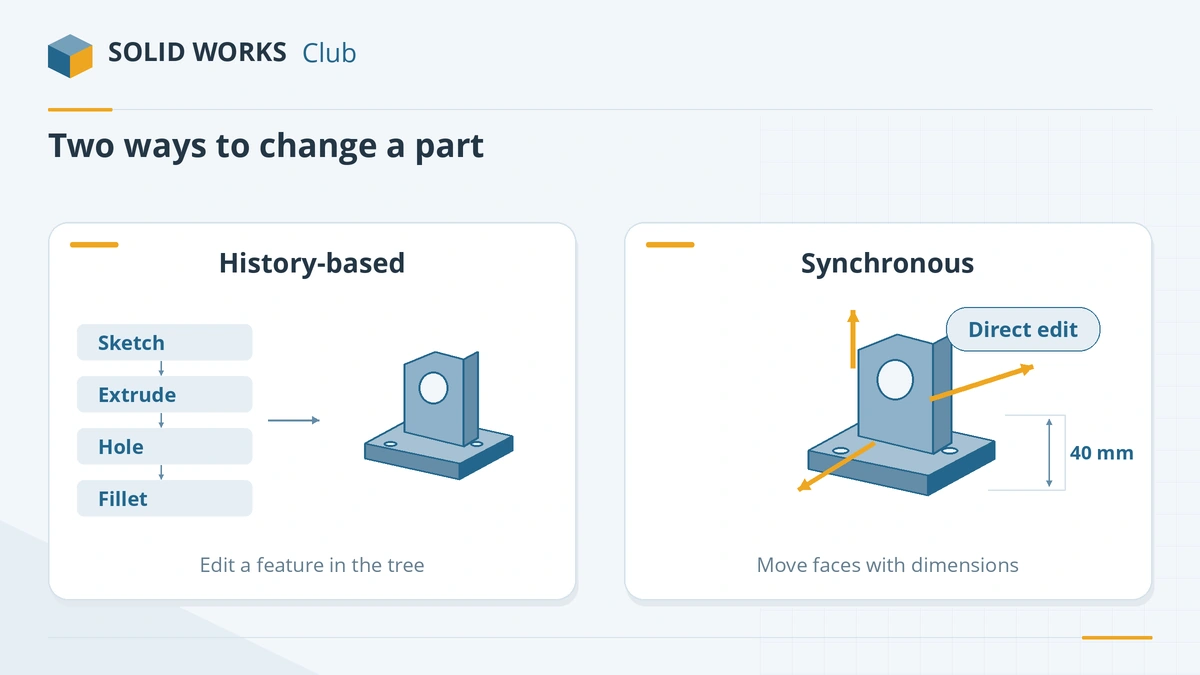
In SOLIDWORKS, every feature depends on earlier ones. Change a sketch at the top of the tree and everything after it rebuilds — powerful for design intent, but slow to edit when the history is messy or the model was imported. Solid Edge's synchronous technology lets you select faces and move them, with dimensions and relationships recognised on the fly, while still supporting ordered, history-based features where you want them.
According to Fictiv's comparison, synchronous modelling can significantly reduce modelling time, but it can be hard to adopt for people trained on history-based CAD. SOLIDWORKS has direct-editing tools too (Move Face, Delete Face), but its core is the feature tree.
Price
| SOLIDWORKS | Solid Edge | |
|---|---|---|
| Commercial, entry | $2,820/yr (US list) | No official US list price |
| Free for hobbyists | No — Makers $48/yr | Community Edition (personal use) |
| Free for students | Yes | Yes |
| Licensing | Subscription or perpetual | Subscription, token-based licensing; ask a reseller about perpetual |
Siemens' pricing page lists a 30-day trial and a first-month offer but no edition prices; third-party G2 lists about $119–$496 a month billed annually.
Other differences
- Releases: Designcenter Solid Edge 2026 premiered in October 2025 with AI-assisted assembly snapping, automatic drawings and a design copilot (Siemens). SOLIDWORKS 2027 is in pre-release — see what's new.
- Data management: Solid Edge links to Siemens Teamcenter; SOLIDWORKS to SOLIDWORKS PDM and the 3DEXPERIENCE platform.
- Platforms: both are Windows-only desktop programs.
- Community Edition limits: files cannot be opened in commercial Solid Edge, and drawings carry a watermark, so it is not a path into paid work.
Which should you choose?
Choose Solid Edge if you edit many imported or supplier models, like direct editing, or want a capable free CAD for personal projects on Windows. Choose SOLIDWORKS for its large talent pool and training ecosystem, and if your customers send native SOLIDWORKS files. More free options are in free SOLIDWORKS alternatives; another Windows rival is Inventor.
Frequently asked questions
What is synchronous technology?
+
Siemens' approach that combines direct modelling — dragging faces around — with dimension-driven design. Fictiv notes it can cut modelling time, but users trained on history-based CAD such as SOLIDWORKS may find it hard to adopt.
Is Solid Edge free?
+
The Community Edition is free for personal, non-commercial use, and the Student Edition is free for students. Files made with them do not open in commercial Solid Edge, and drawings are watermarked.
Can Solid Edge open SOLIDWORKS files?
+
Yes. Siemens says Solid Edge can open SOLIDWORKS parts and assemblies from the File Open dialog if your licence includes the translator.
How much does Solid Edge cost?
+
Siemens does not publish edition prices in the US; its pricing page shows a trial and a first-month promotion. G2 lists editions from about $119 to $496 a month billed annually, though its figures are not consistent.
Related
- The best free SOLIDWORKS alternatives in 2026The best free alternatives to SOLIDWORKS in 2026 — FreeCAD, Solid Edge Community Edition, Fusion Personal Use, Onshape Free and more — with the limits of each.
- SOLIDWORKS vs Inventor: which mechanical CAD to chooseSOLIDWORKS vs Autodesk Inventor 2027 — two Windows parametric CAD tools compared on price, Autodesk integration, automation, file exchange and fit.
- CAD software comparison chart (2026)SOLIDWORKS, Fusion, Onshape, Inventor, CATIA, Creo, Solid Edge, FreeCAD, AutoCAD, Rhino and Blender side by side — price, platforms, kernel, CAM, file import.
- SOLIDWORKS for Makers (2026)SOLIDWORKS for Makers costs $48 a year or $15 a month for personal projects earning under $2,000. What's included, limits, offline use, Mac options and refunds.